This is the in-depth guide. For a five-minute overview, read the companion blog post.
1. Why scheduled agents matter
Until recently, an AI coding agent only worked while someone was watching it. You opened a terminal, gave it a task, approved its actions and read the result. When you closed the session, the work stopped. That model suits exploratory work, but a lot of engineering work is neither exploratory nor urgent. It is recurring: triaging the overnight issue queue, checking that documentation still matches the API, reviewing each pull request against the same checklist, verifying a deployment before the release window closes.
Teams that wanted an agent to do this work unattended had to build the plumbing themselves. The usual options were a cron job in GitHub Actions, a spare machine left running in a cupboard, or a workflow engine such as Trigger.dev or n8n with an agent call bolted on. Each works, but each adds infrastructure, credentials, cost and maintenance around what is really a single instruction: "do this every night and tell me what you found."
Routines remove that plumbing. The schedule, the compute, the repository checkout and the audit trail all live in Claude Code itself.
2. What a routine is
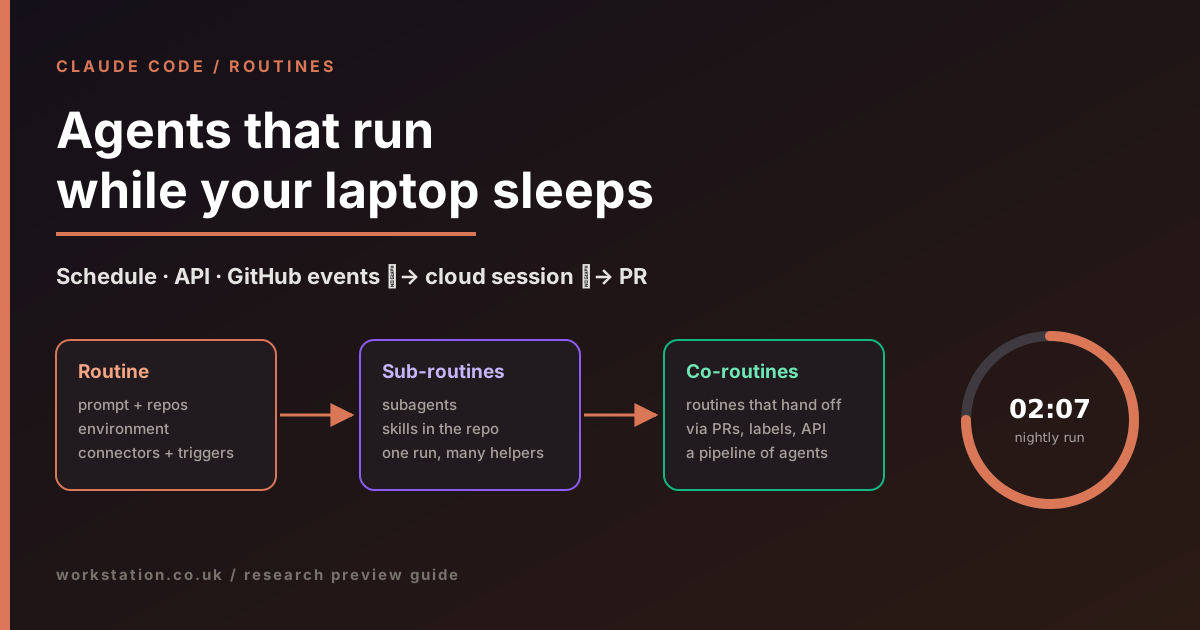
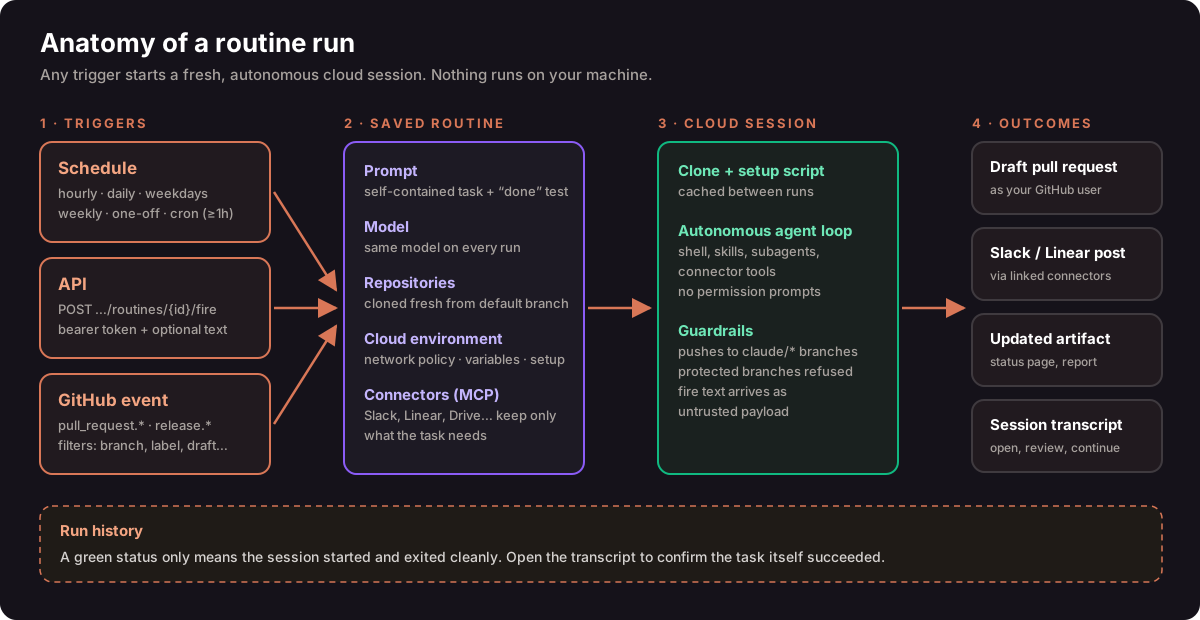
Anthropic defines a routine as a saved Claude Code configuration. It has five parts:
- Prompt. The instruction Claude carries out on every run. Because nobody is present to answer questions, it must be self-contained and must say what "done" looks like. You also choose the model here, and that model is used on every run.
- Repositories. One or more GitHub repositories. Each is cloned fresh at the start of every run, from its default branch unless the prompt says otherwise.
- Cloud environment. This controls network access, environment variables and an optional setup script that installs dependencies. The setup result is cached, so it does not re-run every time.
- Connectors. The MCP integrations on your claude.ai account, such as Slack, Linear or Google Drive, that the routine may read from and write to.
- Triggers. One or more of: schedule, API and GitHub event. A single routine can combine all three.
Each run is a full Claude Code cloud session. It can run shell commands, use the skills committed to the cloned repository and call every tool on the connectors you included. There is no permission-mode picker and nothing waits for approval. That autonomy is the point, and it is also why scoping matters (see section 8).
3. The three trigger types
3.1 Schedule
The simplest trigger runs the routine on a preset cadence (hourly, daily, weekdays or weekly) or once at a specific future time. A few details are worth knowing:
- Local time. You enter times in your own time zone and Claude Code converts them, so a 09:00 run happens at 09:00 on your wall clock wherever the cloud hardware sits. Some early third-party guides said schedules were UTC-only. Anthropic's documentation says otherwise.
- Avoid the top of the hour. Runs scheduled exactly on the hour can start several minutes late. Choosing 09:07 rather than 09:00 gives more predictable timing.
- Custom cron. For intervals the presets do not cover, such as every two hours or the first of the month, pick the nearest preset and then run
/schedule updatein the CLI to set a cron expression. The minimum interval is one hour; anything more frequent is rejected. - One-off runs. Describe the time in plain language, for example
/schedule in 2 weeks, open a cleanup PR that removes the feature flag. Claude confirms the exact timestamp before saving. After it fires, the routine disables itself and is marked Ran. One-off runs do not count against the daily run cap.
3.2 API
An API trigger gives the routine its own HTTPS endpoint. Any system that can make an authenticated POST request can start a run: an alerting tool, a deployment pipeline, an internal admin page. The token is generated in the web UI, shown once, scoped to that routine only, and can be regenerated or revoked at any time.
curl -X POST https://api.anthropic.com/v1/claude_code/routines/<ROUTINE_TRIGGER_ID>/fire \
  -H "Authorization: Bearer <ROUTINE_TOKEN>" \
  -H "anthropic-beta: experimental-cc-routine-2026-04-01" \
  -H "anthropic-version: 2023-06-01" \
  -H "Content-Type: application/json" \
  -d '{"text": "Error rate on checkout-api above 5% for 10 minutes."}'
The response contains a session ID and a session URL you can open to watch the run live. The optional text field carries run-specific context. Security-minded teams should note that Claude Code wraps this text in a <routine-fire-payload> block and labels it as untrusted data. Claude will not follow instructions inside it unless the routine's own saved prompt tells it to use the payload. If your routine is meant to act on an alert body, the prompt should say so explicitly, for example: "Investigate the alert described in the routine-fire-payload block." The design means that a leaked token lets someone start a run, but it does not let them rewrite the routine's instructions.
The endpoint sits behind a dated beta header. Anthropic says breaking changes will ship under new header versions, and the two previous versions will keep working to give callers time to migrate.
3.3 GitHub events
A GitHub trigger starts a new session whenever a matching event happens on a connected repository. It requires the Claude GitHub App to be installed on that repository. Two event categories are supported:
- Pull request: opened, closed, assigned, labelled, synchronised and other updates.
- Release: created, published, edited or deleted.
Filters narrow which events count. You can filter on author, title, body, base branch, head branch, labels, draft state and merged state, using the operators equals, contains, starts with, is one of, is not one of and matches regex. All conditions must match. One pitfall: matches regex tests the entire field, so to catch any title containing "hotfix" you need .*hotfix.*, not hotfix.
Each event produces its own independent session, so two pushes to the same pull request mean two runs. During the preview, GitHub events are also subject to hourly caps per routine and per account. Events above the cap are dropped until the window resets.
4. Creating a routine, step by step
You can create routines from three places: the web at claude.ai/code/routines, the Routines section of the Claude Desktop app's Code tab, or the CLI. All three write to the same account, so a routine created in one appears in the others straight away.
4.1 On the web
- Open
claude.ai/code/routinesand choose New routine. - Name it and write the prompt. Select the model.
- Add the repositories Claude should work in.
- Choose a cloud environment. The Default environment has Trusted network access, which allows common package registries, cloud provider APIs and development domains. If the routine must reach your own services, adjust the environment's allowed domains first.
- Select one or more triggers. For an API trigger, save the routine first; the URL and token are generated afterwards.
- Review the connectors. All of your connected connectors are included by default, and Claude can use every tool on them, including write actions, without asking. Remove anything the task does not need.
- Choose Create, then Run now to test it before relying on the schedule.
4.2 From the CLI
In any local Claude Code session, /schedule (alias /routines) creates a scheduled routine through conversation. Claude asks about the cadence, repositories and prompt, then saves it to your account.
/schedule daily PR review at 9am
/schedule tomorrow at 9am, summarise yesterday's merged PRs
/schedule list
/schedule update
/schedule run
/schedule why did my nightly review do nothing this morning?
The last example is particularly useful. Claude lists the routine's recent runs, reads the relevant log and explains what happened, including tool errors and permission denials. Recent CLI versions can also attach a GitHub trigger conversationally once the GitHub App is installed. API tokens, however, can only be created or revoked on the web.
If /schedule is not recognised, the cause is almost always authentication. Routines need a claude.ai subscription login. A Console API key, an ANTHROPIC_API_KEY environment variable, or a cloud-provider login such as Amazon Bedrock will hide the command. On Team and Enterprise plans, an Owner can also switch routines off for the whole organisation.
5. Writing prompts that survive unattended runs
A routine's prompt is closer to a runbook than a chat message. Nobody is there to clarify ambiguity, so vague instructions produce vague results, or worse, confident actions you did not intend. Compare:
"Look at our repos and let me know what's going on."
"List pull requests in acme/webapp opened or updated in the last 24 hours. For each, record the author, whether CI is green, and any unresolved review threads. Do not comment on or modify any PR. Post one Slack message to #eng-daily with a table of the results, then list PRs older than five days separately under 'Stale'. If there are no PRs, post 'No PR activity' and stop."
A good routine prompt states:
- Scope: which repositories, which time window and which items.
- Allowed actions: what Claude may change and, just as importantly, what it must not touch.
- Output: the exact destination and format, such as a draft PR, a Slack channel or a tracker comment.
- Stop conditions: what to do when there is nothing to do, and when to give up.
- Payload handling: for API triggers, whether and how to use the fire text.
Expect to refine a new routine two or three times in its first week. Read the transcripts, not just the status badge. Anthropic is explicit that a green status only means the session started and exited without an infrastructure error. It does not mean the task succeeded.
6. Sub-routines: structuring work inside one run
Anthropic does not ship a feature called "sub-routines". We use the term at Workstation for a design pattern that makes long, unattended runs far more reliable: the routine's prompt acts as an orchestrator, and it delegates each well-defined step to a subagent or a skill committed to the repository.
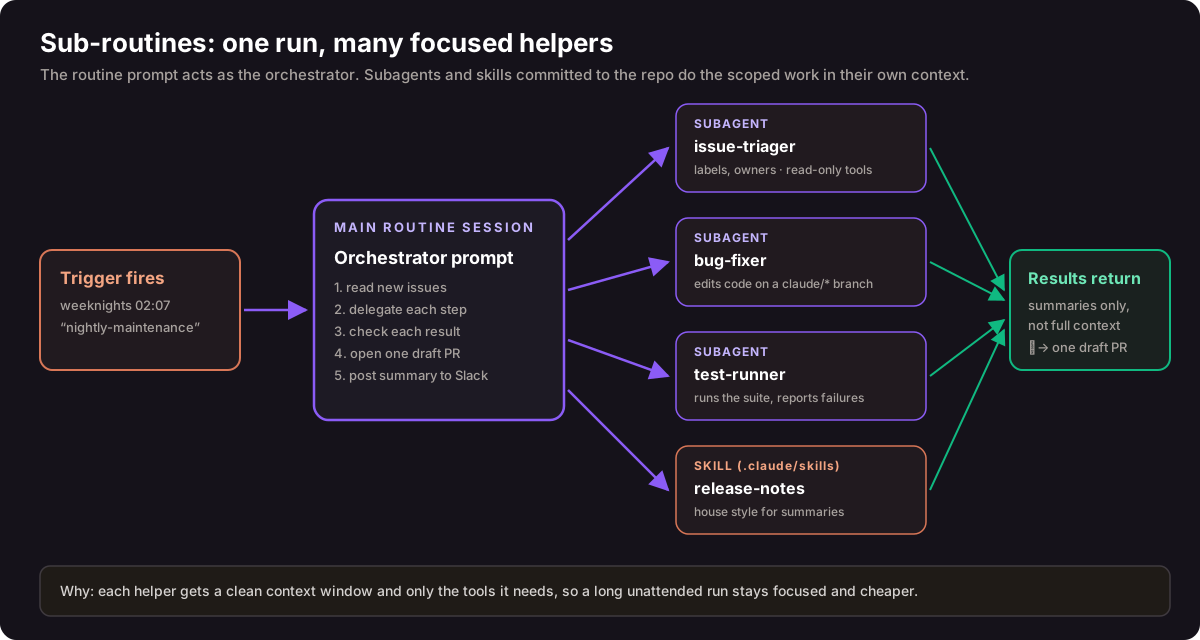
This works because of two Claude Code building blocks that travel with your repository:
- Subagents are Markdown files with YAML front matter in
.claude/agents/. Each has its own system prompt, tool allow-list and optional model, and runs in its own context window. Only a summary comes back to the caller. Subagents can run in parallel, and by default can themselves delegate up to three levels deep. - Skills in
.claude/skills/package reusable procedures, such as your release-note style or your security review checklist, that Claude loads when relevant. Routines use the skills committed to the cloned repository.
A nightly maintenance routine built this way might look like this:
# Routine prompt (orchestrator)
1. Use the issue-triager subagent to label and assign issues opened since the last run.
2. Pick the single highest-priority bug labelled "good-first-fix".
3. Use the bug-fixer subagent to implement a fix on a claude/ branch.
4. Use the test-runner subagent to run the test suite; if it fails twice, stop and report.
5. Open ONE draft PR, using the release-notes skill for the description.
6. Post a three-line summary to #eng-nightly.
# .claude/agents/issue-triager.md
---
name: issue-triager
description: Labels and assigns new issues. Never edits code.
tools: Read, Grep, Glob
model: haiku
---
You triage GitHub issues. Apply area labels from CODEOWNERS and
assign the owning team. Return a table of issue, label and owner.The benefits are practical. Each helper sees only what it needs, so the orchestrator's context stays small and focused over a long run. Tool permissions are narrower per step: the triager above cannot edit files at all. Cheaper models can handle mechanical steps. And because the subagents and skills live in version control, changes to the routine's behaviour go through code review like any other change.
7. Co-routines: routines that cooperate
Again, "co-routines" is our term, not an Anthropic feature. We use it for several independent routines that hand work to one another, the way a production line hands a part from one station to the next. Routines cannot call each other directly and share no memory. Instead, one routine produces a durable artefact that another routine's trigger watches for.
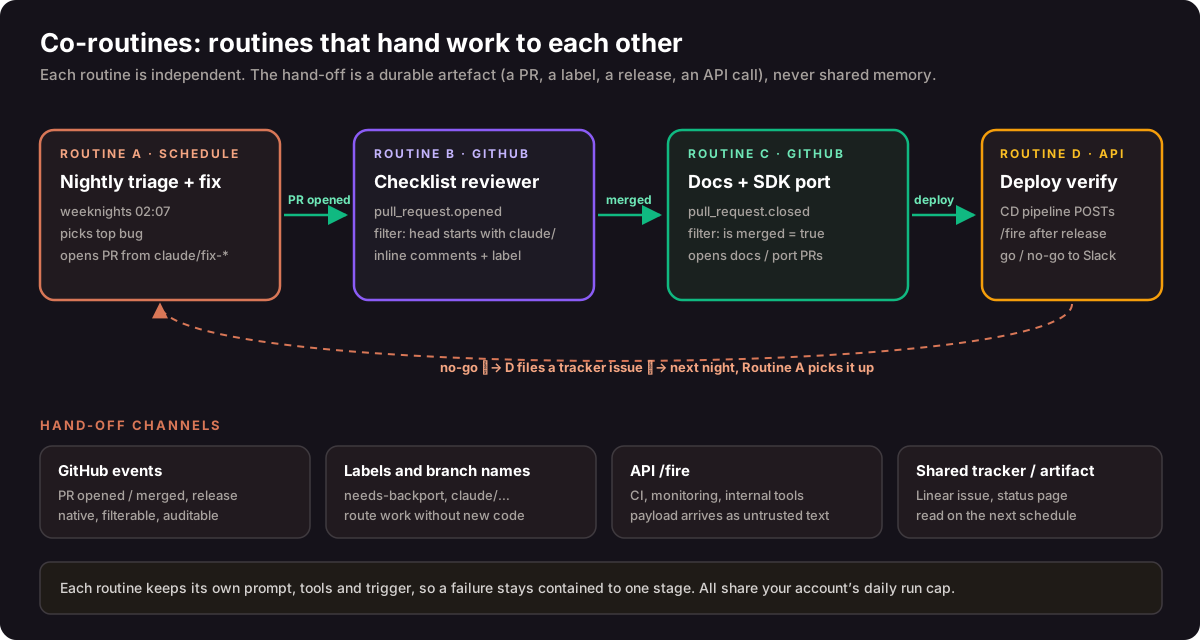
A typical chain:
- Routine A (schedule) triages the backlog on weeknights and opens a draft PR from a
claude/fix-…branch. - Routine B (GitHub,
pull_request.opened) is filtered to head branches starting withclaude/. It applies the team's review checklist and labels the PR. - A human reviews and merges. This is the approval gate.
- Routine C (GitHub,
pull_request.closed, merged = true) updates the documentation or ports the change to a sibling SDK and opens a follow-up PR. - Routine D (API) is called by the deployment pipeline after release. It runs smoke checks and posts go or no-go. On no-go it files a tracker issue, which Routine A picks up the following night.
The hand-off channels, from most to least structured:
- GitHub events: native, filterable and fully auditable.
- Labels and branch naming conventions: route work without writing any glue code.
- API calls: from CI, monitoring or internal tools, with the payload treated as untrusted context.
- A shared tracker or artefact: a Linear issue or a status page that the next scheduled run reads.
Design co-routines carefully. Use filters so a routine never fires on its own output, for example by excluding authors or branches it creates. Keep a human merge between any routine that writes code and any routine that ships it. Remember that every stage draws on the same account-level daily run cap and GitHub event caps. If you find yourself building branching logic, retries and fan-out across many routines, you have outgrown this pattern, and a dedicated workflow engine is the better tool.
8. Security and governance
- Routines act as you. Routines belong to an individual claude.ai account and are not shared with teammates. Commits and pull requests carry your GitHub identity, and connector actions use your linked accounts. Treat a routine like a personal access token with a brain attached.
- Branch protection. Claude pushes to
claude/-prefixed branches by default. It refuses to push to protected branches, to branches with someone else's open PR, and to branches containing other people's commits. - Least privilege. Remove unneeded connectors. Keep network access on Trusted unless a specific domain is required; blocked requests fail with
403andx-deny-reason: host_not_allowed. On Pro and Max plans, store API keys as environment API credentials rather than plain variables, which are visible to anyone using the environment. - Untrusted input. API payloads and Run now text arrive labelled as untrusted. Content fetched during a run, such as issue bodies and web pages, keeps normal prompt-injection handling. Write prompts that tell Claude what to trust.
- Connection health. If the GitHub connection expires, runs are skipped for up to 72 hours and then the routine switches itself off until you reconnect.
- Organisation control. Team and Enterprise Owners can disable routines for all members from the admin settings.
9. Plans, usage and limits
| Plan | Daily routine runs at launch |
|---|---|
| Pro | 5 |
| Max | 15 |
| Team and Enterprise | 25 |
Routines consume subscription usage in the same way as interactive sessions. The daily cap applies on top of that. Your current allowance is shown at claude.ai/code/routines and may change during the preview. With usage credits enabled, runs beyond the cap continue as metered overage; without them, extra runs are rejected until the window resets. One-off scheduled runs do not count towards the cap. While a subscription is paused, its routines are on hold.
10. Routines compared with other scheduling options
10.1 Within Claude Code
| Routines (cloud) | Desktop scheduled tasks | /loop |
|
|---|---|---|---|
| Runs on | Anthropic cloud | Your machine | Your machine |
| Machine must be on | No | Yes | Yes |
| Session must be open | No | No | Yes |
| Local files | No (fresh clone) | Yes | Yes |
| Permission prompts | None (autonomous) | Configurable | Inherits session |
| Minimum interval | 1 hour | 1 minute | 1 minute |
| Best for | Reliable unattended work | Tasks needing local tools | Polling during a session |
/loop tasks are session-scoped and expire after seven days. They are ideal for babysitting a build or a pull request while you work, but they are not a substitute for a routine.
10.2 Outside Claude Code
- GitHub Actions is cheap, lives beside the code and gives full control over the runner. The price is YAML, secrets management and runner maintenance. Choose Actions for deterministic build steps, and routines for work that needs judgement.
- Workflow engines such as Trigger.dev handle retries, fan-out and long-running orchestration, but you write the orchestration in code. Use them when the workflow itself is the product.
- Integration platforms such as n8n and Zapier excel at moving data between SaaS tools. Routines excel at reasoning over code, logs and documents. The two combine well: an n8n flow can call a routine's API endpoint.
11. Use cases that work well
- Backlog grooming: nightly labelling, ownership and a morning summary.
- Alert triage: monitoring calls the API trigger, and Claude correlates the stack trace with recent commits and opens a draft fix.
- Bespoke code review: your own checklist on every ready-for-review PR.
- Deploy verification: smoke checks and log scans after each release, ending with a go or no-go.
- Documentation drift: a weekly scan of merged PRs and update PRs for docs that reference changed APIs.
- Library porting: mirror merged changes from one SDK into its sibling in another language.
- Dependency hygiene: a weekly review of outdated packages with a single, tested upgrade PR.
Routines are less suited to sub-hourly work, to tasks that need a human decision mid-run, and to complex multi-branch workflows with retries.
12. How the community received it
Reaction has been mixed but largely positive. InfoQ quoted engineers who were enthusiastic about wiring AI directly into observability dashboards and CI workflows through webhooks. Others were sceptical. They pointed to earlier Claude scheduling features that only ran on the user's own machine, and argued that reliability, uptime and quota limits deserve attention before new features. Our experience is that routines are well designed on the security side, particularly untrusted payload handling and branch protection. The main operational risks are over-broad connectors and prompts that are not specific enough.
13. How Workstation uses this
At Workstation we run agentic automation for clients across DevOps, finance operations and customer workflows. Routines fit our approach well: deterministic infrastructure for the plumbing, AI for the judgement, and a human approval gate before anything reaches production. If you want help designing routine chains, subagent libraries or the governance around them, talk to our team.
14. Key takeaways
- A routine is a saved prompt, repositories, environment, connectors and triggers, run autonomously in the cloud.
- Triggers can be a schedule (minimum one hour, local time), an API call (bearer token, untrusted payload) or a GitHub pull request or release event.
- Available on Pro, Max, Team and Enterprise, with daily run caps on top of normal usage. The feature is still in research preview.
- Use sub-routines (subagents and skills) to keep a single long run focused and least-privileged.
- Use co-routines (routines handing off through PRs, labels and API calls) for multi-stage pipelines, with a human merge gate in the middle.
- Scope connectors and network access tightly, write prompts like runbooks, and read the transcripts.
Sources and further reading
- Anthropic: Introducing routines in Claude Code (14 April 2026)
- Claude Code Docs: Automate work with routines
- Claude Code Docs: Run prompts on a schedule (/loop)
- Claude Code Docs: Subagents
- Claude Platform Docs: Trigger a routine through the API
- InfoQ: Anthropic Introduces Routines for Claude Code Automation
- MindStudio: Claude Code Routines: How to Run Scheduled AI Agents Without a Server
- Tahir on Medium: What is Claude Code Routines?
Routines are in research preview. Behaviour, limits and the API may change. Facts in this guide reflect Anthropic's published documentation as of 25 September 2026.