
Unboxing Mac Studio M4 and Running Your First LLM
Real readings from mactop on a fresh M4 Max, Ollama install, Llama 3 locally, and a private RAG pipeline in one afternoon
 Balinder WaliaMay 15, 20264 min read
A short, skim-readable companion to the long-form deep dive. For the full walkthrough, jump to the long article.
The box on the desk is now an AI appliance
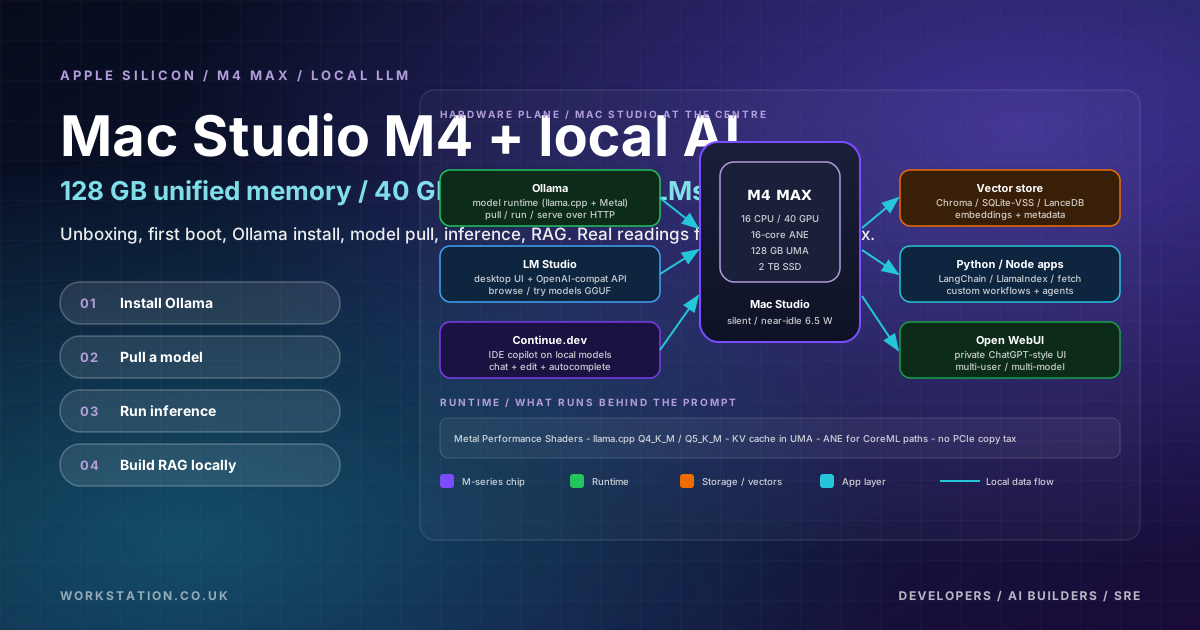
I unboxed a new Mac Studio with the M4 Max chip, 128 GB of unified memory, 40 GPU cores, 16 CPU cores, and a 2 TB SSD. Within an afternoon it was running Llama 3.1 8B locally via Ollama, embedding my own documents, and answering questions over them through a small RAG pipeline. No cloud bill, no API key, no data leaving the room.
This blog is the short version. The full article walks through the same workflow in depth.
The unboxing in 60 seconds
Watch the unboxing short on YouTube: https://youtube.com/shorts/HUlUoHNsyNM
Classic Apple unboxing: minimal cardboard, the machine in a moulded recess, a power cable. The Mac Studio enclosure is roughly 7.7 inches square and dense; you feel the build quality the moment you pick it up. Setup is genuinely fast - Apple ID, language, FileVault, done.
First boot - real readings from mactop
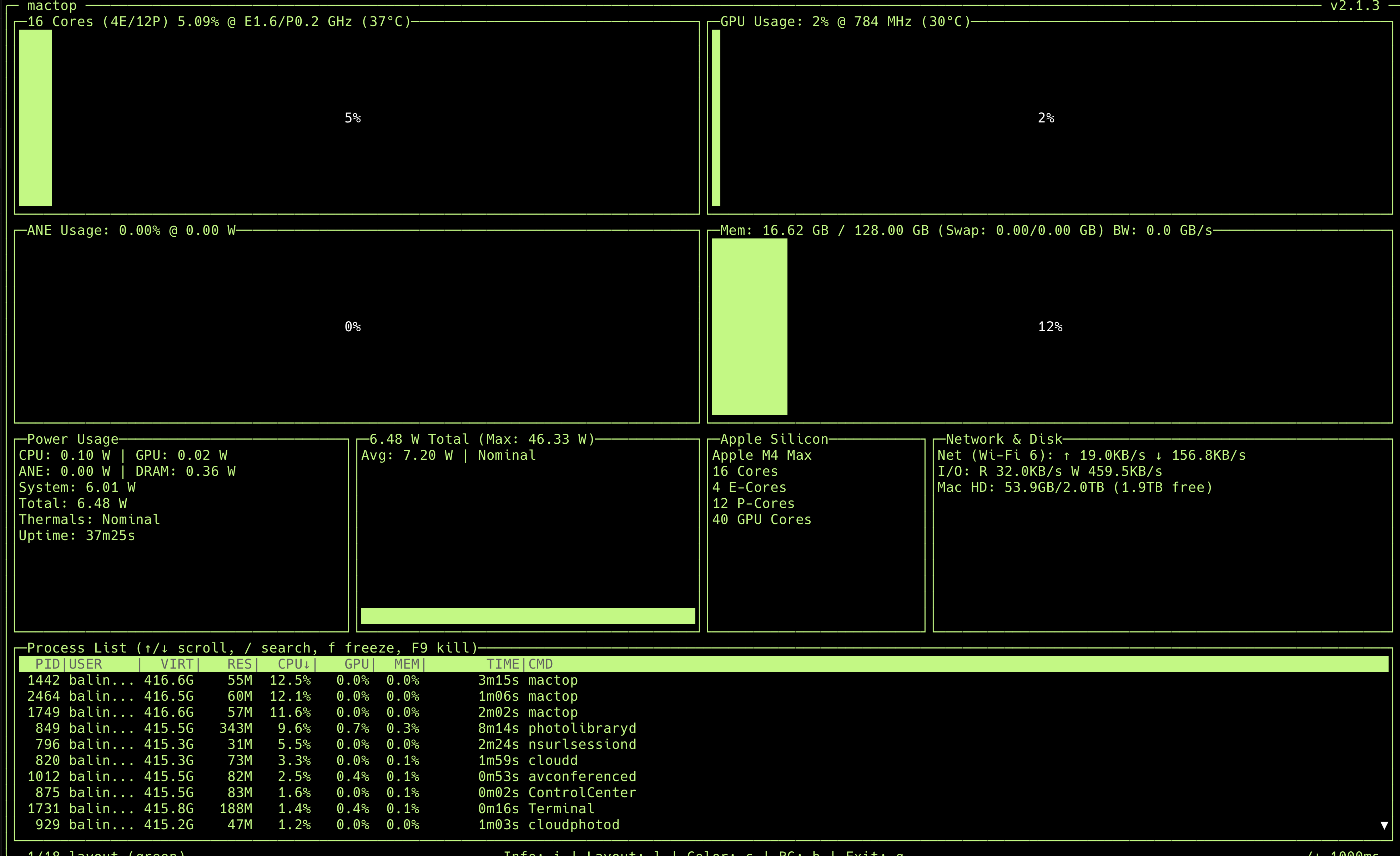
/img/mac-studio-mactop-firstboot.png to swap it in later.The numbers above are the only hard figures I will cite. They are the ground truth from mactop on my machine at 37 minutes of uptime:
- M4 Max - 16 cores (4 E + 12 P), 40 GPU cores at 784 MHz, 16-core ANE.
- 128 GB unified memory - 16.62 GB in use at idle (about 13%).
- 6.48 W total idle power, 46.33 W max observed. Thermals: Nominal.
- 2 TB SSD, 1.9 TB free after the initial setup.
6.48 W at idle for a desktop with 128 GB of usable memory is the headline number for me. This box is genuinely a low-power, always-on AI appliance that you can leave running 24x7 without thinking about the electricity bill.
Why this hardware is special - unified memory in one paragraph
On a traditional PC, your CPU has system RAM and your GPU has separate VRAM. A model has to be copied across PCIe before the GPU can run it; if the model is bigger than VRAM, it does not fit. On Apple Silicon, the CPU, GPU, Neural Engine, and media engines share one 128 GB pool. Nothing is copied. A 70B-parameter LLM at Q4_K_M (around 40 GB on disk, public estimate) loads with roughly 80 GB still free for context, applications, and tools. This is why local LLMs feel different on a Mac.
From box to first LLM in three commands
brew install ollama
ollama serve &
ollama run llama3.1:8b "Explain unified memory in 3 sentences."
That is genuinely the whole bring-up. The first run downloads the model (Llama 3.1 8B Q4_K_M is around 4.7 GB on disk, public estimate) and loads it into unified memory. After that, conversational streaming is smooth, with a noticeable first-token delay and steady output through the response. I am deliberately not publishing tokens-per-second numbers here without a proper benchmark methodology; the long article goes into the reasoning.
Local RAG in under 60 lines of Python
The most useful thing you can do with a local LLM is point it at your own documents. The minimum viable stack is:
- PyMuPDF or
unstructuredfor parsing - nomic-embed-text via Ollama for embeddings
- ChromaDB for the vector store
- Llama 3.1 8B via Ollama for generation
The full code is in the long article. The headline is: everything runs on the Mac Studio, no external API keys, no per-token billing, no data leaving the machine.
Mac Studio vs cloud - the honest decision matrix
Mac Studio wins for: always-on private inference, RAG on your own data, IDE copilots, agent prototyping, learning the stack, and home labs. Cloud wins for: burst training jobs, >70B production serving at scale, unpredictable global traffic, and workloads that need 8x A100/H100 parallelism. Most teams will end up using both. The long article has a full decision matrix as an SVG.
Five lessons after a week
- Privacy unlocks new use cases. When the model is local, I paste in production logs, internal docs, and customer emails without hesitating. That changes how I work.
- Per-query cost is psychological as well as financial. No bill means more queries, more experiments, more curiosity.
- 128 GB is the sweet spot. 64 GB is the floor for serious work. 128 GB gives you headroom to run 70B at Q4_K_M and still have room for everything else.
- Ollama is the easy on-ramp. LM Studio is great as a model browser, MLX is great if you are starting fresh in Python, llama.cpp underpins it all.
- The cloud is not dead. It is still the right tool for training, scale-out serving, and unknown-load workloads.
What is next
Future articles will cover MLX fine-tuning on Apple Silicon, multi-Mac inference clusters with EXO, agent stacks (LangGraph + Ollama), and a deeper benchmark methodology piece. If you want the long version with all the diagrams, code, and decision matrix, read the long article. If you want the visual version, watch the YouTube Short. Either way - subscribe for the rest of the series.