
NebulaCB: Enterprise-Grade Couchbase Management That Saves the Day
Mission control for upgrades, XDCR, validation, and AI-assisted operations
 Balinder WaliaApril 12, 20265 min read
Why enterprise Couchbase teams need a mission control
Couchbase powers critical transactional and analytical workloads. Rolling upgrades, cross-datacenter replication (XDCR), Kubernetes operators, and failover events are all high-stakes operations. When tooling is fragmented, teams rely on ad-hoc scripts, slow war rooms, and incomplete visibility—exactly when data loss and extended downtime hurt the most.
NebulaCB is an open-source, Kubernetes-native Couchbase management platform positioned as mission control: orchestrate upgrades, validate XDCR integrity, monitor multi-cluster health, and use AI-assisted root-cause analysis from one cockpit-style dashboard.
What NebulaCB delivers (at a glance)
According to the product narrative on nebulacb.org, NebulaCB emphasises three headline outcomes for operators: upgrade fearlessly, validate everything, and lose nothing. Under that umbrella it combines operational automation, continuous data-integrity proof, and optional local AI so sensitive telemetry can stay on your network.
- Open source and Kubernetes-aware: fits GitOps and platform engineering practices; integrates with the Couchbase Autonomous Operator and Helm-based workflows.
- Zero data-loss mindset: document-count timelines, hash sampling, sequence-gap detection, and audit workflows to evidence that replicas stayed consistent through change.
- XDCR in the spotlight: bidirectional replication monitoring, pipeline controls, lag and topology visibility, and GOXDCR delay awareness—common pain points during upgrades and region events.
- AI without mandatory cloud keys: local Ollama integration for chat-style diagnostics and structured root-cause analysis, with optional cloud providers when policy allows.
What cmd/nebulacb wires together
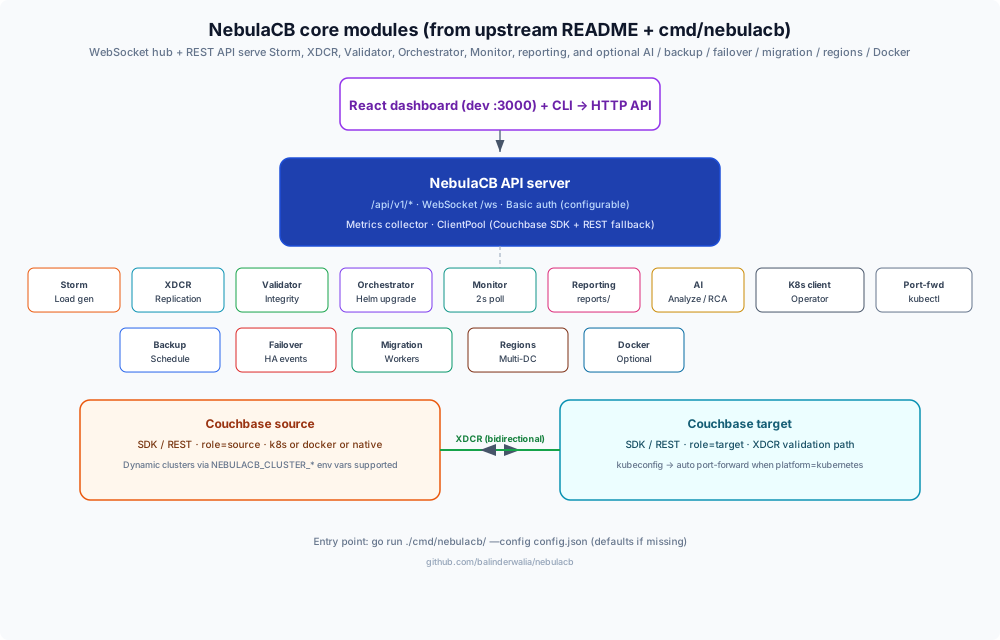
The Go entry point (github.com/balinderwalia/nebulacb/cmd/nebulacb) loads --config (default config.json), falls back to sane defaults if the file is missing, builds a metrics collector, optionally starts kubectl port-forward management when a kubeconfig is present (including a periodic health check to reconnect dead forwards), and connects every registered cluster through a Couchbase ClientPool. It then instantiates Storm, the upgrade orchestrator, XDCR engine, validator, reporting engine, a multi-cluster monitor (polling on the order of every two seconds), plus optional AI, backup, failover, migration, region, and Docker managers. Everything is served through a shared WebSocket hub and HTTP API—the same surface the React UI and nebulacb-cli consume.
React dashboard workspaces
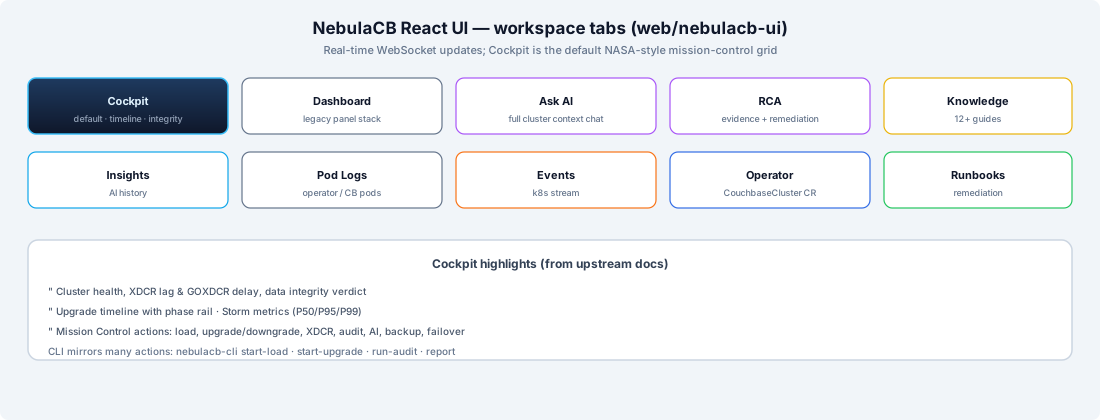
The UI shipped under web/nebulacb-ui exposes multiple workspace tabs—Cockpit (default NASA-style mission-control grid), legacy Dashboard, Ask AI, RCA, Knowledge, Insights, Pod Logs, Events, Operator (CouchbaseCluster CR health), and Runbooks—all backed by live WebSocket updates.
Reference topology (local + k3s)
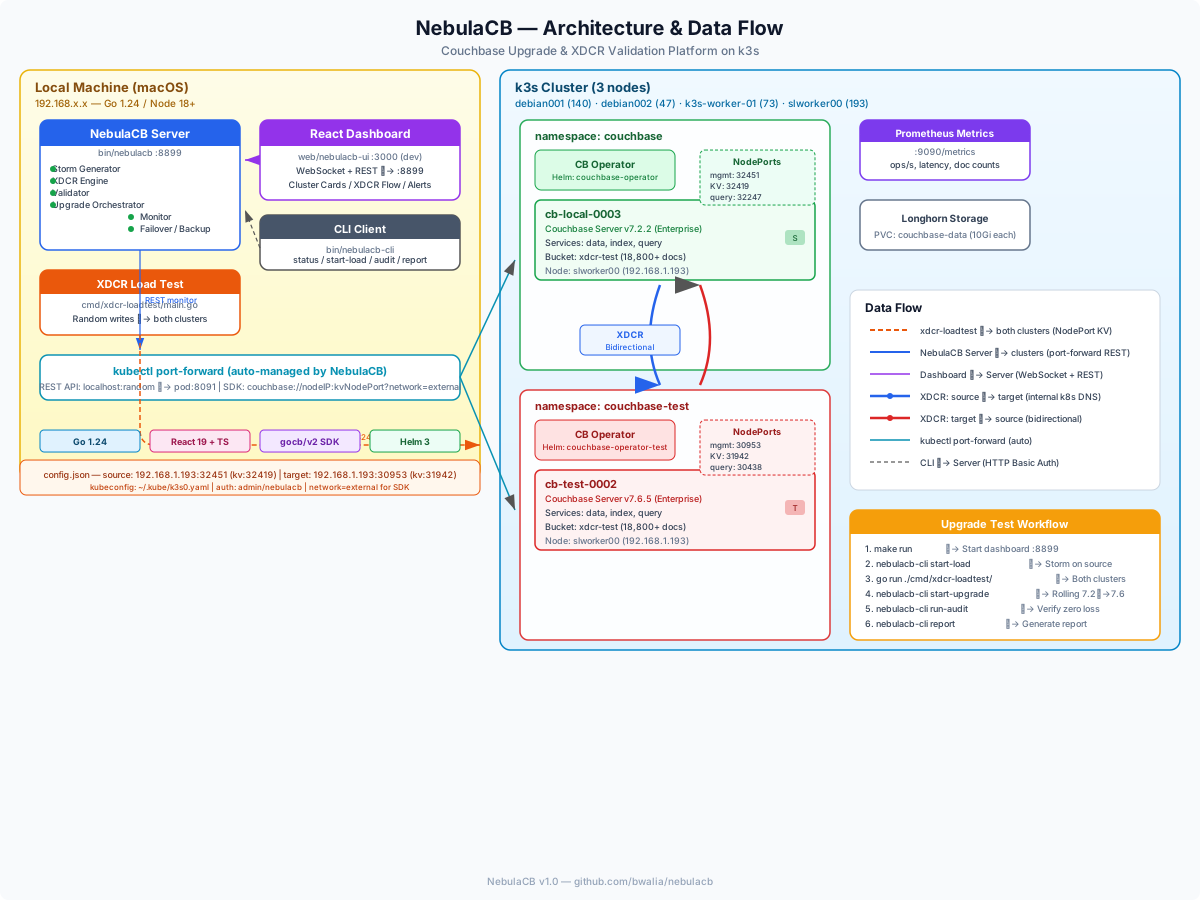
For a concrete picture of how the server, optional dev UI, CLI, Couchbase clusters, and XDCR load tests align, see the diagram below.
Rolling upgrades that match how SRE teams actually work
NebulaCB describes Helm-based rolling upgrades with pause, resume, abort, and rollback, including patching the CouchbaseCluster custom resource image, watching pod rollover, and tracking rebalance completion. Node-by-node progress and explicit downgrade paths reduce the “we started an upgrade and cannot unwind it” risk that keeps many enterprises on ancient Couchbase builds.
XDCR and replication integrity
For multi-region and active-active patterns, NebulaCB highlights real-time XDCR monitoring: replication lag, pipeline restarts, topology changes during upgrades, and tooling to pause, resume, restart, or stop pipelines. That operational depth matters when a single stuck pipeline masks partial synchronisation that only shows up under load.
Data integrity validation (prove, do not assume)
Beyond lag charts, NebulaCB advertises SHA-256 hash sampling, sequence gap detection, continuous doc-count monitoring, and on-demand full audits. Those capabilities support compliance-minded teams that must show evidence—not anecdotes—that upgrades and failover drills did not silently diverge data.
Storm load generator and production-like drills
The platform includes a configurable load generator (writes, reads, deletes, bursts, hot keys) with latency percentiles, plus a standalone dual-cluster load-test path. Coupled with integrity panels, teams can rehearse upgrades under realistic traffic instead of discovering issues only on go-live weekend.
HA, failover, backup, and migration
NebulaCB also surfaces automatic failover configuration, manual and graceful failover, event timelines, scheduled backups with retention and encryption options, and migration with parallel workers and post-run validation. Together, these turn the dashboard into a lifecycle console rather than a read-only metrics page.
AI-powered analysis with local Ollama
Features listed on the site include natural-language Ask AI over cluster context, structured RCA reports with remediation steps, a built-in knowledge base of common Couchbase issues, and integration with Ollama so models such as Llama 3 can run entirely on-premises. The server also supports other providers (for example Anthropic or OpenAI) via configuration and environment variables when policy allows. That design supports regulated industries where sending logs to a public API is non-starters.
CLI and API surface
bin/nebulacb-cli is an HTTP client for the running server—set NEBULACB_URL, NEBULACB_USER, and NEBULACB_PASS (or rely on defaults from the Makefile shortcuts). Frequently used commands include status, start-load / pause-load / resume-load / stop-load, start-upgrade / abort-upgrade, restart-xdcr, run-audit, inject-failure, alerts, health, config, and report.
REST endpoints are namespaced under /api/v1 (dashboard snapshots, command execution, alerts, configuration, clusters, backup, migration, failover, AI analysis—refer to the upstream README for the full matrix). Liveness checks typically call GET /api/v1/health, while dashboards subscribe to ws://<host>:<port>/ws for streaming telemetry.
Typical upgrade rehearsal
- Launch
bin/nebulacb --config config.jsonand open the dashboard on your configured port (8899 is the common default). - Warm the cluster with Storm or
nebulacb-cli start-load; optionally rungo run ./cmd/xdcr-loadtest/for dual-cluster traffic while you change topology. - Execute the rolling upgrade from the Cockpit or via
start-upgrade, watching XDCR lag, integrity tiles, and Kubernetes events in parallel. - After nodes rebalance, run
run-auditto prove hashes, doc counts, and sequences line up. - Capture evidence with
reportfor change-advisory boards.
How this saves the day for enterprises
- Faster, safer upgrades: orchestration plus rollback shortens maintenance windows and reduces Sev-1 risk.
- Earlier detection of replication drift: continuous integrity signals catch XDCR problems before they become customer-visible data bugs.
- Lower mean-time-to-resolution: WebSocket-backed dashboards, RCA, and curated playbooks compress incident cycles.
- Alignment with Kubernetes reality: operator-aware flows match how many enterprises already run Couchbase.
- Cost and sovereignty: open-source core and optional local AI avoid vendor lock-in for every insight.
Where to go next
Explore the project site at https://nebulacb.org/ for installation paths (source, Docker Compose, Helm), architecture diagrams, and GitHub links. If you need help designing Couchbase on Kubernetes, multi-region XDCR, or integrating observability and automation into your platform, contact Workstation at info@workstation.co.uk—we design and ship production data platforms across cloud and edge.