
Couchbase upgrades with CAO pause gates: a support-friendly overview
Controlled rolling upgrade using CAO native pause gates, health checks, and XDCR-aware monitoring
 Balinder WaliaApril 22, 20262 min read
If you support a Couchbase platform (or you’re the person who gets paged when it doesn’t behave), upgrades can feel like a choice between “hands-off and hope” and “manual and risky”. This post captures a pragmatic middle ground: a controlled rolling upgrade for Couchbase Server running under the Couchbase Autonomous Operator (CAO), paced by CAO’s native spec.paused field.
Who this is for
- Tech Support / incident responders: what “normal” looks like during swap-rebalance and what to treat as a red flag.
- SRE / platform engineers: repeatable procedure with preflight checks, soak gates, and rollback triggers.
- Database engineers: rebalance expectations, XDCR behaviour, and post-upgrade validation.
- Developers: what your platform is doing during the maintenance window (and what you should alert on).
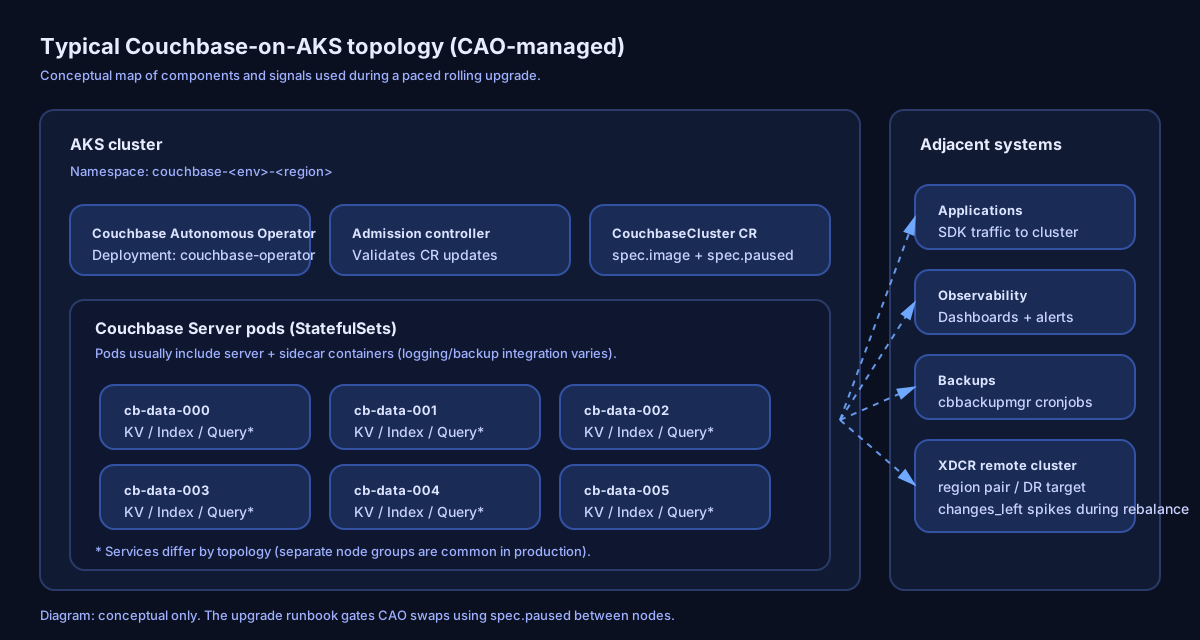
Typical CAO-managed topology (conceptual)
The diagram below is a mental map for the runbook: where the operator sits, what the CouchbaseCluster CR controls, and what signals you should correlate during the upgrade.
The big idea: pace CAO with a pause gate
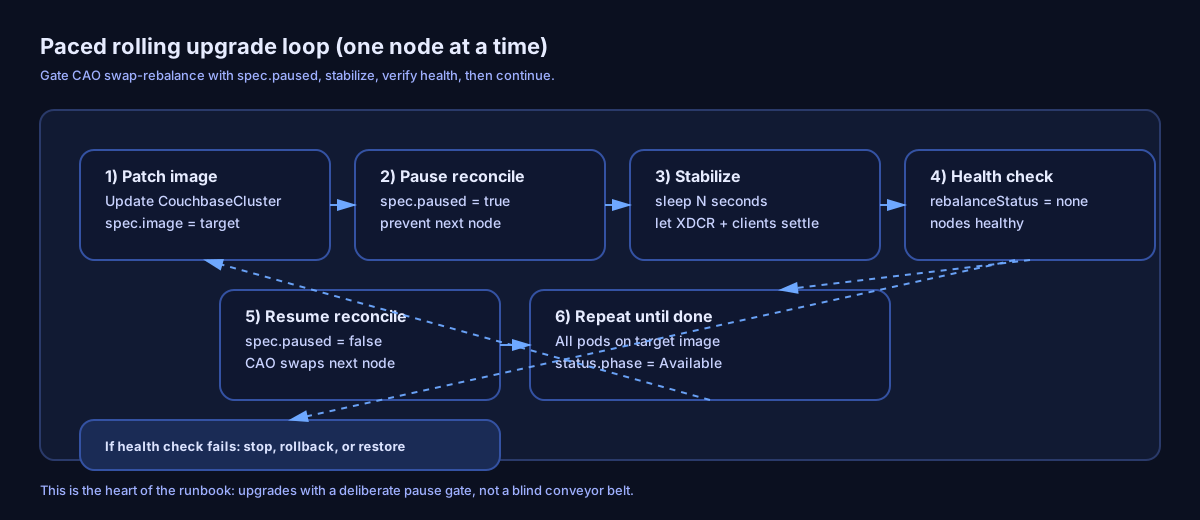
CAO performs a rolling upgrade via swap-rebalance. The runbook adds a deliberate safety gate: pause reconcile between nodes, stabilize, verify health, then resume. That way, if node N misbehaves after its swap, you catch it before node N+1 starts.
Why the pause gate is worth it
- Fewer surprises: isolate symptoms to a single node change.
- Cleaner signals: correlate latency, error rate, rebalance state, and XDCR lag to one swap.
- Safer rollouts: stop the “conveyor belt” quickly by holding
spec.paused=truewhile you investigate.
What “good” looks like during the upgrade
- Pod images: old → new progressively; ideally one swap at a time.
- Cluster phase: often returns to
Availablebetween swaps; brief transitions during rebalance are expected. - XDCR (if enabled):
changes_leftrises during rebalance, then drains during stabilization. - Restarts: new pods start at
RESTARTS=0. Any increase is a signal to pause and investigate.
Preflight checks that save you later
Before you touch anything, make sure the cluster is green (no active rebalance, no warning events), backups are current and restorable, and you’ve recorded the rollback image tag. Decide your XDCR strategy up-front: disable during upgrade for a quieter signal in production, keep running in pre-prod to exercise real behaviour, or use a third standby cluster for strategic cutovers.
Rollback reality check
The uncomfortable truth that mature runbooks say out loud: rollback is only cleanly possible while at least one node remains on the old version. Once every pod has been swapped and the cluster has fully rebalanced, “downgrade” can become “restore from backup”. That’s why pacing matters: it keeps the rollback window open longer.
Next steps
- Read the full operational guide: Couchbase Server rolling upgrade under CAO (paced + pause gate)
- Related background: Couchbase high availability in production (XDCR + Kubernetes operator)