How We Protected the Payments Secure FinTech App with WSLProxy Edge, an Open-Source API Gateway
A plain-English story of putting one security checkpoint in front of a fintech payments API, and the lesson we learned in the first hour.
 Balinder Walia28 सितंबर 20266 min read
People trust a fintech app with payment credentials, account data and identity checks. This post explains, without jargon, how we put a security guard in front of Payments Secure (payments-secure.fictionally.org) using WSLProxy Edge, our open-source API gateway, and what we learned in the first hour. Engineers who want the full configuration should read the in-depth article.
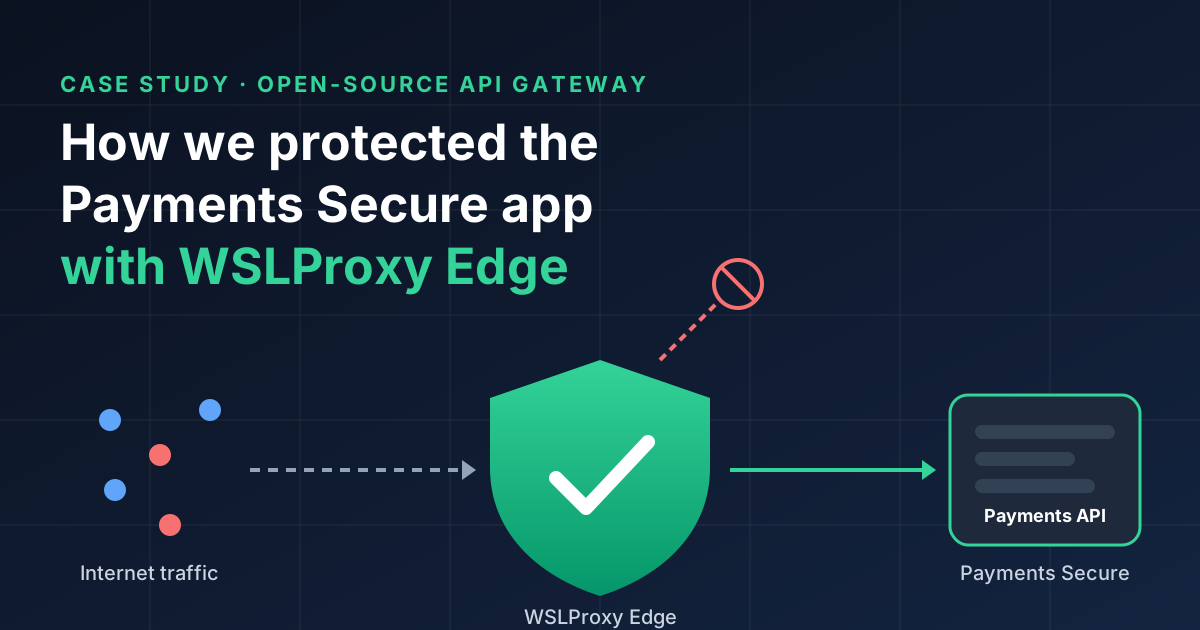
Why a fintech API needs a front door
Think of the app as an office building. The people inside — payment flows, account lookups and identity checks — are good at their jobs, but they should not also have to check ID at reception. Without a front desk, anyone can walk up to any office door and try the handle.
On the internet, people do try the handle, constantly. Automated scanners visit every public address looking for forgotten files such as /.env (where passwords are sometimes stored), old WordPress admin pages, or code folders left open by mistake. Other bots try thousands of passwords a minute against login pages. None of this is aimed at us personally. It is just what being online looks like.
A payments API raises the stakes. It handles credentials, personal data and money-movement paths. So we wanted one place, before the app, where every visitor is checked the same way — with API-gateway AI agents that Workstation designs, implements and maintains.
What we used: WSLProxy Edge
WSLProxy is the open-source gateway we build and run at Workstation. It already sat in front of our sites as the traffic router, content cache and web application firewall. Its newest feature, the API gateway, adds the kind of controls that companies usually buy from specialist vendors such as Kong. Because it is open source, anyone can read exactly what it does. The code is on GitHub.
The important part for a small team is that nothing extra had to be installed. We switched the protection on by adding a block of settings to the app's entry in WSLProxy. The settings live in version control like any other code, so every change is reviewed, recorded and easy to undo.
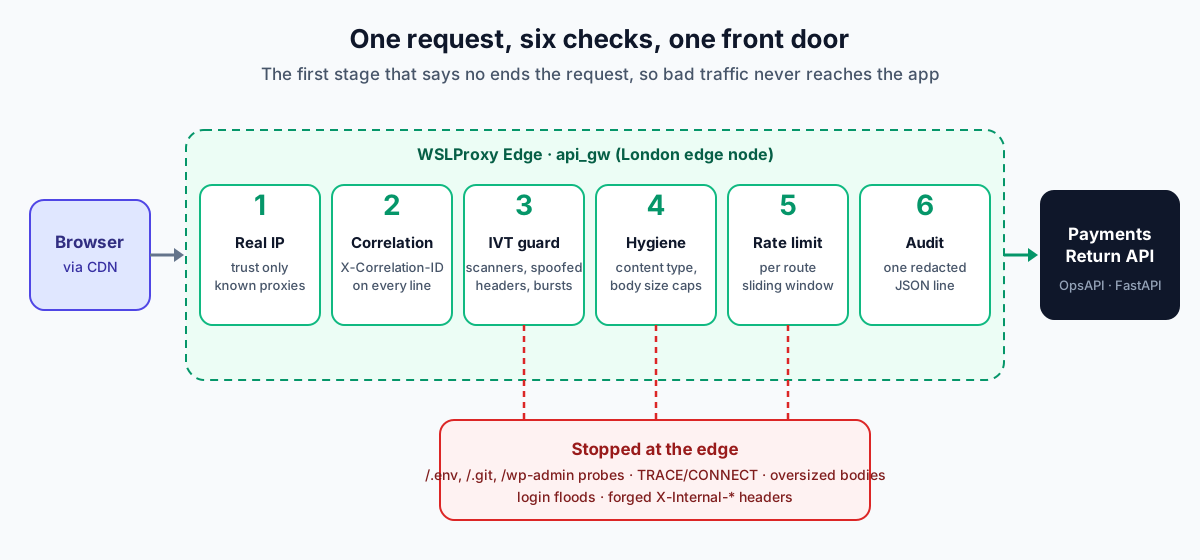
What the front door checks
Every request goes through six checks, in the same order every time:
- Who is really calling? Traffic reaches us through a delivery network, so the "caller" often looks like the network rather than the person. The gateway finds the real visitor's address, but only believes it when it comes from a source we trust. That stops anyone pretending to be someone else just by adding a label to their request.
- A reference number for every visit. Each request gets a tracking number, like a parcel. If a customer reports a problem, support can find that exact request in seconds.
- Turn away the obvious troublemakers. Requests looking for
.envfiles,.gitfolders, WordPress pages or PHP scripts are flagged straight away, because our app has none of those. So are unusual request types that no browser sends, and messages that pretend to come from inside our own systems. - Basic tidiness. Forms and uploads must say what they contain, and each gets a size limit. Login forms stay small, and document uploads may be up to 10 MB. Anything bigger or oddly shaped is refused before it can tie up the app.
- A fair-use speed limit. Each part of the app gets its own limit. Login allows a sensible number of tries per minute from one address. Uploads have their own allowance, and normal use of the app gets a generous one. Health checks, which our monitoring runs constantly, are never limited. A password-guessing bot quickly hits the limit, while a real customer never notices it.
- Keep a record. Every request produces one tidy log line with the time, the route, the decision and the tracking number. Personal details are not stored. Visitor addresses are scrambled before they are written down, so the log is useful for security without becoming a privacy risk.
We started by watching, not blocking
When you add a new guard, the worst outcome is that the guard turns away real customers. So we switched the "troublemaker" check on in audit mode first. It records what it would have blocked, but lets the request through. That gives us real data about what our traffic looks like before we let the guard say no.
We also rolled out to the app's integration environment first. It is the version our team and testers use every day, so any mistake would show up there before it could reach a single customer.
The first lesson came within minutes
That caution paid off almost immediately. Shortly after the gateway went live, logging in with a password stopped working in the test app. Our browser security settings at the edge listed the extra information that browsers are allowed to send, and the login page sent one piece of information (a project code) that was not on the list. The browser did exactly what it should with an unlisted item: it refused to send the request.
The fix was live three minutes later. We let the app itself keep responsibility for those browser rules, because it already managed them correctly. We also raised the login allowance slightly, and made sure the "Sign in with Google" route was never slowed down by the checks. Because the whole setup is one reviewed file in version control, the fix was a small change that went out the same way as the original.
The lesson applies to anyone adding security to a working product: roll out in stages, start by observing, and make every change easy to undo. Security that locks out your own customers is not security.
What customers get
- Less exposure. Automated scanners and password-guessing bots are stopped at the door instead of reaching the app that holds payment and account data.
- A steadier service. One noisy visitor cannot slow the app down for everyone else during peak periods.
- Faster help. Every request has a reference number, so support issues can be traced end to end.
- Nothing to learn. The protection is invisible. Customers log in and use Payments Secure exactly as before.
What comes next
Once audit mode has collected enough real traffic to show that no genuine customers would be caught, we will switch the troublemaker check from "record" to "block". Then we will take the same configuration to production. Because the settings are just a file, moving them to production is a copy and a review, not a new project.
Workstation designs, implements and maintains API-gateway AI-agent protection for fintech applications. One of the apps we protect in this way sits in the portfolio of a large AI fintech — cognoaiuk.com.