Generative AI's Hidden Impact on Developers: What Surveys Miss

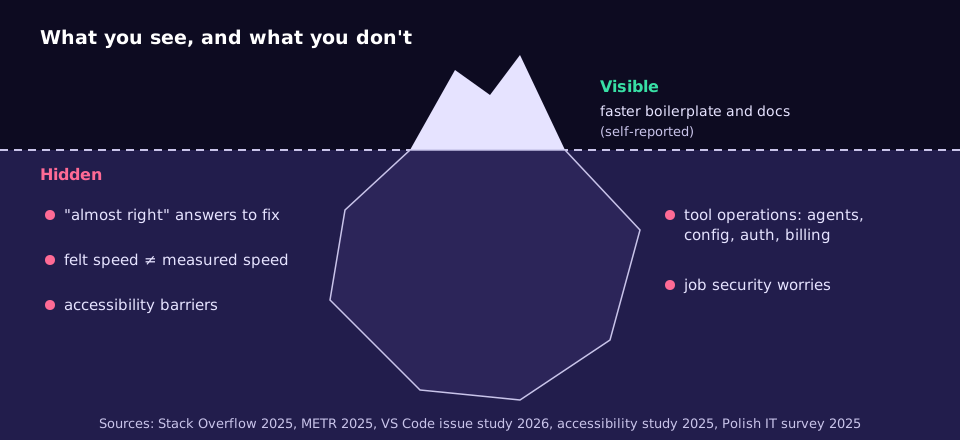
Ask developers whether generative AI makes them faster and most will say yes. The less visible effects are harder to see from the inside: time lost to answers that are almost right, a gap between how fast people feel and how fast they are, new tool administration work, and barriers for developers who use screen readers. This post sets out what the research actually shows and how to measure and manage those effects in your own team.
The visible part: what developers report
Adoption is close to universal. In the 2025 Stack Overflow Developer Survey, 84% of respondents were using or planning to use AI tools, up from 76% the year before [1]. A Polish survey of 68 IT professionals found 97% used generative AI tools to some degree, with ChatGPT the most popular [2].
The reported gains are concentrated in particular kinds of work. A March 2026 study combining a literature review with a survey of 65 developers found generative AI has its highest impact in design, implementation, testing and documentation, with smaller benefits in planning and requirements [3]. Over 70% of those respondents said it at least halved the time for boilerplate and documentation, 79% used it daily, and respondents preferred browser-based chat tools over assistants built into the editor [3]. Two-thirds said their organisation had formal or informal guidelines [3].
These are useful signals, but note what they are: small, self-reported surveys. The next sections cover what self-reports tend to miss.
Hidden impact 1: the perception gap
The most cited controlled study here is METR's randomised trial from early 2025. Sixteen experienced open source developers worked on 246 real issues in large repositories they knew well, with each issue randomly assigned to allow or disallow AI tools (mainly Cursor Pro with Claude 3.5 and 3.7 Sonnet) [4]. With AI allowed, they took 19% longer. Before starting they expected a 24% speed-up, and afterwards they still estimated AI had made them 20% faster [4].
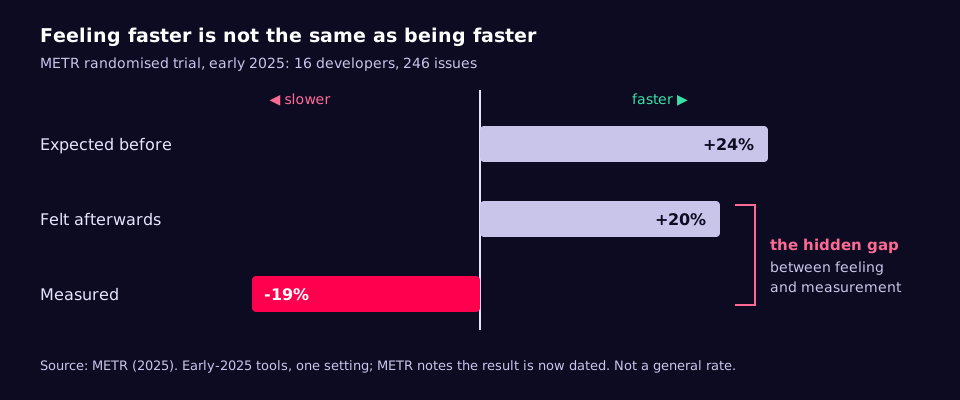
Be careful with this result in both directions. METR itself calls it a snapshot of early-2025 tools in one setting, does not claim it generalises to other developers or later systems, and now flags the page as out of date because it has published newer work [4]. The durable lesson is narrower and more useful: developers' own estimates of AI speed-up were wrong, so a team survey is not a measurement.
Hidden impact 2: the "almost right" tax
The 2025 Stack Overflow survey found more developers actively distrust the accuracy of AI tools (46%) than trust it (33%), and only about 3% highly trust the output [1]. The top frustration, cited by 66%, was "AI solutions that are almost right, but not quite", and 45% said debugging AI-generated code takes more time [1].
This is the cost that does not appear in "time to first draft". A suggestion that is 90% correct still has to be read, understood and fixed, and a subtle error found in review or production costs more than one never written. The Polish survey found the same top concern: inaccurate outputs (64.2%), followed by regulatory compliance (58.2%) and ethical concerns (52.2%) [2].
Hidden impact 3: running the tools becomes work
A September 2026 study analysed 25,227 AI-related issues in the Visual Studio Code GitHub repository, filed between January 2021 and June 2026 [5]. Discussion was dominated by operational concerns: agent management, configuration, reliability, authentication and billing [5]. Risks emphasised in surveys, such as hallucination and licensing, rarely came up, and over time the conversation moved from code completion towards chat and agent-based development [5].
In practice this means someone ends up owning model access, tokens and keys, rate limits, cost, agent permissions and tool upgrades. If nobody is named, it happens informally and invisibly in individual developers' time.
Hidden impact 4: accessibility
A study of ten developers with visual impairments (six with no vision, four with low vision) using GitHub Copilot in VS Code found the assistant useful, but it often made existing accessibility barriers worse and created new ones [6]. Two problems stood out: switching context between AI-generated content and their own code, and an overwhelming number of suggestions, which led participants to ask for "AI timeouts" [6]. The authors recommend a history log of AI interactions, a way to organise suggestions, adjustable levels of detail, the ability to pause AI help, and easy on/off controls [6].
Ten participants, all men, is a small study, so treat it as a strong signal rather than a measurement. But it applies to everyone using a screen reader on your team, and the fixes are cheap.
Hidden impact 5: how people feel about their jobs
In the Polish survey, greater organisational adoption of AI correlated with higher perceived organisational efficiency (r = .470) and also, more strongly, with employees' job security concerns (r = .549) [2]. These are correlations in a sample of 68, not causes. They are still a reminder that a roll-out is a change-management exercise as well as a tooling one.
Visible versus hidden, side by side
| What you see | What may be underneath | How to check |
|---|---|---|
| "I'm much faster" | Felt speed can differ from measured speed [4] | Compare actual to estimated time on comparable tasks |
| More code merged | Time spent fixing near-misses and debugging [1] | Track review rounds and post-merge fixes per change |
| Everyone uses it daily | Unapproved browser tools receiving company code [3] | Ask which tools, not whether |
| Agents doing more work | Unowned config, keys, limits and bills [5] | Name an owner; review spend and permissions monthly |
| Team sentiment positive | Barriers for screen-reader users [6]; job worries [2] | Ask directly, in private, and act on it |
Playbook: measure and manage the hidden part
- Measure outcomes, not opinions. For a month, have engineers estimate each task before starting and log actual time, with a flag for whether AI was used. Compare the ratio of actual to estimate, not raw hours. This copies the logic of METR's design without its randomisation [4].
- Track the verification cost. Count review rounds, reverts and follow-up fixes per change, split by AI-assisted or not. If AI-assisted changes need more rounds, the speed is being paid back in review.
- Bring browser use into the open. Developers prefer browser-based tools [3], which means code and data can leave your environment by copy and paste. Publish an approved tool list and what may and may not be pasted into it.
- Give tool operations an owner. Model access, keys, rate limits, agent permissions and cost all need someone [5]. Put them in the platform team's remit with a monthly review.
- Make AI help adjustable. Default to settings people can quiet or switch off, and tell screen-reader users about the editor's accessible view for AI output (below) [6][7].
- Talk about jobs plainly. State what AI is for in your team and what it is not for, and revisit it as tools change [2].
A small measurement script
Log one row per task in tasks.csv with columns task_id,ai_used,estimate_hours,actual_hours. This compares the geometric mean of actual-over-estimate, so a single long task cannot dominate:
import csv
import statistics
from math import exp, log

with open("tasks.csv", newline="") as f:
    rows = list(csv.DictReader(f))

def ratios(flag):
    return [float(r["actual_hours"]) / float(r["estimate_hours"])
            for r in rows if r["ai_used"] == flag]

def geo_mean(xs):
    return exp(statistics.mean(log(x) for x in xs))

ai, no_ai = ratios("yes"), ratios("no")
print(f"AI used: n={len(ai):3d}  actual/estimate = {geo_mean(ai):.2f}")
print(f"No AI:   n={len(no_ai):3d}  actual/estimate = {geo_mean(no_ai):.2f}")
print(f"AI / no-AI ratio = {geo_mean(ai) / geo_mean(no_ai):.2f} (below 1 means faster with AI)")
Treat the result as a direction, not a precise number. People choose when to use AI, so the two groups of tasks will differ; a few dozen tasks per group is the minimum before reading anything into it.
Editor settings that reduce overload
In VS Code, the Accessible View (Alt+F2 on Windows, Option+F2 on macOS, Shift+Alt+F2 on Linux) presents chat responses and inline completions in a form a screen reader can read line by line [7]. These settings let a developer turn ghost-text suggestions off, or limit Copilot to some file types:
{
  "editor.accessibilitySupport": "on",
  "editor.inlineSuggest.enabled": false,
  "github.copilot.enable": {
    "*": true,
    "markdown": false,
    "plaintext": false
  }
}
With inline suggestions off, the developer can still ask for help in chat when they choose to, which is close to the "AI timeout" participants asked for [6].
Checklist
- We know which AI tools people actually use, including browser ones.
- There is a written list of approved tools and what data may go into them.
- Someone owns AI tool access, keys, limits, agent permissions and spend.
- We measure task time against estimates, split by AI use, for at least a month.
- Review rounds and post-merge fixes are tracked for AI-assisted changes.
- Screen-reader users have been asked what works and have settings to quiet AI help.
- Our stance on AI and roles has been stated to the team.
Common mistakes
- Using a satisfaction survey as the business case. Self-estimates were wrong in the one randomised study we have [4].
- Quoting small surveys as industry facts. Samples of 65 or 68 are useful context, not benchmarks [2][3].
- Counting time to first draft and ignoring verification. Near-misses are the top developer frustration [1].
- Banning tools instead of approving some. People keep using browser tools anyway, just out of sight.
- Turning on every suggestion feature for everyone. Constant suggestions are a real barrier for some developers [6].
What to do this week
- Send a two-question anonymous poll: which AI tools do you use, and where do you paste code into them?
- Create the
tasks.csvtemplate and ask one team to log estimates and actuals for a month. - Name an owner for AI tool access and spend.
- Share the VS Code settings and the Accessible View shortcut with the team.
- Write three sentences on what AI is and is not for in your team, and post them.
Many of these hidden costs, especially code leaving your environment through browser tools and unowned keys and bills, are easier to manage when the models run on infrastructure you control. If that is a direction you are weighing, our private AI page explains the options.
References
- Stack Overflow. 2025 Developer Survey: AI
- Bonin, Smolinski and Winiarski (2025). Exploring the Impact of Generative Artificial Intelligence on Software Development in the IT Sector. arXiv:2508.16811
- Gurgul, Gubela and Lessmann (2026). The State of Generative AI in Software Development: Insights from Literature and a Developer Survey. arXiv:2603.16975
- METR (2025). Measuring the Impact of Early-2025 AI on Experienced Open-Source Developer Productivity
- Rumriankit et al. (2026). How Developers Discuss Generative AI: A Longitudinal Study of the Visual Studio Code Community. arXiv:2609.04680
- Flores-Saviaga et al. (2025). The Impact of Generative AI Coding Assistants on Developers Who Are Visually Impaired. arXiv:2503.16491
- Visual Studio Code documentation. Accessibility