This is the long-form deep dive companion to the intro blog. Product page: Workstation WSL Vault · wslvault.org · GitHub.
20-minute intro — youtu.be/O6q3_H0k2M8
1. Why this matters — steal the server
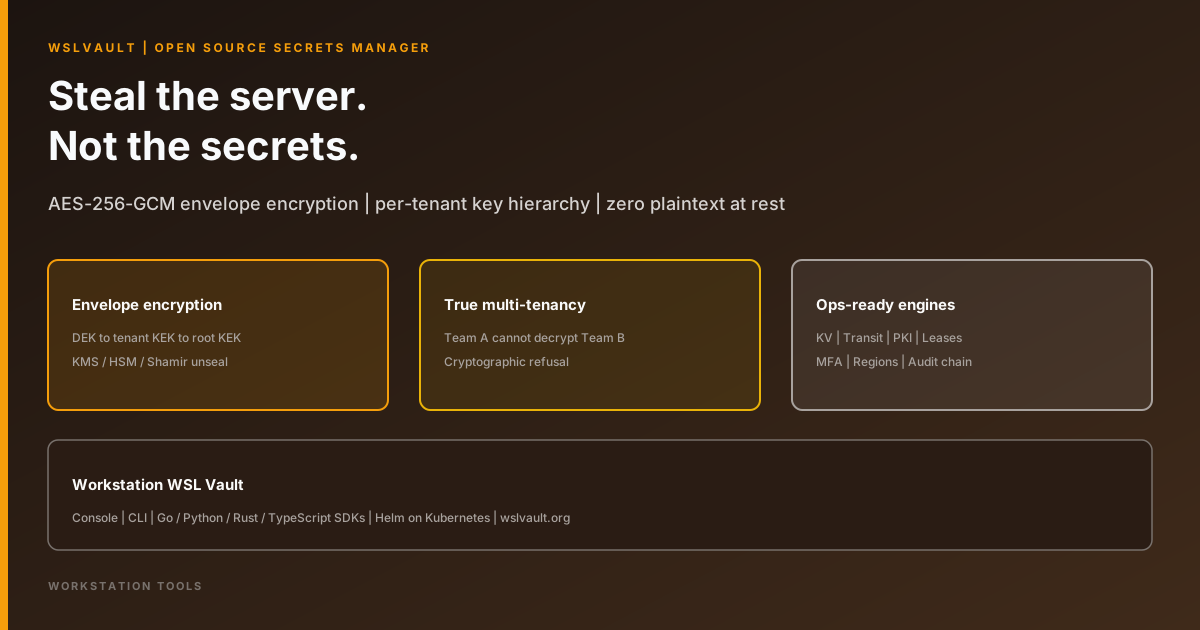
Classic failure mode: back up a database, lose a laptop, or compromise a host — and the attacker leaves with readable credentials. “Encryption at rest” that shares one key across every tenant, or that stores unwrapped material beside ciphertext, collapses under that scenario.
WSLVault’s design answer is simple to state and hard to fake: seal secrets before they touch disk, isolate tenants at the key layer, and keep root custody outside the data plane (KMS, HSM, or Shamir quorum).
2. What WSLVault is
WSLVault is an open-source, self-hosted secrets manager with Vault-compatible workflows:
- Versioned KV secrets
- Transit encryption (encrypt / decrypt / sign / verify)
- PKI and short-lived certificates
- Dynamic leases with real revoke
- Identity, policies, and MFA
- Active/active multi-region replication
- Tamper-evident, hash-chained audit
Operators drive it from a web console, CLI, Go/Python/Rust/TypeScript SDKs, or MCP. Deploy with Helm/GitOps on Kubernetes. Product home: https://www.wslvault.org/.
3. Envelope encryption and key hierarchy
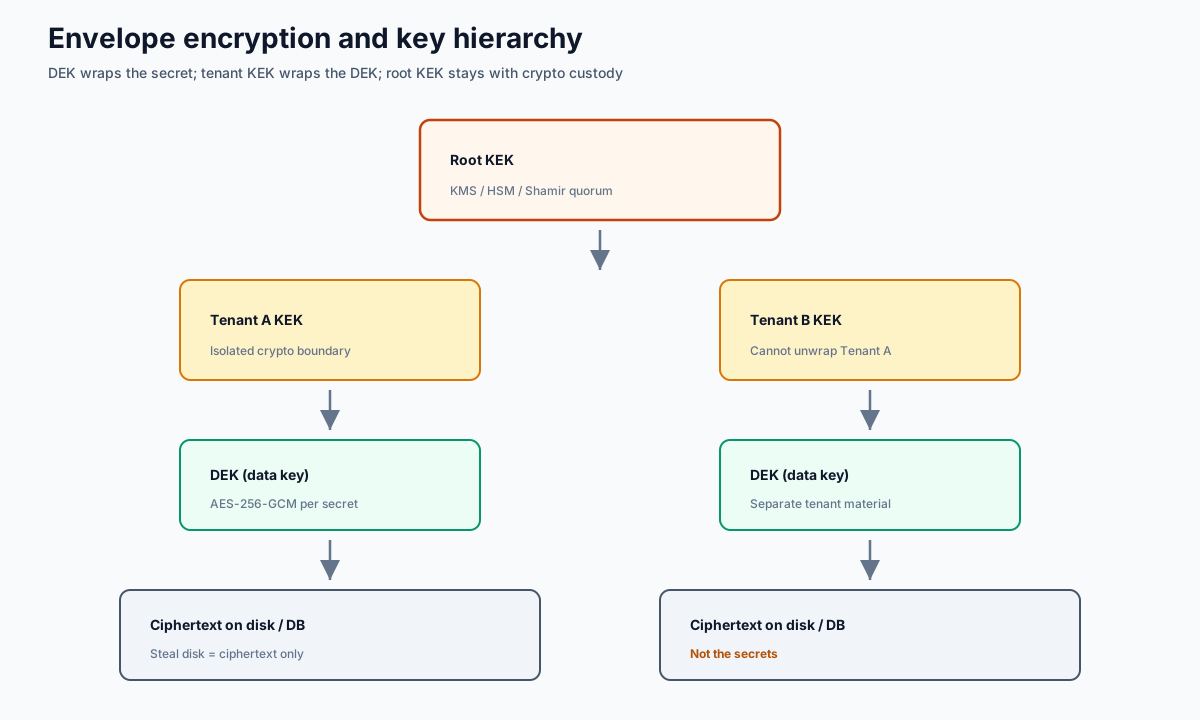
Each secret is sealed with a data encryption key (DEK). The DEK is wrapped under a tenant KEK. Tenant KEKs are wrapped under a root KEK held by the crypto service — typically backed by KMS, HSM, or Shamir-split custody so no single operator can unseal alone.
AES-256-GCM provides authenticated encryption. A database dump yields ciphertext wrapped under keys the database never sees. That is the practical meaning of steal the server, not the secrets.
4. Multi-tenancy that actually isolates
Application “tenant IDs” are not enough. In WSLVault, a data key belongs to exactly one tenant. A cross-tenant request returns “not found” rather than another tenant’s data. Isolation holds at the crypto service — Team A cannot decrypt Team B even if a bug in an upper layer misroutes an identifier.
That is cryptographic refusal, not an “oops” in a filter.
5. Console surfaces: secrets, transit, PKI
The steel/brass console walks the same engines as the API:
| Engine | What operators get |
|---|---|
| KV v2 | Versioned reads/writes, check-and-set, soft-delete/destroy, per-path metadata — sealed before storage |
| Transit | Encrypt/decrypt/sign/verify without plaintext keys leaving the vault; rotate while old ciphertext stays readable |
| PKI | Private CA, roles, short-lived certs; CA private keys envelope-encrypted under their own root |
6. Identity, policies, leases, and MFA
Identity comes from a signed, per-tenant token — never a trusted header alone. Operators get self-service TOTP two-factor with recovery codes, fine-grained policies on API keys and JWTs, plus SCIM, LDAP, OIDC, mTLS, and cloud-workload auth patterns.
Dynamic credentials are leases: issued, listed, renewed, and revoked for real. Revoking a token stops it working immediately — not just flipping a row that something might ignore.
7. Regions, HA, and audit
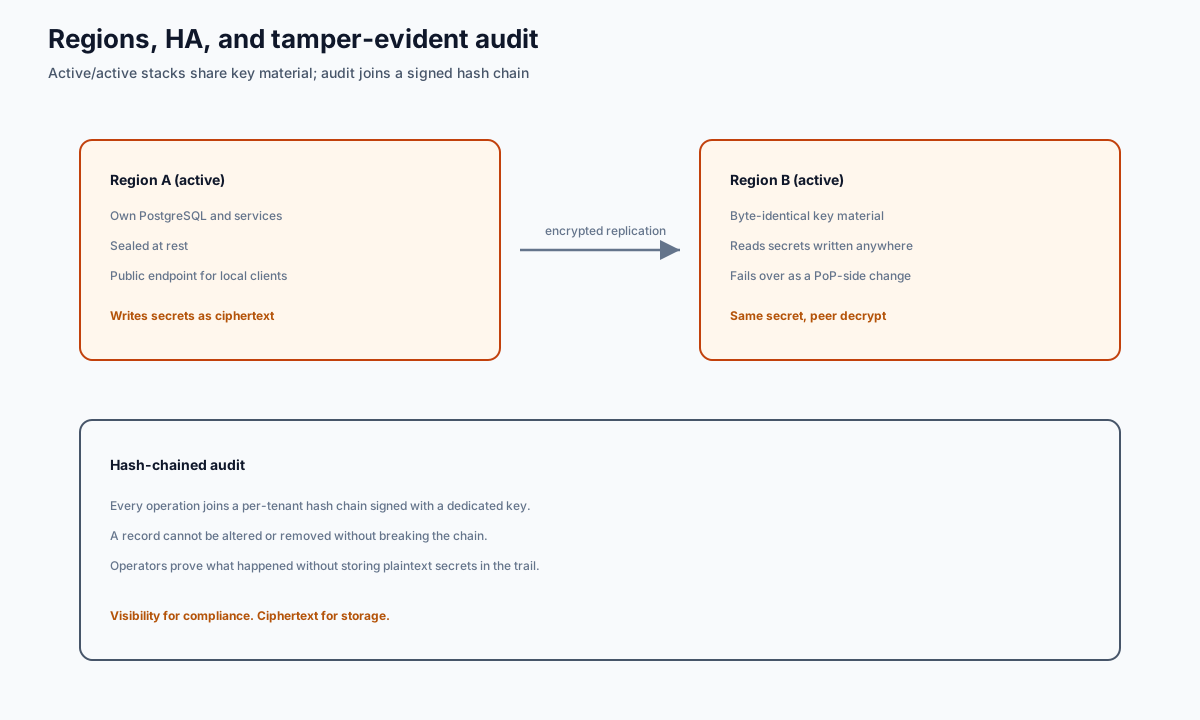
Each region is a complete stack — its own database, services, and public hostname. Regions share key material, not a single live database. Replication moves encrypted changes so a peer can decrypt what was written elsewhere.
Every operation joins a per-tenant hash chain signed with a dedicated key. A record cannot be altered or removed without breaking the chain. That gives compliance visibility without storing plaintext secrets in the trail.
8. Deploy on Kubernetes
Ship with the Helm chart and Kubernetes operator, drive from GitOps, scrape with Prometheus, and reach the vault from SDKs or an AI agent over the built-in MCP server. Start from the official guide: GETTING-STARTED.md.
9. Video chapters
| Time | Topic |
|---|---|
| 0:00 | Why this matters (steal the server) |
| 1:30 | What WSLVault is |
| 3:00 | Envelope encryption and key hierarchy |
| 5:30 | Multi-tenancy that actually isolates |
| 8:00 | Console walkthrough (secrets, transit, PKI) |
| 11:00 | Identity, policies, leases and MFA |
| 14:00 | Regions, HA and audit |
| 17:00 | Deploy on Kubernetes |
| 19:00 | Where to go next |
10. Where to go next
- Product: /en/wsl-vault
- Site: wslvault.org
- Repo: github.com/bwalia/wslvault
- Docs: docs/
- Related Workstation tools: WSL Proxy, Ring Promoter
Published by Workstation.