Decoupling Network Policy in Kubernetes: One Owner per Rule

Most Kubernetes clusters still keep network rules wherever they happened to land: controller annotations, per-service config, a few NetworkPolicies nobody dares delete. That makes every change a negotiation and every audit a hunt. This post shows how to split network policy into layers that each have one owner, using the standard APIs Kubernetes now gives you, and how to migrate without a big-bang rewrite.
What "decoupling" actually means
An API gateway already gives you one kind of decoupling. As HAProxy's engineers put it, a gateway "handles load balancing, security, rate limiting, monitoring, and other cross-cutting concerns", so that "frontend code and backend API endpoints are not tightly coupled" [1]. That is useful, but it only covers traffic arriving at the front door.
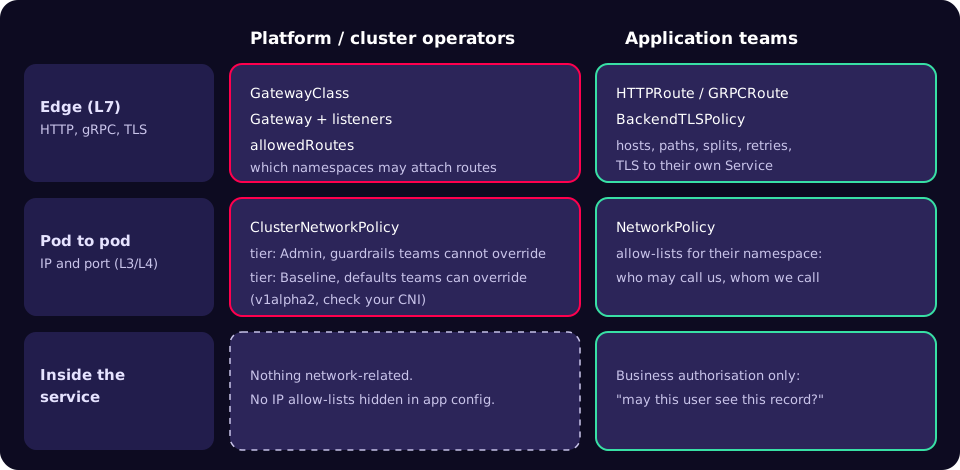
Inside a Kubernetes cluster there are three places a network rule can live, and each answers a different question:
- Layer 3/4 (IP address and port). Which pods may open a connection to which other pods, namespaces or CIDR ranges. This is
NetworkPolicyand its newer cluster-scoped companion,ClusterNetworkPolicy. - Layer 7 (HTTP, gRPC, TLS). Which hostnames and paths route to which services, how TLS is terminated and re-established, how traffic is split for a canary. This is Gateway API:
GatewayClass,Gateway,HTTPRouteand attached policies such asBackendTLSPolicy. - Inside the service. Business authorisation: may this user see this invoice? That belongs in code, and only that belongs in code.
The coupling problem is not that rules exist in all three places. It is that one team ends up editing all three, or that a rule which should be a cluster-wide guarantee is expressed in a resource an application team can delete.
Layer 3/4: guardrails and team allow-lists
The Kubernetes documentation describes NetworkPolicy as the way to "control traffic flow at the IP address or port level (OSI layer 3 or 4)" [2]. Three properties matter for ownership:
- It needs a network plugin that enforces it. "Creating a NetworkPolicy resource without a controller that implements it will have no effect" [2]. A policy that applies cleanly but changes nothing is a common false sense of security.
- Pods are open until selected. By default a pod is non-isolated for ingress and egress, so all connections are allowed [2].
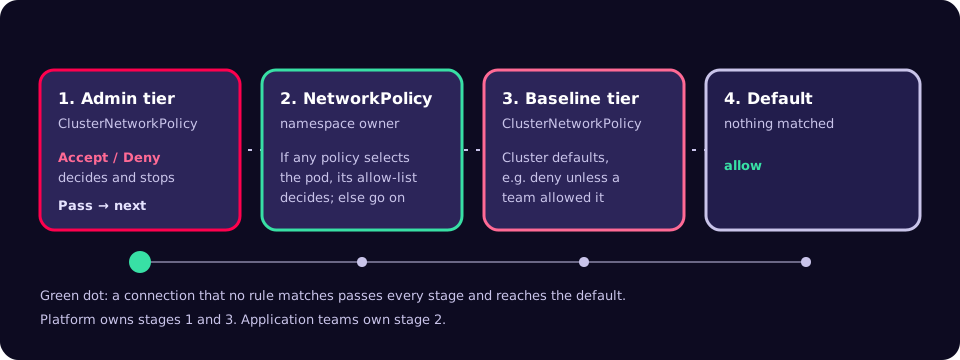
- Policies are additive allow-lists. Once any policy selects a pod, the allowed traffic is the union of all applicable policies, and there is no explicit deny [2].
That last point is why NetworkPolicy alone cannot express a platform guarantee. The docs list what it cannot do, including "Default policies which are applied to all namespaces or pods", "The ability to log network security events" and "The ability to explicitly deny policies" [2]. An application team can always add another allow rule.
The SIG Network Policy API project fills that gap. In October 2025 it merged AdminNetworkPolicy and BaselineAdminNetworkPolicy into a single ClusterNetworkPolicy resource at v1alpha2, where evaluation order is set by a tier field [3]. Admin-tier rules run before NetworkPolicy and "a developer CANNOT override these rules"; Baseline-tier rules run after NetworkPolicy and "CAN be overridden by developer NetworkPolicies" [4]. Rules use three actions: Accept, Deny and Pass, where Pass skips the rest of the current tier and hands the decision to the next one [4].
ClusterNetworkPolicy is still alpha, so check support before you design around it. The project's implementations page lists standard support in Calico v3.32, experimental support in Kube-OVN, and a conformance report for kube-network-policies; it lists only a tracking issue for Cilium [5]. If your CNI does not support it yet, keep the guardrail idea and express it with your CNI's own cluster-scoped policy, knowing you will migrate later.
Here is an Admin-tier guardrail adapted from the project's user stories: monitoring may always reach every namespace, and every pod may always resolve DNS [6].
apiVersion: policy.networking.k8s.io/v1alpha2
kind: ClusterNetworkPolicy
metadata:
  name: platform-always-allow
spec:
  tier: Admin
  priority: 30
  subject:
    namespaces: {}
  ingress:
  - action: Accept
    name: allow-monitoring-ingress
    from:
    - namespaces:
        matchLabels:
          kubernetes.io/metadata.name: monitoring
  egress:
  - action: Accept
    name: allow-kube-dns-egress
    to:
    - pods:
        namespaceSelector:
          matchLabels:
            kubernetes.io/metadata.name: kube-system
        podSelector:
          matchLabels:
            k8s-app: kube-dns
Check the DNS pod label in your own cluster (kubectl -n kube-system get pods --show-labels); distributions differ. Application teams then write ordinary namespace policies. A default deny for ingress is the documented starting point [2]:
apiVersion: networking.k8s.io/v1
kind: NetworkPolicy
metadata:
  name: default-deny-ingress
  namespace: payments
spec:
  podSelector: {}
  policyTypes:
  - Ingress
---
apiVersion: networking.k8s.io/v1
kind: NetworkPolicy
metadata:
  name: allow-from-shared-gateway
  namespace: payments
spec:
  podSelector:
    matchLabels:
      app: payments-api
  policyTypes:
  - Ingress
  ingress:
  - from:
    - namespaceSelector:
        matchLabels:
          kubernetes.io/metadata.name: infra-gateways
    ports:
    - protocol: TCP
      port: 8443
If you also deny egress, remember the documented caution: a default deny-all egress policy blocks DNS too, unless something else allows it [2]. The Admin-tier rule above is one way to make that a platform guarantee rather than something each team has to remember.
Layer 7: Gateway API splits the front door by role
Gateway API describes itself as "designed to be generic, expressive, and role-oriented" [7]. Its security model maps resources to roles: in the simple model, infrastructure providers write GatewayClass, cluster operators write Gateways, and application developers write only Routes [8]. Two mechanisms enforce the boundary:
allowedRouteson a listener. "The Gateway owner must explicitly allow Routes to bind from additional namespaces" [8]. The docs recommend selecting namespaces onkubernetes.io/metadata.name, because other labels do not carry the same guarantee [8].ReferenceGrant. Whenever a reference crosses a namespace, for example a Gateway using a Secret elsewhere, the target namespace must grant it [8].
apiVersion: gateway.networking.k8s.io/v1
kind: Gateway
metadata:
  name: shared-edge
  namespace: infra-gateways
spec:
  gatewayClassName: example-class   # your implementation's class
  listeners:
  - name: https
    protocol: HTTPS
    port: 443
    hostname: "*.example.com"
    tls:
      mode: Terminate
      certificateRefs:
      - kind: Secret
        name: wildcard-example-com
    allowedRoutes:
      namespaces:
        from: Selector
        selector:
          matchExpressions:
          - key: kubernetes.io/metadata.name
            operator: In
            values: ["payments", "orders"]
---
apiVersion: gateway.networking.k8s.io/v1
kind: HTTPRoute
metadata:
  name: payments
  namespace: payments
spec:
  parentRefs:
  - name: shared-edge
    namespace: infra-gateways
    sectionName: https
  hostnames:
  - payments.example.com
  rules:
  - matches:
    - path:
        type: PathPrefix
        value: /v1
    backendRefs:
    - name: payments-api
      port: 8443
Gateway-to-backend TLS used to be implementation-specific. Gateway API v1.4 moved BackendTLSPolicy to the Standard channel; before it, "there was no API specification that allowed encrypted traffic on the hop from Gateway to backend" [9]. It is a policy attached to a Service through targetRefs, which is the general pattern Gateway API calls policy attachment: a resource "that augments the behavior of another resource without modifying the definition of the augmented resource" [10]. The application team that owns the Service can own its TLS policy too.
On versions: Gateway API commits to supporting "a minimum of the most recent 5 Kubernetes minor versions", and recommends the Standard channel by default because the Experimental channel "makes no backwards compatibility guarantees" [11]. The latest release at the time of writing is v1.7.0 (29 October 2026), which promoted HTTPRoute retries to Standard [12].
Before and after
| Concern | Coupled (typical today) | Decoupled |
|---|---|---|
| Cluster-wide "never" rules | Wiki page and good intentions | ClusterNetworkPolicy, Admin tier, owned by platform |
| Default posture | All pods open until someone adds a policy | Baseline-tier default deny, overridable per team |
| Who may call a service | IP allow-lists in app config | Namespace NetworkPolicy in the team's repo |
| HTTP routing | Controller annotations on Ingress | HTTPRoute, portable across implementations |
| Which teams may publish on the edge | Anyone who can create an Ingress | allowedRoutes on the Gateway listener |
| TLS to the backend | Vendor-specific annotation, or none | BackendTLSPolicy attached to the Service |
Migration playbook
- Find out what enforces what. Confirm your CNI enforces NetworkPolicy and whether it supports ClusterNetworkPolicy [5]. Write down which Gateway API implementation and release you run.
- Check for Ingress NGINX. The Kubernetes project ended best-effort maintenance of Ingress NGINX in March 2026 and recommends migrating to Gateway API or another controller [13]. The project's check is
kubectl get pods --all-namespaces --selector app.kubernetes.io/name=ingress-nginx[13]. - Inventory rules by layer. List every annotation, NetworkPolicy and app-level allow-list. Tag each as guardrail, team allow-list, L7 routing or business authorisation, and give each a single owning team.
- Write the guardrails first. DNS and monitoring access as Admin-tier Accept; anything that must never happen as Admin-tier Deny. Start in a non-production cluster.
- Roll out default deny per namespace. Add a namespace's allow-lists, then its default deny, and watch for broken flows. Your CNI's flow logs help here, because NetworkPolicy itself cannot log decisions [2].
- Convert Ingress to Gateway API.
ingress2gateway print --providers=ingress-nginxreads your Ingress resources, converts them and warns about untranslated fields [14]. Version 1.0 supports over 30 common Ingress NGINX annotations, but annotations such asconfiguration-snippetneed a manual replacement [15]. Review every warning. - Lock the edge. Set
allowedRouteson every listener, and restrict RBAC so application teams can write Routes and NetworkPolicies but not Gateways or ClusterNetworkPolicies [8]. - Put policy in CI. Store each layer in the owning team's repository, validate manifests against the CRD schemas, and review guardrail changes as platform changes.
Checklist
- The CNI enforces NetworkPolicy, and you have tested a deny in a scratch namespace.
- Each namespace has a default deny for ingress, and egress where practical, with DNS allowed.
- Cluster guardrails live in a resource application teams cannot edit.
- Every Gateway listener sets
allowedRoutesusingkubernetes.io/metadata.name. - Cross-namespace references are backed by an explicit ReferenceGrant.
- Backend TLS is declared with BackendTLSPolicy where your implementation supports it.
- No IP allow-lists remain in application configuration.
- RBAC matches the ownership grid in Figure 1.
Common mistakes
- Assuming a policy works because it applied. Without an enforcing plugin it has no effect [2].
- Default-denying egress and breaking DNS. The docs call this out explicitly [2].
- Selecting namespaces by custom labels at the edge. Anyone who can label a namespace can then attach routes; prefer
kubernetes.io/metadata.name[8]. - Forgetting the gateway hop. After default deny, the gateway's pods need an explicit allow into each backend namespace, as in the second NetworkPolicy above.
- Building production guardrails on Experimental APIs without a plan for breaking changes [11].
- Treating ingress2gateway output as finished. It is a migration assistant, not a one-step replacement [15].
What to do this week
- Run the Ingress NGINX check from step 2 on every cluster and record the result.
- Apply a default-deny ingress policy in one scratch namespace and prove your CNI enforces it.
- Draw Figure 1 for your own platform: name the owning team for each cell.
- Run
ingress2gateway printagainst one non-production namespace and count the warnings. - Check your CNI's ClusterNetworkPolicy status on the implementations page [5].
Decoupling is less about new tools than about writing down who owns each rule and choosing the resource that matches that ownership. If you want a second pair of eyes on a cluster's network posture before a migration, our security team does this kind of review.
References
- Using HAProxy as an API Gateway, Part 1: Introduction (HAProxy Technologies)
- Network Policies (Kubernetes documentation)
- API update for v1alpha2: ClusterNetworkPolicy replaces AdminNetworkPolicy and BaselineAdminNetworkPolicy (Network Policy API project, 9 October 2025)
- API overview (Network Policy API project)
- Implementations (Network Policy API project)
- User story 2 example (Network Policy API project)
- Gateway API overview (Kubernetes SIG Network)
- Gateway API security model (Kubernetes SIG Network)
- Gateway API 1.4: New Features (Kubernetes blog, 6 November 2025)
- GEP-713: Metaresources and Policy Attachment (Kubernetes SIG Network)
- Gateway API versioning (Kubernetes SIG Network)
- Gateway API releases (GitHub)
- Ingress NGINX Retirement: What You Need to Know (Kubernetes blog, 11 November 2025)
- ingress2gateway README (GitHub)
- Announcing Ingress2Gateway 1.0: Your Path to Gateway API (Kubernetes blog, 20 March 2026)