Agentic AI in Production: Permissions, Approval Gates, Traces and Evals

An AI agent that works in a demo can still fail badly in production: it loops, calls the wrong tool, or changes something nobody approved. The fix is not a better prompt. It is to run the agent like any other distributed service, with explicit permissions, approval gates, traces and evaluations, and this post gives you the playbook to do that.
What actually changes when an agent goes live
A useful working definition: an agent is an LLM wrapped in a loop that can observe state, call tools, record results, and decide when it is done or when to ask for help [1]. Anthropic draws a helpful line between workflows, where LLM calls follow predefined code paths, and agents, where the model directs its own process and tool use [2]. Their advice is to find the simplest solution possible and add autonomy only when it is needed [2]. Many "agent" projects are better built as workflows.
When you do need an agent, three things change for the team that runs it:
- The control flow is no longer in your code. You write the goal, the tools and the limits. The model picks the path, so two runs of the same request can take different routes.
- Failures compound. A wrong early step feeds every later step. Anthropic recommends extensive testing in sandboxed environments and getting "ground truth" from the environment (tool results, test output) at each step [2].
- The security boundary moves to the tools. OWASP lists excessive agency as a top LLM risk and traces it to three causes: excessive functionality, excessive permissions and excessive autonomy [3]. Each of those is a property of the tools and approvals you give the agent, not of the model.
The production playbook
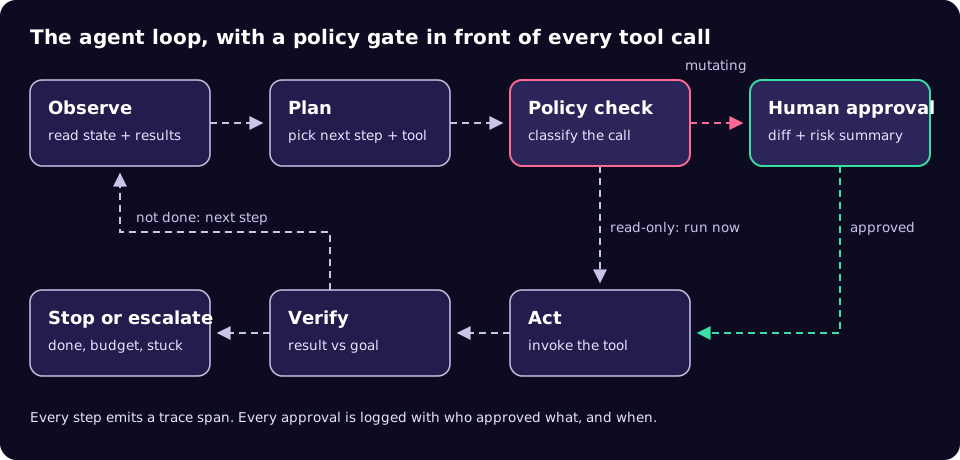
These steps work whether you build on an agent framework, a vendor's managed agent service or your own loop. They assume tools are exposed through the Model Context Protocol (MCP), the open standard for connecting models to tools, which is now governed under the Linux Foundation's Agentic AI Foundation [4]. The same ideas apply to plain function calling.
- Write the job down, including when to stop. State the goal, the inputs, the expected output format and the stop conditions: maximum steps, maximum spend, maximum wall-clock time, and "ask a human" triggers. Anthropic notes that stopping conditions such as a maximum number of iterations are common for keeping autonomous agents under control [2].
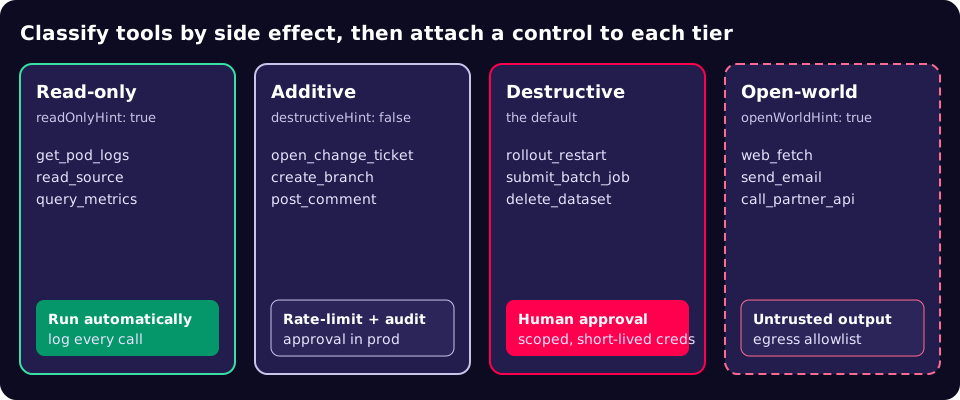
- Inventory and classify every tool by side effect. MCP defines tool annotations for this:
readOnlyHint(default false),destructiveHint(default true),idempotentHint(default false) andopenWorldHint(default true) [5]. Note the safe defaults: a tool that says nothing is assumed to be destructive and open-world. The specification also says clients must treat annotations as untrusted unless they come from trusted servers [6], so record your own classification in your own allowlist. - Give each tool the narrowest credentials that work. OWASP's mitigations for excessive agency include minimising extensions and their permissions and executing them in the user's context [3]. MCP's security guidance forbids "token passthrough": a server must not accept tokens that were not issued to it [7]. Keep secrets out of the agent's context entirely. One concrete example: Hypercubic's Hopper mainframe agent stores FTP and CICS credentials in the operating system keychain rather than in the application [8].
- Gate mutations behind a human. The MCP tools specification says there should always be a human in the loop with the ability to deny tool invocations [6]. Hopper shows a practical split: read-only actions such as listing members, reading source or querying spool run without confirmation, while mutating actions pause for explicit approval before anything on the mainframe changes [8]. Show the approver the exact arguments, not the model's summary of them.
- Break the "lethal trifecta". Simon Willison's rule of thumb: an agent with access to private data, exposure to untrusted content and a way to communicate externally can be tricked into leaking that data [9]. Do not give one agent all three. Split the work, or remove the external channel.
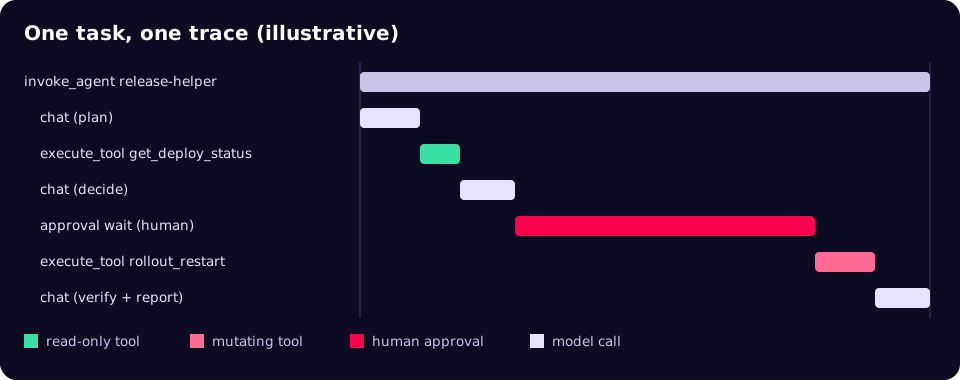
- Trace every step with standard names. OpenTelemetry's GenAI semantic conventions define
invoke_agentandexecute_toolspans with attributes such asgen_ai.agent.nameandgen_ai.tool.name[10][11]. They are still marked "Development", so pin the version you emit. Add your own attributes for approval outcome and approver. - Evaluate before and after release. In Thoughtworks' write-up of Bayer's PRINCE platform, the team runs dataset evaluations whenever the workflow, prompts or models change significantly, and daily evaluations on live traffic without reference answers [12]. For hard-to-find edge cases, generated scenarios help: a recent paper uses local language models on a laptop to generate, critique and cluster edge-case scenarios for safety assurance of autonomous systems [13].
- Engineer for partial failure. The same PRINCE write-up describes retries at both the LLM-call and workflow-node level, passing error context back to the agent, persisting state so a failed run resumes from the failed node, and falling back to a model from another provider after repeated failures [12].
A policy gate in code
The gate belongs in your harness, outside the model's control. This sketch uses your own tool policy (not the server's annotations), records the approval, and emits an OpenTelemetry span using the GenAI attribute names. agent.approval.* attributes are custom.
from dataclasses import dataclass
from opentelemetry import trace

tracer = trace.get_tracer("release-agent")

@dataclass(frozen=True)
class ToolPolicy:
    read_only: bool          # from YOUR allowlist, not the server's hints
    needs_approval: bool = True

class ApprovalDenied(Exception):
    pass

async def call_tool(session, name, args, policies, approver, audit):
    policy = policies.get(name)
    if policy is None:
        raise PermissionError(f"tool not on allowlist: {name}")

    with tracer.start_as_current_span(f"execute_tool {name}") as span:
        span.set_attribute("gen_ai.operation.name", "execute_tool")
        span.set_attribute("gen_ai.tool.name", name)

        if not policy.read_only and policy.needs_approval:
            decision = await approver.request(tool=name, arguments=args)
            audit.record(tool=name, arguments=args,
                         approver=decision.user, approved=decision.ok)
            span.set_attribute("agent.approval.outcome",
                               "approved" if decision.ok else "denied")
            if not decision.ok:
                raise ApprovalDenied(name)

        # MCP Python SDK ClientSession.call_tool(name, arguments)
        return await session.call_tool(name, args)
Keep the limits next to the policy so reviewers can see both in one place. The format below is illustrative, not a standard:
agent: release-helper
limits:
  max_steps: 25
  max_wall_clock: 15m
  max_model_spend_gbp: 2.00
escalate_when:
  - same_tool_failed: 3
  - approval_denied: 1
tools:
  get_deploy_status: { read_only: true }
  get_pod_logs:      { read_only: true }
  open_change_ticket: { read_only: false, needs_approval: false }
  rollout_restart:   { read_only: false, needs_approval: true }
What to monitor: services versus agents
Request-response dashboards miss most agent failures. An agent can return HTTP 200 after twenty wrong tool calls. Track the loop, not just the endpoint.
| Concern | Typical API service | Production agent |
|---|---|---|
| Unit of work | One request, one code path | One task, many model and tool calls, path chosen at run time |
| Main failure modes | Errors, latency, saturation | Loops, wrong tool, wrong arguments, early "done", prompt injection |
| Key signals | Rate, errors, duration | Steps per task, tool error rate, approval rate and wait time, escalations, cost per task |
| Correctness check | Unit and contract tests | Dataset evals on change, sampled live-traffic evals [12] |
| Change control | Code review on deploy | Review of prompts, tool allowlist and model version, plus approval at run time for mutations |
| Audit record | Access logs | Full trace: plan, tool arguments, results, approver identity |
Regulated and legacy environments
Banks, insurers, healthcare providers and tax processors do not need a different architecture. They need the same controls applied strictly. The Hopper example is useful because it targets the hardest case: an agent that reads COBOL and JCL, submits and monitors jobs, and decodes VSAM records on a mainframe [8]. Its design choices (read-only by default, explicit approval for changes, credentials held by the operating system) are exactly the ones in the playbook above.
Two additions matter in regulated settings. First, keep evaluation data and generated test scenarios inside your boundary; local models are one way to do that, as the scenario-generation paper shows [13]. Second, make the approval record part of your change-management evidence, so an auditor can see who approved which tool call with which arguments.
Production readiness checklist
- The task, inputs, output schema and stop conditions are written down and reviewed.
- Every tool is on an allowlist with your own side-effect classification.
- Unknown tools are refused, not passed through.
- Each tool runs with its own least-privilege, short-lived credentials; no secrets in prompts.
- Mutating calls require approval, and the approver sees the exact arguments.
- No single agent combines private data, untrusted input and an outbound channel.
- Every model call and tool call is traced; approvals and denials are logged.
- An evaluation set runs on every prompt, tool or model change.
- Retries, resume-from-failure and a fallback model are tested, not assumed.
- There is a kill switch that stops the agent and revokes its credentials.
Common mistakes
- Trusting server-declared annotations. A third-party server that labels a tool read-only is making a claim, not a guarantee [6].
- Approving summaries. If the human only sees the model's description of the change, the gate is cosmetic.
- One agent with every tool. PRINCE's top-level agent acts as a coordinator rather than an all-knowing component [12]. Smaller agents with narrower toolsets are easier to permission and audit.
- No budget. Without step, time and spend limits, a confused agent keeps going.
- Adding LLM checks by reflex. The PRINCE team removed an LLM review step for generated SQL because it rejected valid queries without improving accuracy [12]. Measure each guard.
What to do this week
- List every tool your agent can call and mark each read-only, additive, destructive or open-world.
- Remove any tool the agent has not used in its last 100 traces, or justify keeping it.
- Put an approval step in front of the destructive tier and check it shows raw arguments.
- Add
execute_toolspans withgen_ai.tool.nameand an approval-outcome attribute. - Write twenty real tasks with expected outcomes and run them against your current prompt and model.
Agents earn their place in production by being boring to operate: predictable permissions, visible decisions and a clear record of who approved what. If you want help designing that harness around your own systems, our AI agents team builds and runs them for UK organisations.
References
- The Agentic AI Handbook: Production-Ready Patterns, Nikola Balić, nibzard.com, January 2026.
- Building effective agents, Anthropic Engineering, 19 December 2024.
- LLM06:2025 Excessive Agency, OWASP GenAI Security Project.
- Donating the Model Context Protocol and establishing the Agentic AI Foundation, Anthropic, 9 December 2025.
- MCP schema, ToolAnnotations (revision 2026-07-28), Model Context Protocol.
- MCP specification: Tools (2026-07-28), Model Context Protocol.
- MCP Security Best Practices, Model Context Protocol.
- Hopper: agentic TN3270 emulator, Hypercubic.
- The lethal trifecta for AI agents, Simon Willison, 16 June 2025.
- Semantic conventions for GenAI agent spans, OpenTelemetry.
- Semantic conventions for GenAI spans (execute_tool), OpenTelemetry.
- Building Reliable Agentic AI Systems, Sarang Sanjay Kulkarni, martinfowler.com, June 2026.
- A Local Agentic AI Framework to Generate Edge Case Scenarios for Safety Assurance, Hodge, Paterson and Alexander, arXiv, October 2026.