

Workstation Logo
Продукты
AI LabsАгенты OpenAIАгенты ClaudeGrok BotWorkstation CRM (WSL CRM)МаркетингВсе продукты
Решения ИИ
Рабочие станции ИИAI SME PackagesЧастный ИИКластеры GPUПограничный ИИЛаборатория корпоративного ИИИИ по отраслям
Услуги
Platform ModernisationDigital EngineeringData Foundations & AIAutonomous OperationsИИ-консалтингАвтоматизация DevOpsКибербезопасностьРазработка ПОСоздание агентовНастройка MLOps
О нас
ПартнёрыИстории клиентов
Статьи
Документация
WSL ProxyRing PromoterWSL VaultJobshoutSysOps 24/7
Блог
Связаться с намиLogin
Workstation

AI-рабочие станции, мультиагентное AI-ПО, GPU-инфраструктура и решения на базе интеллектуальных агентов для современного бизнеса.

Связаться с нами

AI-решения

Рабочие станции ИИAI SME PackagesЧастный ИИКластеры GPUПограничный ИИЛаборатория корпоративного ИИИИ по отраслям

Продукты

Все продуктыWSL CRM и ERPМаркетингАгенты OpenAIWSL ProxyRing PromoterWSL VaultJobshoutSysOps 24/7

Компания

О насПочему WorkstationПартнёрыИстории клиентовЦеныКонтакты

Ресурсы

СтатьиДокументацияБлогПоискКарта сайта
Офис в Великобритании
77-79 Marlowes, Hemel Hempstead HP1 1LFКак добраться: съезд 20 с трассы M25, Внешний ЛондонРег. номер компании: 11641870Пн - Пт: 9:00 - 18:00 GMT
+44 7515 356 146
Офис в Бельгии
Workstation SRL, Rue Vanderkindere 34, 1180 Uccle, BrusselsBE 0751.518.683Пн - Пт: 9:00 - 18:00 CET
+32 492 45 67 46
Офис в Индии
#159 Sector 9, Pocket 1, DDA Flats, 110077 Dwarka, New Delhi
+91 98881 98841

© 2026 Workstation AI. Все права защищены.

КонфиденциальностьФайлы cookieУсловия использованияКарта сайта

Loading blog...

Home / Blog
AIAI AgentsSecurityLLMDevOps

How to Deploy Secure AI Agents in Healthcare

Give agents the right access for appointments, billing and clinical support — with guardrails that keep PHI and payments out of the model

Balinder Walia17 сентября 2026 г.2 min read

AI agents can book appointments, take payments and support clinical work. Healthcare teams should give them the right access — and no more. Companion deep dive: long article.
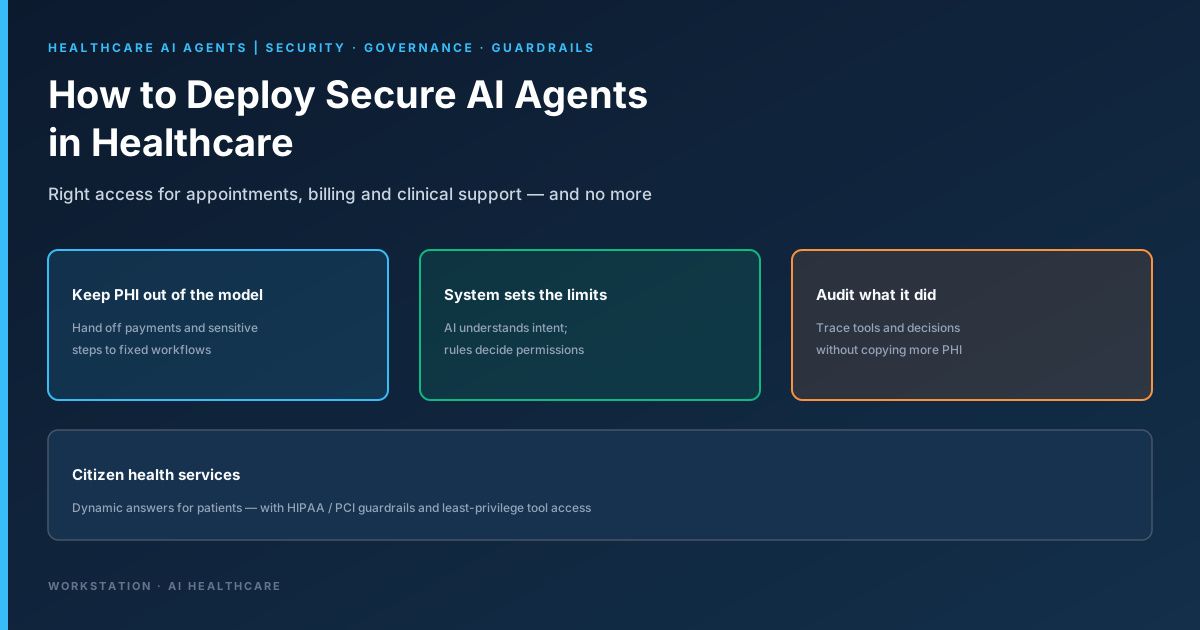
How to deploy secure AI agents in healthcare

Bottom line. Do not ask whether the AI is “safe enough” to see all PHI. Ask what access the agent needs to finish the patient’s request — then keep everything else on fixed, rule-based paths with audit trails that do not copy more sensitive data.

Healthcare teams are moving past AI pilots. Agents can work out what a patient wants, pick a tool, connect to systems and take action: appointments, billing questions, payments and clinical support. That creates a new security problem. Normal software follows a fixed path. An agent does not — the path changes with the conversation. Near Protected Health Information (PHI) or payment data, the key question is least privilege, not model trust.

Three ideas for healthcare leaders
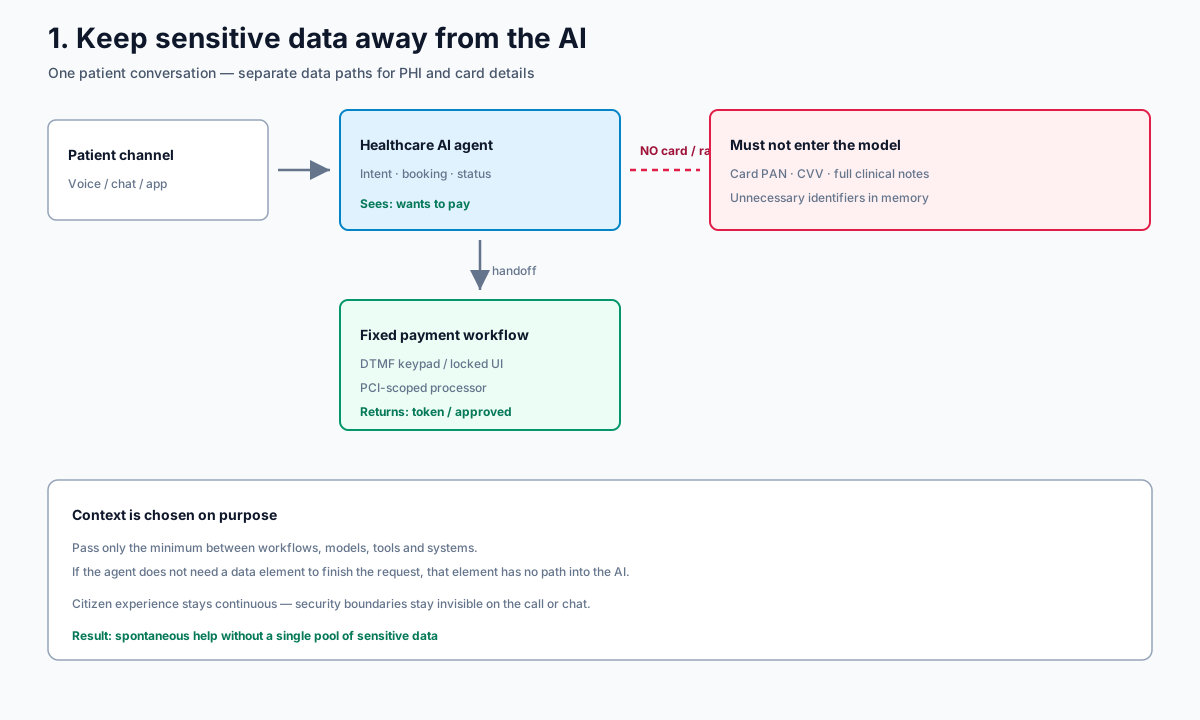
Keep sensitive data away from the AI agent

  1. Keep sensitive data away from the AI. On a bill-pay call, the agent needs intent and payment status — not the card number. Use DTMF or a locked digital payment flow; return only a token or “approved”. Context must be chosen on purpose, not passed by default.
  2. Do not use the AI as your security guard. Let the model understand language. Let fixed controls decide login, permissions and high-risk actions.
  3. Track what the agent did, not just what it said. Audit agent, workflow, tools, permission decisions, boundary crossings and results — without dumping PHI into logs and analytics.
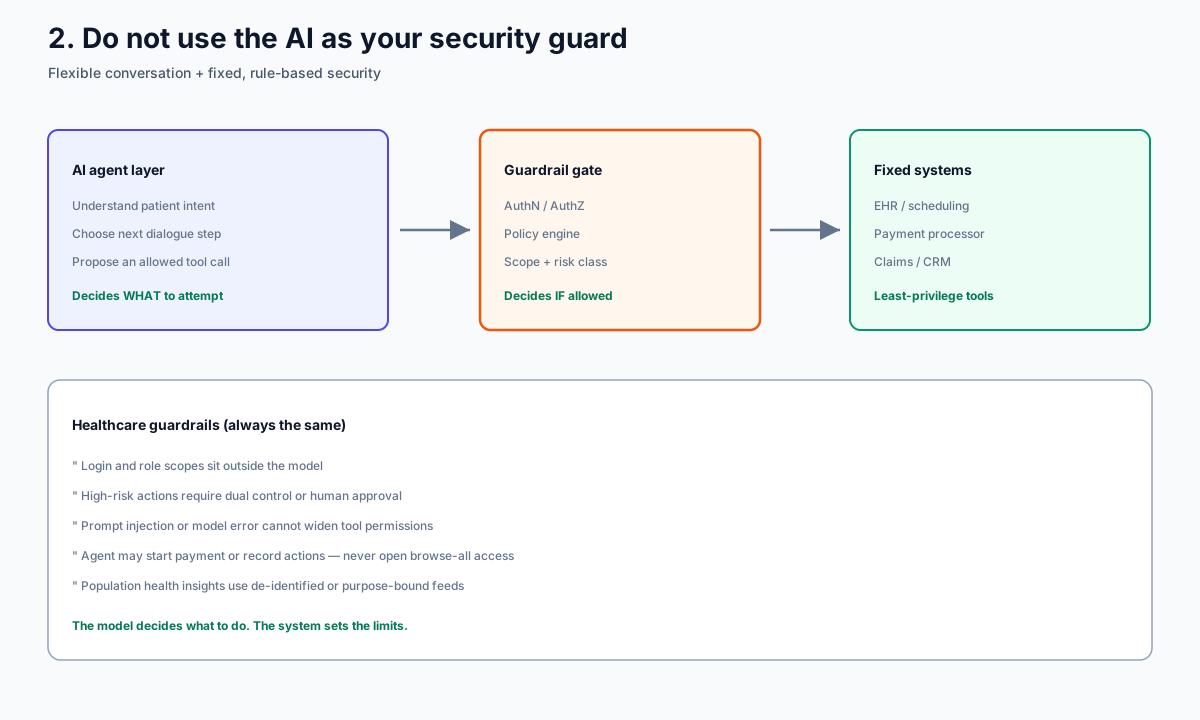
AI decides intent; system enforces healthcare guardrails

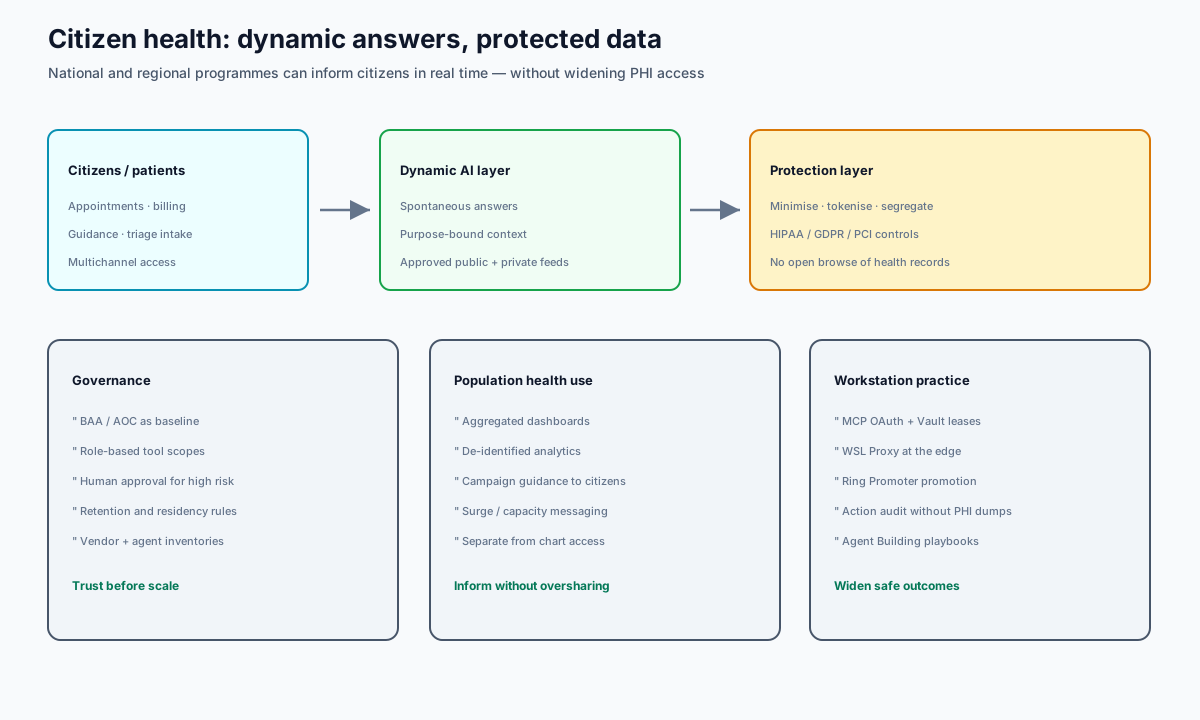
Citizen health dynamic answers with protected data

For national and regional programmes, citizens still need spontaneous, dynamic answers — appointments, guidance, capacity messaging — while charts and payment data stay behind purpose-bound feeds, tokenisation and governance. A BAA (HIPAA) and AOC (PCI DSS) are starting points, not the whole design.

Workstation practice. Pair flexible agents with MCP OAuth, Vault leases, edge controls (WSL Proxy), and promotion discipline (Ring Promoter). See also agentic security and AI Healthcare.

Read the full technical brief · Talk to Workstation