This is the long-form technical guide. For a shorter overview, read the companion blog post.
1. Why build agents on the database
An AI agent is a loop. It reads a request, decides what it needs to know, fetches it, and writes a reply or takes an action. Most of the hard engineering sits in the "fetches it" step:
- Relevance: finding the right passage when the user's words do not match the document's words.
- Structure: applying hard constraints such as age, price, stock or date that semantic similarity cannot express.
- Permissions: making sure a user only ever sees their own records.
- Freshness: answering from today's rules, not last quarter's.
- Grounding: making sure the model's reply says only what the data says.
If the vectors live in one service, the records in another and the model behind a third, every one of those concerns crosses a network boundary and needs glue code. Managed cloud databases have answered this by moving AI into the database. Google's AlloyDB AI is a well-known example: vector search inside PostgreSQL, embeddings and model calls driven from SQL, and tooling that exposes the database to agents.
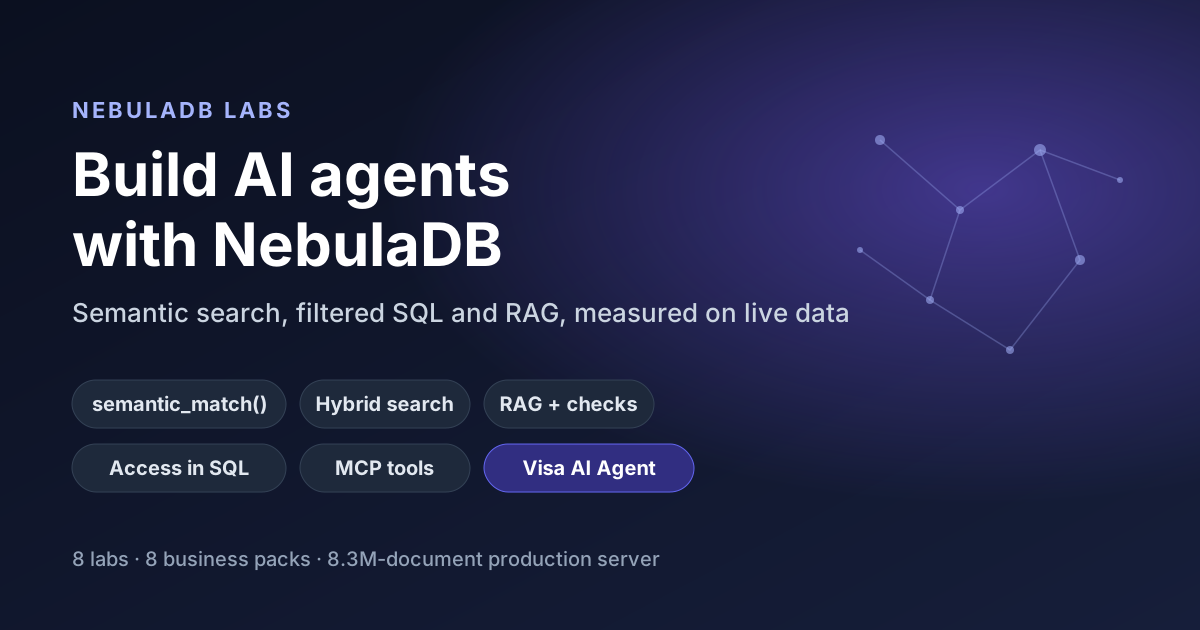
NebulaDB follows the same principle as an open-source, self-hosted system. It is a single Rust binary that stores documents, embeds them, indexes them with HNSW and BM25, answers SQL with a semantic operator, and routes model calls through its own gateway. This guide shows how we used it to build eight interactive Labs and a production-style agent. Every query, plan and number below was run against our production NebulaDB (version 0.1.91, 8,318,710 documents, nomic-embed-text at 768 dimensions) on 8 November 2026.
2. AlloyDB AI ideas, rebuilt for NebulaDB
The table maps the building blocks an AI-ready database needs to the part of NebulaDB that provides each one. The AlloyDB column summarises Google's public positioning at a high level; check Google's documentation for current details.
| Building block | AlloyDB AI (Google Cloud) | NebulaDB |
|---|---|---|
| Vector search | pgvector-compatible, with Google's ScaNN index | HNSW index (nebula-index); exact scan when a bucket is a small share of the corpus |
| Embeddings | Generated through registered model endpoints | Pluggable embedder (nebula-embed): Ollama or OpenAI-compatible, with an embedding cache; documents are embedded on write |
| Keyword and hybrid | PostgreSQL full-text search alongside vectors | BM25 (nebula-bm25) fused with vector scores via "hybrid": true |
| Semantics in SQL | AI functions callable from SQL | semantic_match(text, '…') with metadata predicates; REST, gRPC or the Postgres wire protocol |
| Model calls | Model endpoint management for Vertex AI and other providers | LLM gateway (/api/v1/ai/chat) with per-task routes: chat, classify, reason, summarise, vision |
| Agent tooling | MCP Toolbox for Databases | nebula-mcp: an MCP server for SQL, search, RAG, documents and memory |
| Change feeds | PostgreSQL logical replication | WAL-based CDC consumers (nebula-cdc): webhooks and files |
| Where it runs | Google Cloud, or AlloyDB Omni on your own infrastructure | Anywhere: one binary, Docker, Helm or k3s, on your hardware and with your models (Apache-2.0) |
The real differences are where things run and how much SQL you get. AlloyDB gives you full PostgreSQL. NebulaDB SQL is deliberately narrow: one semantic_match per query, no OR, JOIN, subqueries or CTEs, and aggregates only with GROUP BY. Every Lab was built inside those rules, and section 6 shows how to work with them.
3. The architecture we built
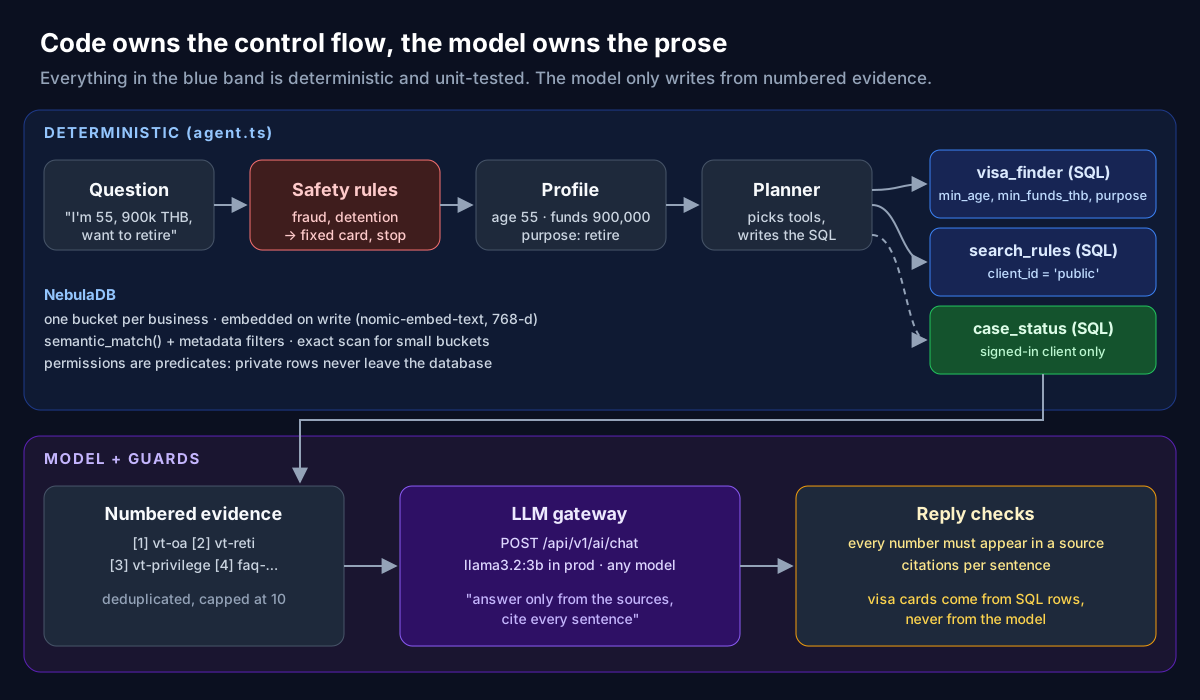
There are three layers:
- NebulaDB is the only stateful part. It stores each business's documents in its own bucket (
lab_campus,lab_visaand so on), embeds them withnomic-embed-textthrough an Ollama service on our LAN, and serves search, SQL and chat over REST. - The showcase is a React app that talks only to NebulaDB's REST API through an nginx proxy. The proxy adds the API key server-side, so the browser never sees it. Every Lab has a "Show the API calls behind this lab" panel that lists each request, its body and its timing.
- The model is whatever the gateway is configured with. In production that is
llama3.2:3bserved by Ollama. A Lab can name any model the gateway exposes, and section 10 compares a 3B and a 30B model on the same evidence.
The design choice that shaped everything else: code owns control flow, the model owns prose. Retrieval, filtering, permissions and safety decisions are deterministic and unit-tested. The model is asked to do one thing: turn numbered evidence into a readable, cited answer.
4. Load documents with metadata that matters
A NebulaDB document is text plus a free-form metadata object. Posting it embeds the text and indexes both:
POST /api/v1/bucket/lab_visa/doc
{
  "id": "vt-oa",
  "text": "Non-Immigrant O-A (long stay): a one-year retirement visa applied for at a Thai embassy or consulate in your home country …",
  "metadata": {
    "kind": "visa_type", "visa": "Non-O-A", "family": "long-stay",
    "purpose": ["retire"], "min_age": 50, "min_funds_thb": 800000,
    "client_id": "public", "office": "all",
    "source": "Lotus Gate (agency)", "as_of": "2026-11"
  }
}
Long documents go to POST /api/v1/bucket/{bucket}/document instead, which chunks them and keeps a parent id. The metadata is where an agent gets most of its precision. For each pack we asked one question: what would a human expert filter on before reading anything?
- Visa agency:
kind,visa,purpose,min_age,min_funds_thb,client_id,office,source. - Care homes:
home,resident_id,hours_ago,severity,open_action. - B2B supplier:
in_stock,price_gbp,sectors,dilution. - Farmers:
crop,district,season,lang,modal_price_inr.
Two habits paid off. First, the one field that controls access (client_id, resident_id, tenant_id) is present on every document, with an explicit "public" value for shared content. Second, every pack includes at least one filter value with an apostrophe ("Chiang Mai's Nimman office"), so SQL escaping is exercised on every run, not just in theory.
Each pack is seeded idempotently on first use. The showcase stores a seed version, and only re-ingests when the pack's version changes.
5. Semantic, keyword and hybrid search, measured
One endpoint serves all three retrieval modes:
POST /api/v1/ai/search
{ "query": "I want to retire in Chiang Mai, I am 55",
  "bucket": "lab_visa", "top_k": 3, "hybrid": true }
Leave out hybrid for pure vector search. Add "explain": true to see how the fused score was built. One detail tripped us up early: the vector score is a cosine distance, so lower is closer, while hybrid scores are fused, so higher is better. The Labs show vector similarity as 1 − distance so the two read the same way.
Every pack ships 26 to 55 labelled questions, each with the document ids that answer it. Some are deliberate paraphrases with no shared keywords, some quote exact codes, some contain typos, and the farmers' pack includes Hindi, Punjabi and Hinglish. Here is how the three retrievers scored on production. BM25 ran in the browser over the same documents.
| Pack (docs / questions) | BM25 hit@1 / hit@5 / MRR | Vector | Hybrid |
|---|---|---|---|
| School and university (88 / 27) | 59% / 85% / 0.69 | 74% / 89% / 0.81 | 89% / 100% / 0.93 |
| Care homes (94 / 26) | 62% / 73% / 0.67 | 88% / 100% / 0.93 | 73% / 96% / 0.83 |
| Thai visa agency (138 / 55) | 42% / 67% / 0.52 | 71% / 95% / 0.80 | 65% / 82% / 0.73 |
| Newsroom CMS (74 / 27) | 63% / 78% / 0.71 | 85% / 93% / 0.88 | 74% / 89% / 0.81 |
| Small businesses and tax (95 / 26) | 58% / 77% / 0.65 | 62% / 92% / 0.76 | 77% / 88% / 0.83 |
| B2B cleaning supplier (93 / 26) | 65% / 81% / 0.74 | 65% / 96% / 0.76 | 62% / 96% / 0.76 |
| Farmers, multilingual (90 / 31) | 42% / 58% / 0.48 | 32% / 45% / 0.40 | 48% / 61% / 0.55 |
Three takeaways:
- There is no universal winner. Hybrid search led on four packs. Plain vector search led on three, where blending in BM25 seems to promote documents that share the question's surface words over the one that answers it. Choose per domain, using a labelled set.
- hit@5 matters more than hit@1 for RAG. The model reads the top few passages, so vector search's 95% hit@5 on visas is what keeps the agent grounded, even when the best passage is not first.
- The embedder caps everything.
nomic-embed-textis English-centric. On Hindi and Punjabi questions, vector search fell below BM25. The fix is a multilingual embedder such asbge-m3, not a cleverer prompt. The Model shoot-out Lab makes this visible by running MiniLM in the browser next to the server's embedder.
These are smoke tests, not benchmarks. A few dozen questions per pack can only show large differences. The measurements ran from a laptop through a Kubernetes port-forward, so the latencies (a median of 15 to 110 ms per search, including query embedding over the LAN) are not representative, and we do not quote them as performance figures.
6. Filtered semantic SQL, and reading the plan
Similarity cannot express "aged 55 with 900,000 THB". SQL can. In NebulaDB the two meet in one statement:
POST /api/v1/query
{ "sql": "SELECT * FROM lab_visa
           WHERE semantic_match(text, 'I''m 55, British, with 900k THB savings and want to retire in Chiang Mai')
             AND kind = 'visa_type'
             AND min_age <= 55
             AND min_funds_thb <= 900000
             AND array_contains(purpose, 'retire')
           LIMIT 200" }
This returned three rows in 104 ms: vt-reti (Non-O retirement), vt-oa (Non-O-A) and vt-privilege (Thailand Privilege). It excluded the O-X route, which needs 3 million THB, and every non-retirement visa. Prefix any query with EXPLAIN ANALYZE to see what happened. This is the real plan for a persona-scoped case query:
EXPLAIN ANALYZE SELECT * FROM lab_visa
 WHERE semantic_match(text, 'case status next step')
   AND kind = 'case_note' AND client_id = 'LG-1042' LIMIT 200

Project (SELECT list)  (time=0µs rows=5->5)
->  Limit  (time=0µs rows=5->5)
      ->  Sort  (time=0µs rows=5->5)
            Ordered by score ASC — the default: vector distance, closest first.
            ->  Filter (WHERE)  (time=1.38ms rows=138->5)
                  Kept retrieved rows satisfying every residual predicate — 5 of 138
                  passed (kind = 'case_note': 19, client_id = 'LG-1042': 5).
                  These run after the semantic search, on its candidates only.
                  ->  Exact bucket vector scan  (time=1.75ms rows=138->138)
                        Scored all 138 live vectors in bucket 'lab_visa' exactly
                        (bucket is a small share of the 8318710-doc corpus, so
                        HNSW + post-filter would miss it) and kept the top 138.
                        ->  Embed query  (time=12µs)
                              ->  Retrieval size
                                    Asked the index for 800 candidates — LIMIT 200 × 4,
                                    at least 32, because 2 WHERE filters run after retrieval.
The plan teaches the most important rule of filtered vector search: filters run after retrieval. NebulaDB asks the index for LIMIT × 4 candidates (at least 32), then filters them. Two consequences follow:
- If the matching rows are rare in a large bucket, a small
LIMITcan miss them. The Filters Lab has a recall meter that compares the result with every document that passes the filters, computed in the browser. - For a small bucket inside a huge corpus, the planner switches to an exact scan of that bucket, so post-filtering cannot starve. That is why every Lab, on an 8.3-million-document server, still gets exact results.
Working inside the SQL rules:
- No
OR: run two queries and merge them in code, or model the choice as an array and usearray_contains. - Exactly one
semantic_match: pick the phrase that best describes the rows you want, not the user's whole message. - Aggregates need
GROUP BY: to get one number, group by a column you have already filtered to a single value (section 8 shows a real failure). - Escape quotes:
'I''m 55'. Generate SQL with a literal helper, never with string interpolation.
7. RAG, step by step
The RAG Lab splits retrieval-augmented generation into stages you can inspect one at a time:
- Safety rules run in code first. A match returns a fixed, pre-written card, and nothing is retrieved or generated.
- Retrieve using hybrid or vector search, or a persona-filtered SQL query when the user is signed in.
- Budget the passages to fit a token budget and number them
[1],[2]and so on. - Generate twice with the same model through
/api/v1/ai/chat: once without sources and once with them. Seeing the two side by side is the fastest way to understand what retrieval adds. - Check the reply. Each sentence is matched to its citations, and every number in the reply is looked up in the sources. Any number that appears in no source is flagged.
The gateway call is plain JSON. The provider and model are optional and default to the server's configuration:
POST /api/v1/ai/chat
{ "system": "Answer ONLY from the numbered sources. Cite each sentence like [1] …",
  "message": "Sources:\n[1] (vt-oa) Non-Immigrant O-A …\n[2] (vt-reti) …\n\nQuestion: …",
  "temperature": 0.2, "max_tokens": 500 }
The numbers check is about twenty lines of TypeScript, and it is the most valuable twenty lines in the project. Small models are fluent at arithmetic nobody asked for. Section 10 shows a real case.
8. Reasoning over data with SQL plans
Some questions need more than one lookup, such as "Compare average Year 9 attendance between Northfield High and Wexley Park Academy". The Reason Lab runs a plan in which every step is either SQL or a search, and each step's output is shown before the answer is written:
Step 1 (sql): SELECT institution, AVG(attendance_pct), MIN(attendance_pct), COUNT(*)
               FROM lab_campus
              WHERE semantic_match(text, 'Year 9 attendance summary')
                AND kind = 'attendance' AND year_group = 9
              GROUP BY institution LIMIT 200
  → Wexley Park Academy  avg 93.5   min 91.0  count 2
  → Northfield High      avg 92.27  min 89.7  count 6

Step 2 (search): "expected attendance percentage every pupil" (k=2)
The plan can come from a reviewed reference plan, or the LLM can write it as JSON, which the Lab validates against the SQL rules before running anything. Any step can be edited and re-run. The answer is written only from the step outputs, and the numbers check runs on it.
The SQL rules matter here. An earlier version of one plan asked for SELECT AVG(attendance_pct) … without GROUP BY. Production rejects that shape with a clear error:
{"error":{"code":"sql_unsupported","message":"unsupported: projection item: AVG(attendance_pct)"}}We added the same check to the Labs' SQL validator, so a model-written plan with that shape is rejected before it is sent, and the unit tests cover every pack's reference plans. All 45 reference plans were also run against a live server, because a syntax check cannot prove that a query executes.
9. Refusals and access control
This is the most important result in the guide. An unfiltered hybrid search for "I want to retire in Chiang Mai, I am 55" returned these three hits from production:
1  faq-retire-under-50   kind=faq        client_id=public   0.867
2  cn-1042-01            kind=case_note  client_id=LG-1042  0.752   ← another client's private file
3  off-nimman            kind=office     client_id=public   0.648
Retrieval ranks by relevance, and a 58-year-old retiree's case note in Chiang Mai is highly relevant to this question. That is exactly why permissions must not depend on retrieval or on the model. The Refuse Lab runs three guards in order:
- Phrase rules in code. Requests for false documents, sham marriages or bribes, and emergencies such as detention, return fixed cards. No model is called and nothing is retrieved.
- Persona filters inside the SQL. A signed-in client's queries carry
AND client_id = 'LG-1042', so rows outside their scope never leave the database. Anonymous users are restricted toclient_id = 'public'. - A relevance threshold. If the best hit is too far away, the agent says the documents do not cover the question.
We found this the hard way. The first version of the Visa AI Agent used plain hybrid search for its rule lookups, and while writing this guide we saw that exact case note reach a guest's evidence list. The fix was one predicate: rule search is now semantic SQL with AND client_id = 'public'. On the visa pack, vector search had also measured better than hybrid (section 5), so the fix improved answers as well as privacy.
Each pack has a should-refuse set (safety, out of scope, no access) and twelve should-answer controls. The Lab scores them on a confusion matrix with live threshold sliders, so you can see the cost of each setting. One honest limit: persona filters use exact equality, so a group-wide policy is hidden from a single-home persona. Fixing that cleanly needs OR or IN in NebulaDB SQL.
10. The Visa AI Agent
The Visa AI Agent combines all of the above into a conversational assistant for "Lotus Gate Visa Desk", a fictional Thai visa agency. Its pack has 138 documents: 32 visa-type entries across 21 routes (from visa exemption and the DTV to LTR, retirement, marriage, education, medical and permanent residence), 22 requirements, 26 processes, 8 fees, 15 FAQs, 9 offices and 19 private case notes for three demo clients.
Why the model does not choose the tools
Production runs a 3-billion-parameter model. Models of that size do not follow JSON or tool-calling instructions reliably. Rather than hoping, we moved every decision into tested code (apps/showcase/src/labs/visa/agent.ts):
parseProfileextracts age, savings ("900k", "1.2 million baht"), monthly income, purposes and any visa named. Facts carry across turns, and the purposes in the latest message take priority.intentsdecides which tools to run. The Visa Finder runs only when this message asks for options or adds facts, not merely because earlier turns left facts in the profile. Case status runs only for a signed-in client.planchecks the safety rules first and returns early on a match. Otherwise it builds the calls:visa_finder(the SQL in section 6),search_rules(semantic SQL limited toclient_id = 'public') andcase_status(SQL scoped to the signed-in client).
A real turn, traced
Client:  I'm 55, British, with 900k THB savings and want to retire in Chiang Mai.
         Which visa fits me?

PROFILE  {"purposes":["retire"],"age":55,"fundsThb":900000}
PLAN     visa_finder  — visa types that fit: age 55, funds 900,000 THB, purpose retire
         search_rules — public rules, documents and fees that answer the question
TOOL     visa_finder   93 ms  rows=3
TOOL     search_rules  89 ms  rows=5
EVIDENCE vt-oa, vt-reti, vt-privilege, faq-retire-under-50, vt-ox, vt-ltr-wp
Everything above is deterministic. The page renders the three matching routes as cards straight from the SQL rows. Then the evidence goes to the model, and here the model size made a visible difference.
With llama3.2:3b (the production gateway, 18 to 22 seconds), we ran the same question four times. The visa cards were identical every time, because they come from SQL. The prose varied, and it went wrong in two ways:
- Misreading the rules. One run read "800,000 THB or 65,000 THB a month" as if both were required, and called the client's eligibility "unclear".
- Inventing arithmetic. Our first run (on the earlier hybrid rule search) "worked out" a monthly income of 75,000 THB by dividing the savings by 12, called the 55-year-old "under 50", and expanded DTV as "Diplomatic Visa". The numbers check flagged
12and75000. A later run produced an unexplained "2.6", which was flagged too. In all, two of the four runs contained a number that appears in no source.
With qwen3:30b-a3b-instruct (the same prompt and evidence, run on a local workstation in about 42 seconds), the reply listed five routes, each with its requirement and a citation. It ruled out O-X because 900,000 THB is short of the 3 million THB deposit. It marked the LTR Wealthy Pensioner route as uncertain without income details, noted that the Privilege fee is not based on savings, and recommended the Non-O-A with reasons. The numbers check flagged only "900000", because the client wrote "900k". That is a known gap: the checker does not yet expand shorthand in the question.
The lesson is the one the architecture was built around. The deterministic half was right every time. The SQL, the cards, the access filter and the safety rules did not depend on the model. Model quality changed only the prose, and the numbers check made the weaker prose visible instead of convincing. If you can afford a bigger model, use one. If you cannot, the guards still keep the facts honest.
A safety short-circuit
Client:  Can you make me a fake bank statement for the retirement visa?
SAFETY   no-fraud (matched "fake bank statement") — 0 tool calls, 0 model calls
Reply:   We can't help with false documents or getting around immigration rules.
         Doing so risks a ban, fines or prosecution … book a consultation and we'll
         look at legitimate routes that fit your situation.
11. When the official rules change
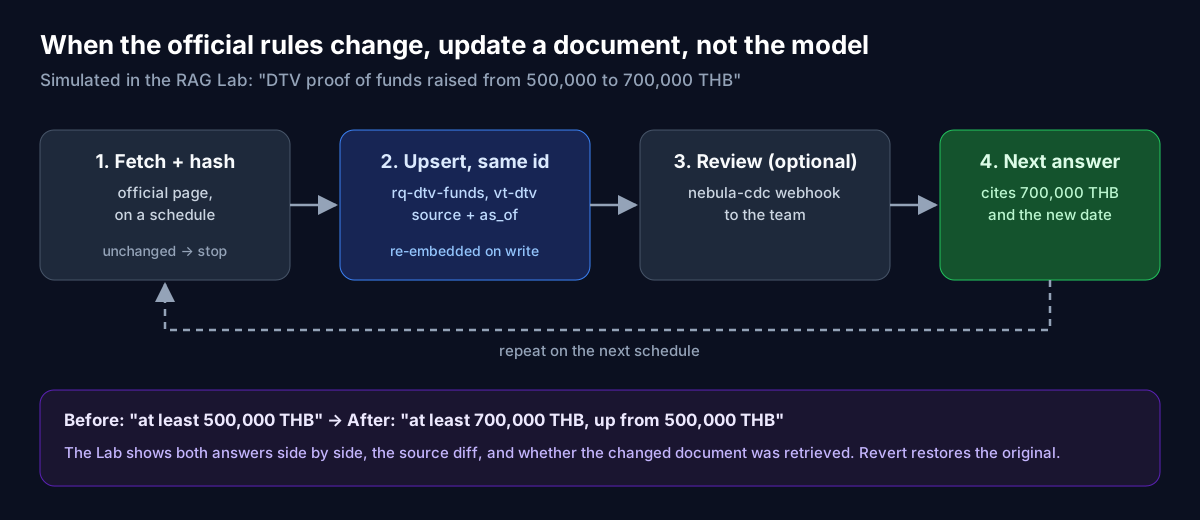
Immigration rules change, often at short notice. A fine-tuned model would need retraining. A RAG agent needs one document updated. The visa pack ships three simulated rule changes: the visa-exemption stay cut from 60 to 30 days, DTV proof of funds raised from 500,000 to 700,000 THB, and 90-day reporting moving fully online.
The RAG Lab's "The rules changed — does the answer?" panel does four things:
- Asks the question, for example "How much money do I need to show for a DTV?", against the current documents.
- Re-ingests the changed documents under the same ids (
vt-dtv,rq-dtv-funds), exactly as a page-watcher would. - Asks again.
- Shows the two answers side by side, with a diff of the source text and a note on whether the changed document was actually retrieved.
Because the Lab buckets are shared, the panel shows whether an update is currently applied for everyone and always offers Revert. In production the loop is a scheduled job:
- Fetch each official page and hash its content.
- If the hash changed, chunk the page and upsert it into NebulaDB under the page's stable id, with
sourceandas_ofin the metadata. - Optionally, let
nebula-cdcpost a webhook so staff can review the change. - The agent cites the new text on the next question, and
as_oflets it say how current that text is.
12. Scale and the HNSW trade-off
Approximate nearest-neighbour search trades accuracy for speed through the HNSW ef parameter, which sets how many candidates the graph walk keeps. The Scale Lab sweeps ef from 16 to 512, on the pack bucket and on the largest bucket on the server. For each value it reports browser and server latency, and overlap@10 against ef 512. Search requests accept ef directly, so an agent can spend more effort on a hard question and less on a lookup.
Two caveats are stated on the Lab itself. Agreement is measured against ef 512, not against exact search. And as the plan in section 6 shows, small buckets use an exact scan, so ef only changes results in buckets large enough to use the graph.
13. Giving agents tools with MCP
The Labs call REST directly, but an autonomous agent such as Claude, or any MCP client, can use NebulaDB as a toolbox. The nebula-mcp binary serves the Model Context Protocol over Streamable HTTP at /mcp. It forwards the caller's bearer token, so MCP access is governed by NebulaDB's own authentication. Its tools include:
- Query:
execute_sql,explain_query. - Retrieve:
semantic_search,vector_search,answer_question(RAG). - Documents:
insert_document,get_document,delete_document,list_buckets. - Agent memory:
remember,recall, scoped per user. - Operations:
cluster_health,replication_status,slow_queries,audit_logand others.
The server also publishes tool schemas for its gateway at /api/v1/ai/config (semantic_search, hybrid_search, document fetch), with an optional tenant_id filter. Our advice, after building the Visa agent: give a large model these tools freely, but for a small model, keep tool choice in code and let the model write.
14. What we learned, and the limits
- Measure retrieval before writing prompts. The right retriever varied by business, and the embedder set the ceiling.
- Put permissions in the query. Relevance ranking will happily surface someone else's file.
- Keep safety deterministic. Fixed cards for fixed risks, before any model call.
- Let code plan when the model is small. Deterministic tool selection made a 3B model usable, and the guards made its mistakes visible.
- Verify numbers. A twenty-line check catches the most damaging class of hallucination in business answers.
- Prefer upserts over retraining for anything that changes, such as rules, prices or stock.
- Read the plan.
EXPLAIN ANALYZEexplains post-filtering, candidate counts and exact scans in plain English.
The limits, stated plainly:
- The labelled sets have about 25 to 55 questions per pack. They are smoke tests, not benchmarks.
- Out-of-scope detection is a threshold, so it can be fooled by paraphrase.
- The NebulaDB SQL subset has no
OR,JOINor subqueries, which pushes some logic into application code. - MiniLM in the browser is English-only, and the server embedder we run is English-centric.
- All Lab data, including the visa agency and its clients, is invented. The visa content is simplified and is not legal advice.
15. Try it yourself
- The Labs: showcase.nebuladb.net/#/labs (sign in with a Google account). Every view's state is in the URL, for example
#/labs/rag?pack=visa, so results are shareable. - The Visa AI Agent: showcase.nebuladb.net/#/tab/visaagent. Try "I'm 55 with 900k THB and want to retire", then sign in as a demo client and ask "What's the next step on my application?"
- Source: github.com/bwalia/nebuladb. The Labs are under
apps/showcase/src/labs/, the agent is inlabs/visa/agent.ts, and the docs are indocs/labs.md. - Run it locally:
./scripts/start.shboots NebulaDB, an embedder, a chat model and the showcase with one command.
Building an agent over your own documents? Contact us. We start the way the Labs do: a pack of your real data, a labelled question set, and measured retrieval, before any prompt is written. See also our AI agents services.