What an AI Factory Actually Delivers: One Rack, 32 Blackwell Ultra GPUs and the Work It Does for You
From your data to answers, agents and your own models, explained without the jargon
 Balinder WaliaNovember 2, 20268 min read
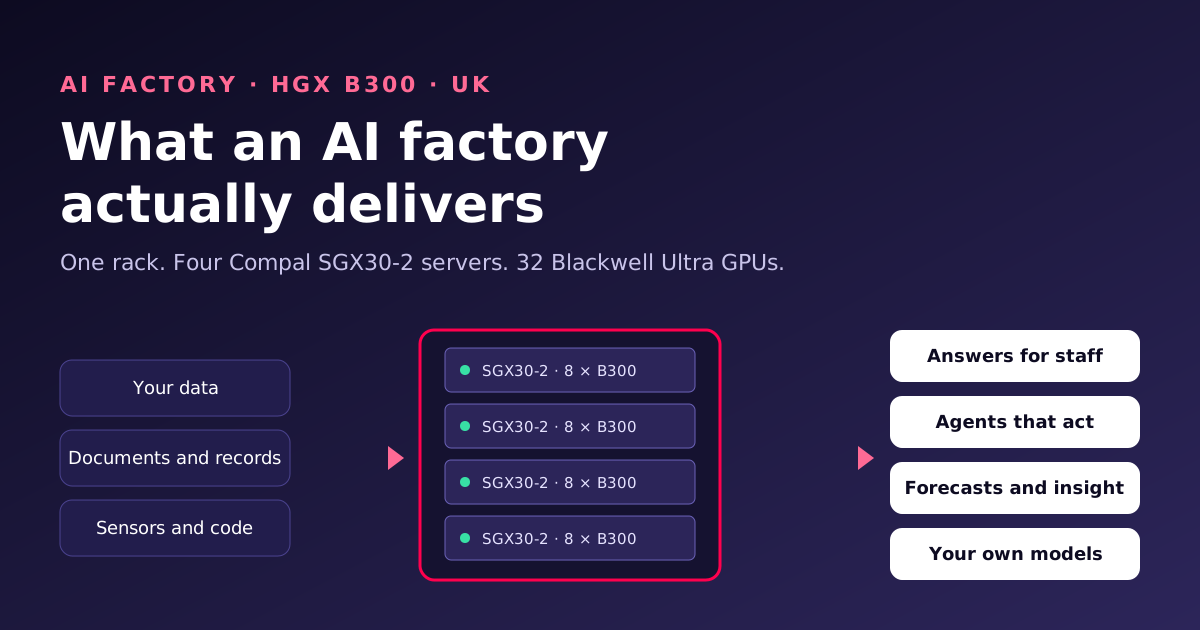
"AI factory" is quickly becoming one of those phrases everyone uses and few people define. This post explains, in plain business terms, what one actually delivers: what goes in, what comes out, how the work flows through it every day, and what you need to own and run one. We use a real configuration throughout, a rack of four Compal SGX30-2 servers with 32 NVIDIA Blackwell Ultra GPUs, so the numbers are concrete. Engineers who want the node architecture, the network design and the bring-up tests should read the technical article.

From storing information to producing it
For thirty years, data centres have mostly stored and served information: websites, databases, email, files. An AI factory does something different. It manufactures new information on demand. A member of staff asks a question about a contract and gets an answer drawn from your own document archive. An agent reads an incoming claim, checks it against policy and drafts a decision. A model trained on five years of your maintenance records predicts which machine will fail next month.
The unit of output is the token, a fragment of text that a model reads or writes. Every answer, summary and agent action is made of tokens. So the questions that matter in an AI factory are the same as in any factory: how much can it produce, how good is the output, what does each unit cost, and how reliably does it run?
What goes in, what comes out
| Goes in | Comes out |
|---|---|
| Documents, contracts, policies, manuals | Accurate answers with references to the source, in seconds |
| Tickets, emails, chat logs | Agents that triage, draft replies and route work |
| Operational and sensor data | Forecasts, anomaly alerts and maintenance predictions |
| Your code and engineering records | Coding assistants that know your systems and standards |
| Feedback on what worked | Better models next month: fine-tuned on your own outcomes |
The right-hand column is what you are paying for. The rack is simply the machine that produces it.
The production line, stage by stage

- Ingest. Raw material arrives: documents, records, tickets, code. It is cleaned, de-duplicated and, where needed, personal data is redacted. Text is turned into embeddings so it can be searched by meaning rather than by keyword.
- Train or fine-tune. Most organisations do not train a model from scratch. They take a strong open model and fine-tune it on their own data, so it speaks their language and knows their products. With 32 GPUs this is a job measured in hours or days, not months.
- Evaluate and promote. Before any new model reaches staff or customers, it is tested for accuracy, safety, cost and speed. Models that pass are promoted step by step from a test ring to production, the same way good software teams release code. We use our own Ring Promoter for this, so every release has an audit trail and can be rolled back.
- Serve. This is where value is created: chat assistants, document search, agents and APIs answering requests all day. Access goes through WSL Proxy, which handles encryption, sign-in and web-application firewalling, and keys and credentials live in WSL Vault rather than in code.
- Improve. Every interaction tells you something: which answers helped, which were corrected, where agents got stuck. That feedback becomes the training and test data for the next round. This loop is why an AI factory gets more valuable over time, rather than depreciating like ordinary IT.
Underneath all five stages, a scheduler shares the GPUs between teams and jobs, so training can run overnight on capacity that serves staff during the day. Idle GPUs are the most expensive thing in an AI factory, and good scheduling is how you avoid them.
What is in the rack, and what each part does
Our standard building block is the Compal SGX30-2, an NVIDIA-Certified server for the HGX B300 platform. Four of them make one rack. Here is what each server contains, in plain terms.
| Component | Per server | What it does for you |
|---|---|---|
| NVIDIA HGX B300 NVL8 baseboard | 8 Blackwell Ultra GPUs, 288 GB of memory each | The engine. Runs and trains the models. Large memory means big models and long documents fit without compromise. |
| Intel Xeon 6 processors | 2 (6767P, 6776P or 6768P) | Prepares data, runs the operating system and keeps the GPUs fed. |
| DDR5-6400 ECC memory | 32 × 96 GB (3 TB) | Working space for data loading and for parking model memory when GPUs are busy. |
| NVMe E1.S drives | 8 × 3.84 TB | Fast local storage for datasets, model files and training checkpoints. |
| M.2 boot drives | 2 × 960 GB | Operating system, mirrored so one failure does not stop the server. |
| NVIDIA ConnectX-8 SuperNICs | 8 onboard, 8 × 800G ports | A private 800 Gb/s line for every GPU, so 32 GPUs in four servers can work on one job together. |
| NVIDIA BlueField-3 B3240 | 1 | Handles storage and user traffic separately, with security and isolation built in. |
| Power supplies | 12 × 3200 W Titanium, 6+6 redundant | Half of them can fail, or one power feed can drop, and the server keeps running. |
| Warranty | 3-year return-to-base | Repairs and replacements arranged through us. |
Across the rack that adds up to 32 GPUs, about 8.4 TB of GPU memory, 12 TB of system memory and about 123 TB of fast local storage, all connected by a network fabric running at 800 Gb/s per GPU.
What that capacity means in practice
We are careful not to promise performance numbers we have not measured on your workload, because real throughput depends on the model, the length of the questions and answers, and how many people use it at once. But some things follow directly from the memory and the design:
- Large open models fit comfortably. A single server has 2.1 TB of GPU memory, so even models with several hundred billion parameters can be served from one server, with room left for long conversations.
- Several services can run side by side. One server can host your main assistant while another runs document search and embeddings, and the remaining two handle agents and overnight fine-tuning.
- Training jobs can use the whole rack. When a fine-tuning run needs all 32 GPUs, the 800 Gb/s fabric lets four servers act as one, and the scheduler hands the capacity back to serving afterwards.
- It is built for reasoning models. Blackwell Ultra doubles the speed of the "attention" maths at the heart of modern models compared with the first Blackwell generation, which matters most when models think through a problem before answering.
Owning versus renting
Cloud GPUs are excellent for experiments and short bursts. The economics change once AI becomes part of daily work. Rented capacity is billed by the hour whether it is busy or not, and its price, availability and terms belong to someone else. Owned capacity is a fixed cost: every extra question answered, agent run or model trained lowers the cost of each one.
There are other reasons beyond cost. With an AI factory on your own infrastructure, your data, prompts and outputs never leave the UK or your control, which simplifies UK GDPR, regulator and client conversations considerably. You also get capacity when you need it, without quota requests or waiting for a cloud region to free up.
It is not right for everyone. If your use of AI is occasional, or you need large capacity for a few weeks only, renting is usually cheaper. We will tell you honestly which side of that line you are on.
What you need to host it
- Power: each server needs in the region of 14 kW and the rack around 60 kW. That rules out most ordinary office server rooms, but many UK colocation halls can provide it.
- Cooling: the SGX30-2 is air cooled, so no liquid-cooling plant is needed, but the hall must handle high-density racks with hot-aisle containment.
- Space: 40U of rack space for the four servers, plus network switches and storage.
- Time: NVIDIA data-centre GPUs are allocated by NVIDIA and the server makers, and lead times are measured in months. Site preparation and design happen while you wait, so the factory can go live soon after delivery.
- Paperwork: advanced GPUs are subject to UK and US export controls, so we confirm the end user, intended use and installation site before we can confirm supply.
Who runs it once it is live
A factory that is not operated well slowly loses output to failures, drift and security gaps. We can run yours as much or as little as you like. Our SysOps247 service monitors GPU health, temperatures, errors and capacity around the clock, applies firmware and security updates in planned windows, and handles faults and warranty returns. Your teams focus on the work the factory produces.
A sensible way to start
- Write down the work. Which questions, decisions and documents would you hand to AI first, and how many people would use it?
- Check the site. Do you have, or can you rent, around 60 kW of rack space? We can survey it or shortlist colocation options.
- Start with one rack, or even one server. Everything is built to a reference design, so more servers and racks join later without redesign.
- Plan the first three services. Usually a staff assistant over your documents, one agent for a well-defined process, and one fine-tuned model. Prove value there, then grow.
Where to go next
- For the node architecture, the four networks, the software stack, model-sizing maths and the acceptance tests, read the technical article: Inside a 32-GPU HGX B300 AI factory.
- See the AI factory solutions we build, from RTX PRO servers to GB300 NVL72, and the Compal SGX30-2 and HGX B300 32-GPU rack pages.
- The SGX30-2 is available to order in our shop. Pricing is confirmed on a written quote.
- Planning something similar? Talk to us.