শপ চালু

আমরা ওয়েবসাইট, AI এজেন্ট ও LLM প্রশিক্ষণের জন্য Workstation AI মেশিন তৈরি করি — অনলাইনে কনফিগার করে কিনুন।

ট্রেড মূল্য পান
AI পণ্য
এআই ল্যাবসOpenAI এজেন্টClaude এজেন্টGrok BotWorkstation AI নেটিভ CRMমার্কেটিংসব পণ্য
AI সমাধান
প্রয়োগকৃত AIAI এজেন্টজেনারেটিভ AIAI স্বয়ংক্রিয়করণAI দক্ষতা বৃদ্ধিএসএমইর জন্য AI প্যাকেজএন্টারপ্রাইজ AI ল্যাবAI ওয়ার্কস্টেশনNVIDIA হার্ডওয়্যার ও সফটওয়্যারNVIDIA অ্যাক্সিলারেটেড কম্পিউটিংপ্রাইভেট AIGPU প্রাইভেট ক্লাউডGPU ক্লাস্টারএজ AIশিল্প অনুযায়ী AI
AI সেবাসমূহ
প্ল্যাটফর্ম আধুনিকীকরণডিজিটাল ইঞ্জিনিয়ারিংডেটা ভিত্তি ও AIস্বায়ত্ত পরিচালনাএআই পরামর্শDevOps অটোমেশনসাইবার নিরাপত্তাসফটওয়্যার ডেভেলপমেন্টএজেন্ট নির্মাণMLOps সেটআপGPU লিজিংGPU প্রাইভেট ক্লাউড
আমাদের সম্পর্কে
কোম্পানিআমাদের গল্পঅংশীদারগ্রাহকদের গল্প
এআই ডেটা সেন্টার
এআই ডেটা সেন্টারGPU প্রাইভেট ক্লাউডGPU ক্লাস্টারGPU লিজিং
AI অন্তর্দৃষ্টিJev সিরিজবেঞ্চমার্ক ল্যাবমডেল নির্বাচন
প্রযুক্তিগত নোট
ডকুমেন্টেশন
Linux OSUbuntuRed Hat Enterprise LinuxSUSE LinuxAlpine LinuxDebian, Rocky & AlmaLinux
AI ক্লাউড প্ল্যাটফর্মAWS & Amazon BedrockGoogle Cloud & Vertex AIMicrosoft Azure & AI FoundryGPU ক্লাউড ও মার্কেটপ্লেস
প্রাইভেট AI ডেটা সেন্টারআইন সংস্থার জন্যঅ্যাকাউন্টিং ফার্মের জন্যঅন-প্রিমিসেস প্ল্যাটফর্মসম্পূর্ণ সুরক্ষিত ক্লাউড
সরঞ্জামRing PromoterJobshout
খবর
ব্লগ
যোগাযোগ করুনসাইন ইন

আধুনিক ব্যবসার জন্য AI ওয়ার্কস্টেশন, AI মাল্টি-এজেন্টিক সফটওয়্যার, GPU অবকাঠামো এবং বুদ্ধিমান এজেন্ট সমাধান।

যোগাযোগ করুন

AI সমাধান

প্রয়োগকৃত AIAI এজেন্টজেনারেটিভ AIAI স্বয়ংক্রিয়করণAI দক্ষতা বৃদ্ধিএসএমইর জন্য AI প্যাকেজএন্টারপ্রাইজ AI ল্যাবশিল্প অনুযায়ী AI

পণ্য

সব পণ্যWorkstation AI native CRM ও ERPমার্কেটিংOpenAI এজেন্টRing PromoterJobshout

কোম্পানি

আমাদের সম্পর্কেকোম্পানিএআই ডেটা সেন্টারকেন Workstationঅংশীদারগ্রাহকদের গল্পমূল্যযোগাযোগTenthMatrix

রিসোর্স

AI অন্তর্দৃষ্টিপ্রযুক্তিগত নোটডকুমেন্টেশনLinux OSAI ক্লাউড প্ল্যাটফর্মপ্রাইভেট AI ডেটা সেন্টারব্লগঅনুসন্ধানসাইটম্যাপ
যুক্তরাজ্য অফিস
77-79 Marlowes, Hemel Hempstead HP1 1LFদিকনির্দেশ - M25 আউটার লন্ডন থেকে জংশন ২০ নিনকোম্পানি নং: 11641870সোম - শুক্র: সকাল ৯:০০ - সন্ধ্যা ৬:০০ GMT
+44 7515 356 146
বেলজিয়াম অফিস
Workstation SRL, Rue Vanderkindere 34, 1180 Uccle, BrusselsBE 0751.518.683সোম - শুক্র: সকাল ৯:০০ - সন্ধ্যা ৬:০০ CET
+32 492 45 67 46
ভারত অফিস
#159 Sector 9, Pocket 1, DDA Flats, 110077 Dwarka, New Delhi
+91 98881 98841

© 2026 Workstation AI। সর্বস্বত্ব সংরক্ষিত।

গোপনীয়তাডেটা মুছে ফেলাকুকিপরিষেবার শর্তাবলিওয়েবসাইট সাইটম্যাপ

NVIDIA, the NVIDIA logo, RTX, RTX PRO, Blackwell, CUDA, NVLink, MGX, Omniverse, Spectrum-X, Quantum, BlueField, DGX and HGX are trademarks and/or registered trademarks of NVIDIA Corporation in the US and other countries. AMD, the AMD Arrow logo, EPYC, Instinct, Ryzen and Threadripper are trademarks of Advanced Micro Devices, Inc. Dell and PowerEdge are trademarks of Dell Inc. or its subsidiaries. Intel and Xeon are trademarks of Intel Corporation or its subsidiaries. AMAX, AceleMax and LiquidMax are trademarks of AMAX Engineering Corporation. All other product names, logos and brands are the property of their respective owners. We use them only to identify the products we describe, supply or support; their use does not mean their owners endorse us.

GPU প্রাইভেট ক্লাউড

Your own AI cloud: GPUs, storage and software in a data centre you control

Run AI assistants, agents, search and model training on GPUs dedicated to you, next to your data, at a cost you can predict. We design, build and run GPU private clouds from a single server to full racks, on your premises or in a UK data centre.

এই পৃষ্ঠায়

  1. What a GPU private cloud is
  2. Why organisations build their own GPU cloud
  3. See the hardware: official videos from NVIDIA, Dell and AMD
  4. GPUs, VRAM and servers
  5. How much VRAM do you need?
  6. Storage that keeps GPUs busy
  7. The network between GPUs
  8. Everything a complete GPU private cloud includes
  9. Private, public or hybrid: compared
  10. Building a GPU private cloud from scratch
  11. Try it: the private AI cloud lab
  12. GPU private cloud FAQs

Try it: the private AI cloud lab

What a GPU private cloud is

A GPU private cloud gives your teams the self-service experience of a public cloud (pick a model, start a notebook, deploy an assistant) on GPU servers that only you use. The hardware sits on your own premises or in a colocation data centre, and the platform software, security policies and data all stay under your control.

Public cloud is excellent for trying ideas and covering short peaks. But AI assistants and agents run all day, every interaction is metered, and the data they need is often the data you can least afford to move. Once usage is steady, a private cloud usually makes costs predictable, keeps sensitive data in one place and cuts the latency between your models and your systems.

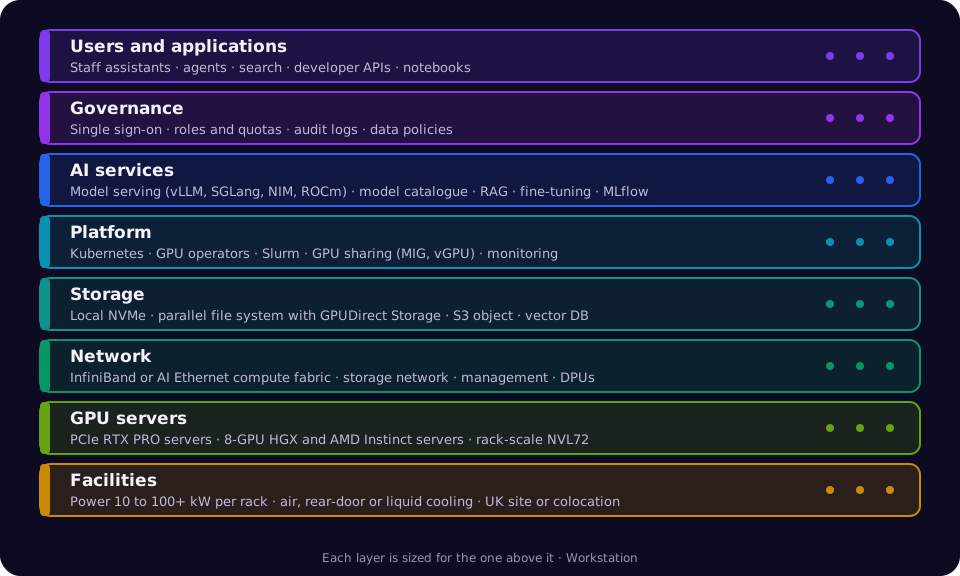
It is not one product. A private AI cloud is a stack: power and cooling, GPU servers, a fast network, storage that can keep GPUs busy, a container and scheduling platform, model serving and data tools, and the governance around them. The rest of this page goes through each layer, then lets you try the options for your own workloads.

Diagram of the GPU private cloud stack from facilities at the bottom, through GPU servers, networking and storage, to the platform, AI services and governance at the top, with users and applications above.
The eight layers of a GPU private cloud. Each one has to be sized for the layer above it.

Back to contents

Why organisations build their own GPU cloud

The reasons we hear most often, and what each one means in practice.

Predictable cost for always-on AI

Assistants, agents and APIs that run 24/7 cost the same each month on hardware you own or lease, instead of a bill that grows with every token and every user.

Data stays where you decide

Keep customer, patient, legal or financial data in the UK, on your own site, or completely offline, and prove it to auditors and regulators.

Low latency next to your data

Models run beside your databases, documents and applications, so retrieval and agent tool calls don't cross the internet on every step.

Freedom of models and tools

Run open-weight models, your fine-tuned models and commercial ones side by side, and change them without re-platforming. No lock-in to one provider's catalogue.

Governance built in

Single sign-on, role-based access, quotas per team, audit logs of every model call and policies on which data each assistant can reach.

Self-service for every team

Data scientists start notebooks and fine-tuning jobs, developers deploy model endpoints, and IT keeps one console for capacity, health and cost.

Guaranteed GPU capacity

Your GPUs are there when a project starts, not sold out in the region you need. Scheduling decides which team gets them, not a queue at a provider.

Hardware that keeps paying back

Older GPUs move to inference, development and teaching when new ones arrive, so each generation keeps earning for years.

Back to contents

See the hardware: official videos from NVIDIA, Dell and AMD

Played from each manufacturer's own YouTube channel. Each video loads only when you press play.

The AI Factory. NVIDIA-এর অফিসিয়াল YouTube চ্যানেল থেকে চালানো হয়। YouTube-এ দেখুনNVIDIA, Blackwell, DGX, Grace এবং RTX PRO হলো NVIDIA Corporation-এর ট্রেডমার্ক এবং/অথবা নিবন্ধিত ট্রেডমার্ক। আমরা যে পণ্য সরবরাহ করি তা বর্ণনা করতে এগুলো দেখানো হয়েছে; এতে NVIDIA-র কোনো সমর্থন বোঝায় না।
How Dell Technologies Is Building the Engines of AI Factories With NVIDIA Blackwell. NVIDIA-এর অফিসিয়াল YouTube চ্যানেল থেকে চালানো হয়। YouTube-এ দেখুনদেখানো পণ্যের নামগুলো NVIDIA and Dell Technologies-এর ট্রেডমার্ক বা নিবন্ধিত ট্রেডমার্ক। আমরা যে পণ্য সরবরাহ করি তা বর্ণনা করতে এগুলো দেখানো হয়েছে; এতে কোনো সমর্থন বোঝায় না।
AMD Helios Rackscale Solution: Open AI Infrastructure for the AI Factory Era. AMD-এর অফিসিয়াল YouTube চ্যানেল থেকে চালানো হয়। YouTube-এ দেখুনদেখানো পণ্যের নামগুলো AMD-এর ট্রেডমার্ক বা নিবন্ধিত ট্রেডমার্ক। আমরা যে পণ্য সরবরাহ করি তা বর্ণনা করতে এগুলো দেখানো হয়েছে; এতে কোনো সমর্থন বোঝায় না।

Back to contents

GPUs, VRAM and servers

GPU memory (VRAM) decides which models fit and how many users each GPU can serve; memory bandwidth decides how fast it answers. These are the data-centre GPUs we build private clouds with most often.

Data-centre GPUs compared

GPUMakerMemory per GPUমেমরি ব্যান্ডউইথFormGood for
RTX PRO 6000 Blackwell Server EditionNVIDIA96 GB GDDR71.6 TB/sPCIe card, air cooledInference, RAG, fine-tuning small and medium models, graphics and simulation
L40SNVIDIA48 GB GDDR6864 GB/sPCIe card, air cooledInference of small models, vision, rendering
H200NVIDIA141 GB HBM3e4.8 TB/s8-GPU HGX boardLarge-model inference and fine-tuning
B200NVIDIA180 GB HBM3e8 TB/s8-GPU HGX boardTraining and high-throughput inference
B300 (Blackwell Ultra)NVIDIA288 GB HBM3e8 TB/s8-GPU HGX board, air or liquidReasoning models, very large models, training
GB300 NVL72NVIDIA288 GB HBM3e per GPU, 72 GPUs per rack8 TB/s per GPULiquid-cooled rackFrontier training and the largest inference services
Instinct MI325XAMD256 GB HBM3E6 TB/s8-GPU OAM platformLarge-model inference with lots of memory per GPU
Instinct MI355XAMD288 GB HBM3E8 TB/s8-GPU OAM platform, liquidTraining and inference of very large models
DGX Spark (GB10)NVIDIA128 GB unified273 GB/sDesk-side systemDevelopment, prototyping and pilots before the cluster

Figures are the manufacturers' published specifications. Partner servers may run GPUs at different power limits.

Servers that hold them

PCIe GPU servers

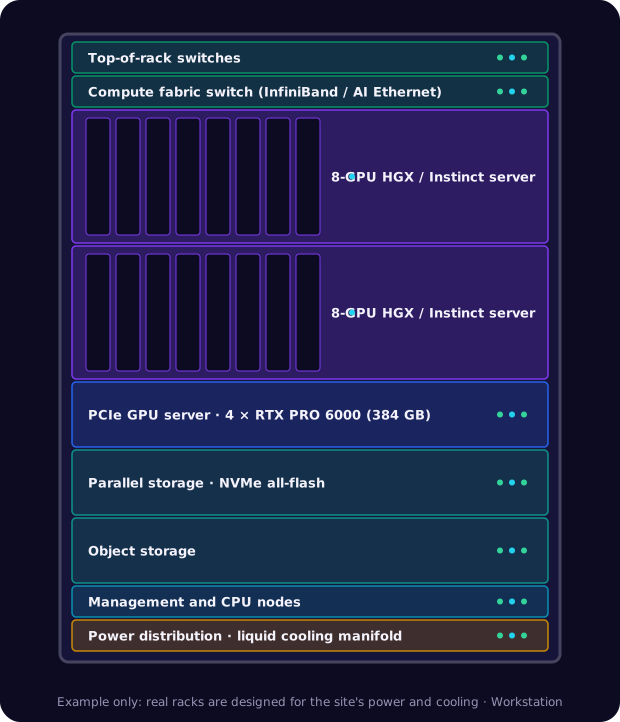
Two to eight PCIe GPUs such as RTX PRO 6000 or L40S in a standard air-cooled server, for example Dell PowerEdge XE7745 or R760xa. The easiest way into a private cloud: fits most racks and power budgets.

8-GPU HGX and OAM servers

Eight GPUs joined by NVLink or AMD Infinity Fabric, for example Dell PowerEdge XE9680 (H200 or AMD Instinct MI300X), XE9780 (B300) and XE9785 (AMD Instinct MI355X), or NVIDIA DGX B200 and DGX B300.

Rack-scale systems

Whole liquid-cooled racks that act as one giant GPU, such as NVIDIA GB300 NVL72 or AMD Helios. For organisations training or serving the largest models, in a data centre built for them.

Desk-side AI systems

DGX Spark and AI workstations for developers and pilots. The same software stack as the cluster, so work moves across unchanged.

Back to contents

How much VRAM do you need?

A quick way to size GPU memory before you talk to anyone. Use the sizer further down for your own numbers.

  • Model weights: about 2 GB per billion parameters at 16-bit, 1 GB at 8-bit (FP8) and 0.5 GB at 4-bit.
  • KV cache: every user's conversation needs memory too, growing with context length and the number of users served at once. For busy services it can match the weights.
  • Headroom: leave about 10 to 20% for the runtime, activations and spikes.
  • Fine-tuning needs more: full fine-tuning can take three to four times the memory of inference; LoRA and QLoRA need far less.
  • Mixture-of-experts models must fit all their experts in memory, even though only some are used for each word.
Model sizePrecisionMemory for weightsFits on (with room for users)
8 billion parameters16-bitabout 16 GBOne L40S or RTX PRO 6000; DGX Spark
32 billion parameters8-bitabout 32 GBOne RTX PRO 6000
70 billion parameters8-bitabout 70 GBOne H200, or two RTX PRO 6000
120 billion parameters (MoE)4-bitabout 60 to 65 GBOne RTX PRO 6000 or H200
405 billion parameters8-bitabout 405 GBOne 8-GPU H200, B200 or MI325X server
670 billion parameters and up (MoE)8-bitabout 670 GB or moreOne 8-GPU B300 or MI355X server, or several servers

VRAM sizer

Back to contents

Storage that keeps GPUs busy

GPUs that wait for data waste money. AI storage is usually three tiers, sized for the read speeds training needs and the capacity your data needs.

Local NVMe in each server

Fast scratch space for datasets, checkpoints and model caches, close to the GPUs. Typically several NVMe drives per GPU server.

NVMe SSDs in each GPU server

Shared high-performance file system

One namespace all servers read in parallel, fast enough to feed training and to load models in seconds. Look for support for GPUDirect Storage, which moves data straight into GPU memory.

Dell PowerScale, VAST Data, WEKA, DDN, IBM Storage Scale, Lustre

Object storage and backup

Large, low-cost capacity for raw data, datasets, model versions and backups, using the S3 interface most AI tools already speak.

Dell ECS or ObjectScale, Ceph, S3-compatible appliances, tape or cloud for off-site copies

Vector and document stores for RAG

Assistants that answer from your documents need a vector database and the original files, with the same access controls as the source systems. For example pgvector, Milvus, Qdrant or Elasticsearch.

Back to contents

The network between GPUs

Inside a server, GPUs talk over NVLink or Infinity Fabric. Between servers, the network decides whether many GPUs can work as one.

Compute fabric

For training or serving across servers: NVIDIA Quantum InfiniBand (400 to 800 Gb/s per port), NVIDIA Spectrum-X Ethernet, or Ethernet with AMD Pensando Pollara AI NICs. Usually one 400 or 800 Gb/s port per GPU.

Storage and front-end network

A separate Ethernet network for storage traffic, users and applications, typically 100 to 400 Gb/s per server, so it never competes with the compute fabric.

Management and security

Out-of-band management for every server, DPUs such as NVIDIA BlueField to isolate tenants and offload security, and firewalls between the AI cloud and the rest of the business.

Back to contents

Everything a complete GPU private cloud includes

Our checklist for a private AI cloud that teams actually use. We tick these off at design, build and handover.

Facilities

  • Power per rack sized for GPU servers (10 kW to over 100 kW)
  • Air, rear-door or direct liquid cooling to match
  • Redundant power feeds and UPS
  • Floor loading, access control and fire suppression checked
  • UK data centre or on-premises site survey

কম্পিউট

  • GPU servers matched to model sizes and users
  • CPU-only nodes for data preparation and services
  • Spare capacity or spare parts for failures
  • Firmware and driver baselines tested together
  • Burn-in and benchmark before handover

নেটওয়ার্ক

  • InfiniBand or AI Ethernet compute fabric
  • Separate storage and front-end networks
  • Out-of-band management network
  • Segmentation from the corporate network
  • Optional DPUs for tenant isolation

স্টোরেজ

  • Local NVMe scratch in each server
  • Shared parallel file system with GPUDirect Storage
  • S3-compatible object storage
  • Snapshots, backup and off-site copies
  • Vector database for RAG

Platform

  • Kubernetes with the NVIDIA or AMD GPU Operator
  • Slurm or a Kubernetes batch scheduler for training jobs
  • GPU sharing: MIG, time-slicing or vGPU
  • Quotas and priorities per team
  • Image registry and infrastructure as code

AI services

  • Model serving: vLLM, SGLang, NVIDIA Dynamo and NIM, or AMD ROCm images
  • A model catalogue with approved open and commercial models
  • Chat and assistant front end for staff
  • RAG pipelines connected to your document stores
  • Notebooks, fine-tuning and experiment tracking (MLflow)

Security and governance

  • Single sign-on and role-based access
  • Secrets management and encryption at rest and in transit
  • Audit logs of every model call and data access
  • Policies on which data each assistant may use
  • Air-gapped option for classified or regulated work

Operations

  • GPU health and utilisation monitoring (DCGM, Prometheus, Grafana)
  • Cost and usage reports per team
  • Patch, driver and model upgrade process
  • Capacity planning for the next GPU generation
  • Optional managed service and on-call support

Back to contents

Private, public or hybrid: compared

The usual trade-offs. Most organisations end up hybrid: a private base for steady work and the public cloud or leased capacity for peaks.

Public cloud AI servicesGPU private cloud in a colocation data centreGPU private cloud on your premisesHybrid
How you payPer token, per hour or per user, monthlyHardware bought, financed or leased, plus rack space and powerHardware bought, financed or leased; your own power and coolingA private base plus metered cloud for peaks
Best whenTrying ideas, spiky or short workloadsSteady AI use and you lack a suitable server roomSteady use, strict data rules and a site with power and coolingSteady base load with occasional big peaks
Where data livesThe provider's regionsA UK data centre you chooseYour own building, can be air-gappedSensitive data private, the rest where it's cheapest
Time to startMinutesWeeks to months: hardware lead times and installationWeeks to months, longer if the site needs power or cooling workStart in the cloud, move steady work in as hardware arrives
Cost as usage growsRises with every user and every callFlat until you need more GPUsFlat until you need more GPUsFlat base, metered peaks
Latency to your systemsOver the internet or a private linkLow, with a private connection to your sitesLowest, on your own networkLow for private workloads
Model and tool choiceThe provider's catalogue and limitsAnything you can runAnything you can runBoth
Skills neededCloud and application skillsPlatform and GPU operations, or a managed servicePlatform, GPU and facilities operations, or a managed serviceBoth, plus workload placement
GPU availabilityNewest GPUs often sold out or rationedGuaranteed once installedGuaranteed once installedGuaranteed base, best-effort peaks
Hardware refreshThe provider's choiceYour choice, every 3 to 5 years; older GPUs move to lighter workYour choice, every 3 to 5 yearsYour choice for the base

Back to contents

Building a GPU private cloud from scratch

The eight stages we take every private cloud through, from the first workshop to a platform your teams use every day.

  1. 1

    Workloads and sizing

    List the assistants, agents, searches and training jobs you want to run, the models, the users and the data. We turn that into GPUs, VRAM, storage and network.

    You decide: Which workloads come first, and what success looks like

  2. 2

    Site

    Your own server room, your data centre or a UK colocation hall. We survey power, cooling, floor loading and connectivity, or find colocation space built for GPU racks.

    You decide: On-premises or colocation

  3. 3

    Hardware design

    GPU servers (NVIDIA or AMD, Dell or NVIDIA DGX), CPU nodes, storage tiers, compute fabric and management network, with spares and room to grow.

    You decide: GPU family, vendor and how much growth to build in

  4. 4

    Funding

    Buy outright, spread the cost with a finance lease or lease to own, or lease some capacity while your own hardware arrives.

    You decide: Capital, finance lease or leased capacity

  5. 5

    নির্মাণ ও বার্ন-ইন

    Delivery, racking, cabling and power-up, then firmware baselines, fabric tests, storage benchmarks and a multi-day burn-in of every GPU.

    You decide: Acceptance tests and dates

  6. 6

    Platform

    Kubernetes and the GPU operators, schedulers, GPU sharing, image registry, identity, secrets and monitoring, all as code so it can be rebuilt.

    You decide: Kubernetes, Slurm or both

  7. 7

    AI services

    Model serving, the model catalogue, a staff assistant, RAG over your documents, notebooks and fine-tuning, connected to your systems.

    You decide: Approved models and which data each service can use

  8. 8

    Handover and run

    Runbooks, training for your team, cost and usage reporting, and either your own operations or our managed service.

    You decide: Who runs it day to day

Back to contents

Try it: the private AI cloud lab

Four ways to explore the options for your own AI workloads. Nothing you enter leaves your browser unless you choose to send it to us.

Six questions, one per stop. At the end you get a starting design: hardware, VRAM, storage, network, power and the platform, plus where to go next.

1Workload2স্কেল3Models4Data5Site6Paying

1 of 6

What will run on it first?

Back to contents

GPU private cloud FAQs

How small can a GPU private cloud be?
A single PCIe server with a few RTX PRO 6000 GPUs, running the same platform as a large cluster, is a real private cloud. Many customers start there, or with DGX Spark for development, and add servers as usage grows.
NVIDIA or AMD?
Both work. NVIDIA has the widest software support and the most ready-made AI services. AMD Instinct offers a lot of memory per GPU, which suits large-model inference, and runs the main open-source frameworks on ROCm. We size both and recommend the one that fits your models and team.
Can we use open-source models?
Yes. Open-weight models run on vLLM, SGLang and similar servers alongside commercial models and your own fine-tuned ones. We help you pick models and set up an approved catalogue.
Does it have to be on our premises?
No. Many private clouds run in a UK colocation data centre with the power and cooling GPU racks need, connected privately to your sites. The hardware is still dedicated to you.
How long does it take?
A starter private cloud can be running within weeks of the hardware arriving. Larger clusters depend on GPU lead times and site work; we give you a dated plan at the design stage, and can lease capacity in the meantime.
Can you run it for us?
Yes. We can operate the whole platform as a managed service, or build it, train your team and support them.
How do we pay for it?
Buy outright, spread the cost with a finance lease or lease to own, or lease capacity monthly. See GPU leasing for the options.

Related pages

এআই ডেটা সেন্টার · GPU ক্লাস্টার · GPU লিজিং · প্রাইভেট AI · AI Factory · MLOps সেটআপ

Back to contents

Plan your GPU private cloud

Tell us the workloads, users and data rules, or send your build journey answers, and we'll come back with a design, a dated plan and the cost of buying, financing or leasing it.

Talk to us about a private cloudBrowse GPU servers