NVIDIA OpenShell: Secure Agent Runtime on Mac Studio and GPU Workstations
A Workstation guide to NVIDIA OpenShell — sandboxed agents, policy, and inference routes — including how to run the gateway on a Mac Studio GPU machine and when to use NVIDIA --gpu passthrough.
 Workstation team5 أكتوبر 20264 min read
NVIDIA OpenShell is an open, policy-governed runtime for autonomous agents — sandboxes, credential isolation, supervised network egress, and configurable inference routes. NVIDIA’s overview lives at build.nvidia.com/openshell; this is the Workstation rewrite for teams deciding where to run it, including on a Mac Studio GPU machine.
--gpu.
What OpenShell actually gives you
Most “agent security” slides stop at prompt filters. OpenShell treats agents like untrusted code with real side effects:
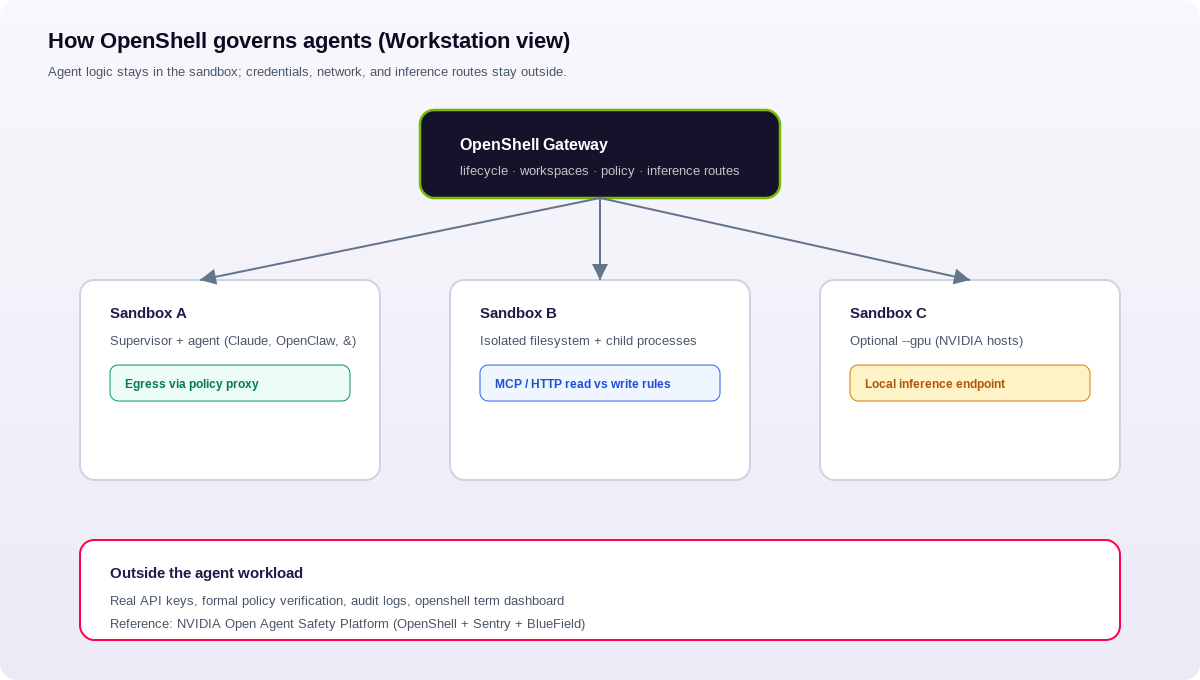
- Sandboxed execution — each workload gets kernel-level filesystem and network boundaries that survive generated code and child processes.
- Supervised egress — HTTP, GraphQL, and MCP traffic can be allowed for reads while writes to the same API are blocked.
- Credential brokering — service keys stay outside the agent; the supervisor injects them only after policy checks.
- Central gateway — one place to manage lifecycles, team workspaces, and formal policy verification before changes go live.
- Operator UI —
openshell termis a live terminal dashboard (gateway health, sandboxes, logs) similar in spirit to k9s.
OpenShell sits in NVIDIA’s broader Open Agent Safety Platform story (alongside Sentry and BlueField enforcement). Even if you never deploy BlueField, the sandbox + policy model is the useful part for SMEs and product teams shipping agents this year.
Mac Studio: yes, OpenShell runs here — and your GPU still matters
A common misconception is that OpenShell is only for DGX racks. It is not. NVIDIA documents macOS support through the VM compute driver (Apple Hypervisor.framework) and through Docker Desktop on Mac — you configure compute_drivers on the gateway, then use the same sandbox CLI everywhere.
On a Mac Studio (M2 Ultra, M3 Ultra, M4 Max/Ultra class machines with large unified memory), the practical pattern looks like this:
- Install the OpenShell CLI and start
openshell-gatewayon the Mac. - Serve a local model on the host with Ollama, MLX, or vLLM bound to a port the gateway can reach (often
0.0.0.0:8000). - Point sandboxes at that endpoint:
openshell inference set --provider local-vllm --model <handle>so agents inside sandboxes useinference.local. - Create sandboxes for your agent stack, e.g.
openshell sandbox create --from openclaw -- …or your coding agent of choice.
The Apple GPU accelerates token generation on the host. The sandbox remains the trust boundary — the agent never holds your production API keys or unfettered network access.
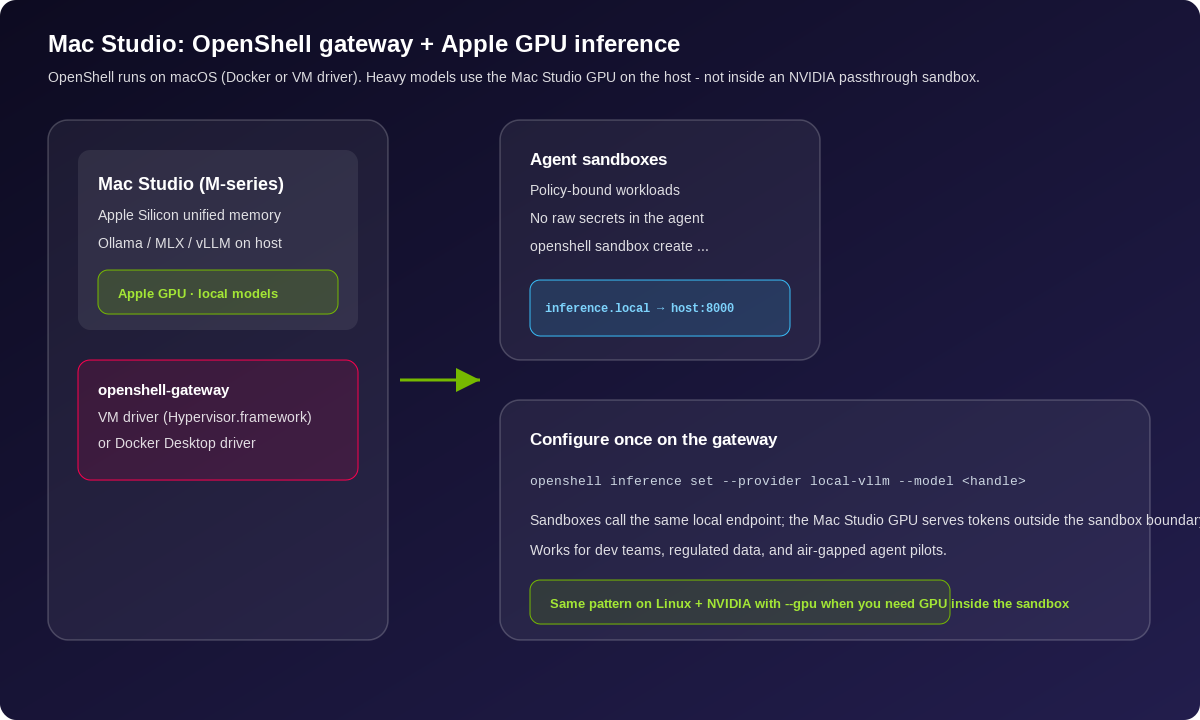
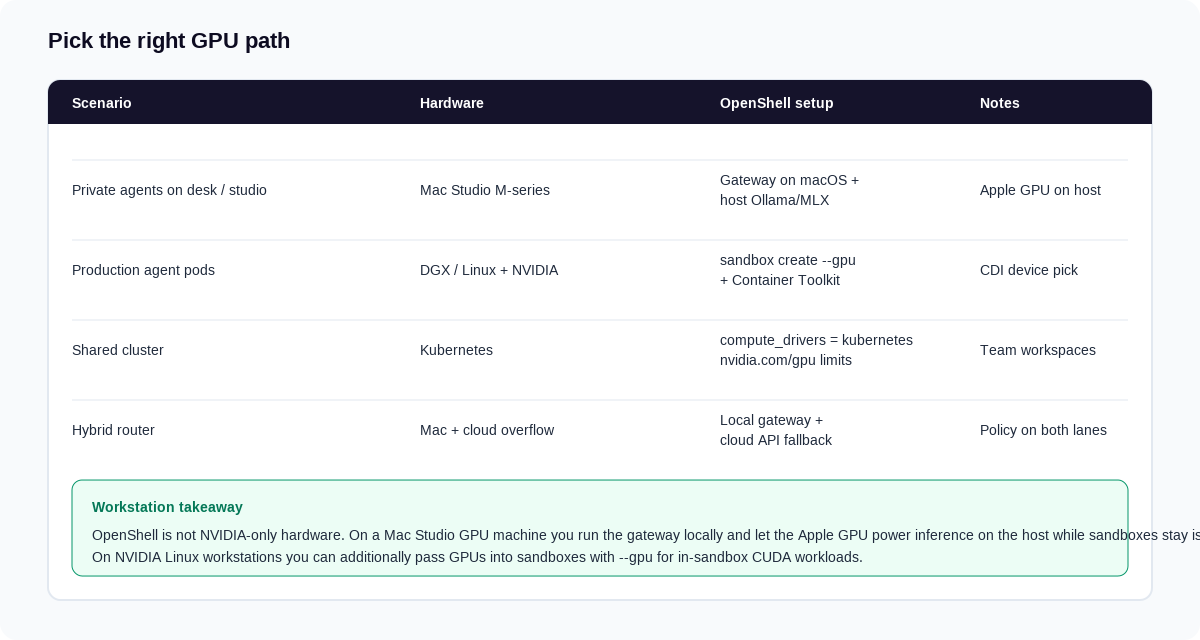
--gpu. Experimental GPU passthrough (openshell sandbox create --gpu) targets NVIDIA hosts with drivers and the NVIDIA Container Toolkit (Docker/Podman CDI, or Kubernetes nvidia.com/gpu limits). That path is for CUDA inside the sandbox — fine-tuning, in-container inference, GPU tools. It is not how Apple Silicon exposes its GPU. On Mac Studio, treat the GPU as a host inference accelerator wired through openshell inference set, not as a device passed into the sandbox.
Linux and NVIDIA workstations: when to pass a GPU into the sandbox
When you have a Linux box with NVIDIA GPUs (workstation, DGX Spark, or a cloud GPU node), OpenShell can request GPUs at create time:
openshell sandbox create --gpu -- claude
openshell sandbox create --gpu 2 -- claude
openshell sandbox create \
  --gpu \
  --driver-config-json '{"docker":{"cdi_devices":["nvidia.com/gpu=0"]}}' \
  -- claude
You still need a GPU-ready sandbox image — the default base image does not ship CUDA stacks. Plan a custom image (BYOC) when agents must compile CUDA code or run in-container models.
Day-one commands worth memorising
openshell sandbox create -- …— spin up an isolated agent environment.openshell sandbox connect <name>— shell into a running sandbox for debugging.openshell policy set --policy file.yaml— apply egress and credential rules.openshell inference set --provider … --model …— route all sandboxes to your local or remote model.openshell term— live dashboard for gateway and sandbox status.
How this fits a Workstation deployment
We see three mature patterns among clients:
- Studio on the desk — Mac Studio gateway for product and legal teams; local models for PII-heavy workflows; cloud API fallback only for overflow.
- Shared Linux gateway — Docker or Kubernetes driver in a private VPC; MCP tools pointed at internal APIs; GitOps for policy YAML.
- Hybrid — OpenShell policy on-prem, Ring Promoter or similar for app releases, and vault-backed credentials so agents never see long-lived secrets.
If you are standardising on agents in 2026, OpenShell is a credible control plane — not a replacement for human approval on destructive actions, but a strong default for “agents are code with network access.”
Further reading
- NVIDIA OpenShell on GitHub
- Manage sandboxes (GPU flags)
- Compute drivers (Docker, VM, Kubernetes)
- Workstation: AI workstations · local agents on Ollama
Need help standing up OpenShell on Mac Studio or NVIDIA Linux, wiring MCP tools, or writing policy YAML? Talk to Workstation.